
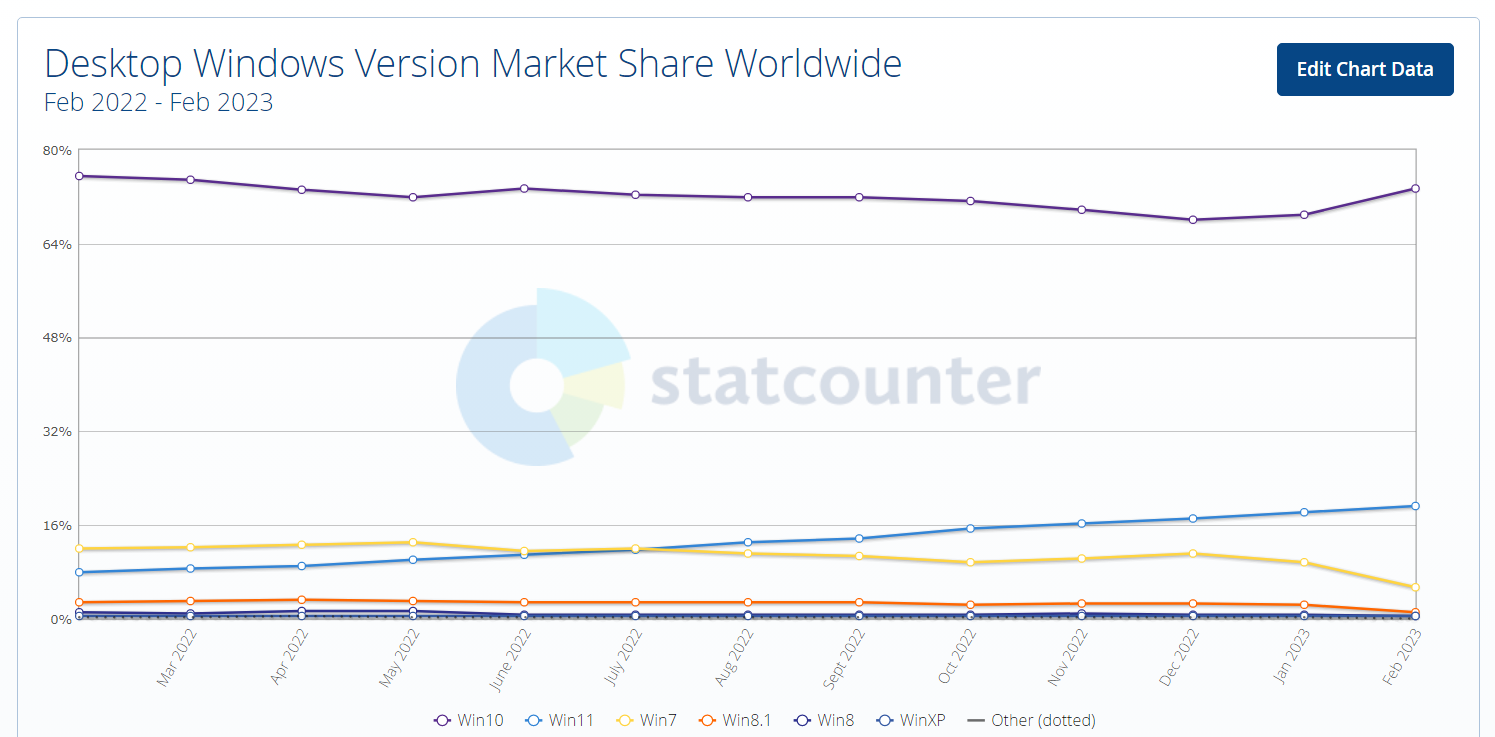
Windows 10 market share skyrockets, while Windows 7 market share nearly halves
Analysing market share developments of the Windows operating system is usually a rather boring tasks. A percent or so shifts from one version to another, but unless something major happens, there is […]
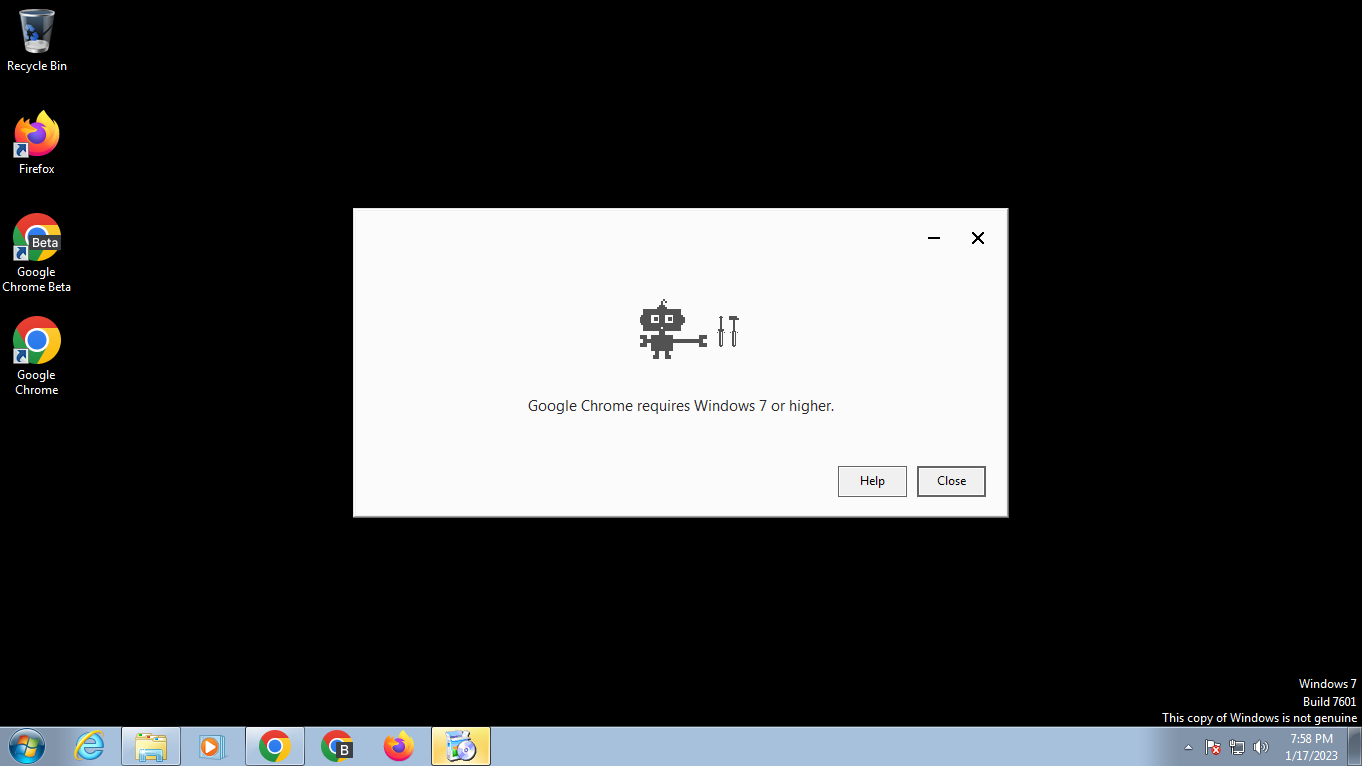
Here is what happens when you try to install and run unsupported browsers on Windows 7
Microsoft ended support for its Windows 7 and Windows 8.1 operating systems on January 10, 2023. End of support means that the company will not release security updates or any other type […]
Microsoft sneaks Secure Boot support into Windows 7 shortly before support ends
Support for Extended Security Updates for Windows 7 is ending today officially. Microsoft will release a last cumulative update for Windows 7 on January 10, 2023 before the operating system is laid […]

While Windows 7 has a fighting chance, it is game over for Windows 8.1
Windows 8.1 receives one more batch of security patches on the coming Tuesday before Microsoft lays the operating system to rest. Windows 8.1 does not get the same Extended Security Updates treatment […]
Windows 7 and 8.1 support ends next month
Microsoft plans to end support for Windows 7 and 8.1 on January 10, 2022. The devices won't receive updates anymore after end of support and some programs, like Chrome or Microsoft Edge, […]

Chrome notification suggests Windows 10 or 11 on Windows 7 and 8.1 devices
Google Chrome users who use the web browser on Windows 7 Service Pack 1, Windows 8.1 or Windows Server 2012 R2 devices get a notification at the top of the browser screen […]
0Patch promises 2 additional years of security patches for Windows 7 and Server 2008 R2
Windows 7 and Windows Server 2008 R2 will get at least an additional 2 years of security updates, courtesy of the micro-patching solution 0Patch. Microsoft introduced Extended Security Updates for Windows 7 […]
It looks as if Microsoft could extend Windows 7 Support by another three years
Microsoft ended support for its Windows 7 operating system in 2020. The company offers extended support to organizations and businesses, but not to Home customers. Microsoft's initial plan was to limit extended […]

Microsoft won't extend Windows 7 Extended Security Updates. Server gets another year
Microsoft's popular Windows 7 operating system reached the end of its support lifecycle in January 2020. The company launched ESU, Extended Security Updates, for Windows 7 and Windows Server 2008 at the […]

OneDrive's desktop app won't be supported anymore on Windows 7 and 8.1 in early 2022
Microsoft announced plans this week to end support for OneDrive desktop applications on the company's operating systems Windows 7, Windows 8 and Windows 8.1. Customers who use these operating systems may still […]

You can still upgrade Windows 7 and 8.1 systems to Windows 10 for free
When Microsoft launched its Windows 10 operating system, it knew that it had to convince customers to give it a try. The bad adoption of Windows 8 still haunted the company and […]

Google extends Chrome support for Windows 7 until January 15, 2022
Google revealed this week that it decided to extend support for Google Chrome on Microsoft's Windows 7 operating system until at least January 15, 2022. Update: Google announced that it will extend […]

Microsoft pushes the new Microsoft Edge to unsupported Windows 7 systems
Microsoft ended support for the company's Windows 7 operating system in January 2020 officially. The company provides Enterprise and business customers with options to extend support for up to three years, but […]

Microsoft to support new Edge browser until July 15, 2021 on Windows 7
Microsoft released the first stable version of the company's new Chromium-based Microsoft Edge web browser one day after it ended support for its Windows 7 operating system. Support for Windows 7 ended […]

It appears that the Windows 7 ESU Bypass is indeed working
Support for Microsoft's Windows 7 operating system ended on January 14, 2020 officially. Home users cannot extend support for the operating system while business and Enterprise customers may extend support by up […]

That Windows 7 Wallpaper Bug Microsoft introduced? Buy ESU to get it fixed
Microsoft released a final cumulative update for the company's Windows 7 operating system on the January 2020 Patch Day before support ended officially. KB4534310 fixes several security issues on machines running Windows […]

Internet Explorer 11 on Windows 7 is no longer supported
Microsoft ended its support for the company's Windows 7 operating system last week officially. While Enterprise and business customers may extend support by up to three years, it is no longer supported […]

Windows 7 Support ends today: here are your options
Microsoft's Windows 7 operating system has reached the end of its lifetime, at least for home users. Microsoft will release a final round of patches for the operating system later today before […]

Windows 7: Microsoft Security Essentials will receive definition updates after support end
Microsoft Security Essentials will receive security definition updates after Windows 7 support ends despite Microsoft's earlier claims stating the contrary. Earlier this week, Microsoft stated in no uncertain terms that the company's […]

How to disable the "Your Windows 7 PC is out of support" full screen popup
Microsoft plans to inform users of the company's Windows 7 operating system on January 15, 2020 that support for the system ended. The company wants to display a full screen popup on […]
Windows 7: Microsoft Security Essentials support ends on January 14, 2020
Windows 7 Home users who protect their systems with the security software Microsoft Security Essentials will soon have to find a different product to protect their devices as Microsoft won't support the […]
Someone found a way to bypass Windows 7 Extended Security Updates checks
Someone discovered a way to enable Extended Security Updates on all machines running Microsoft's Windows 7 operating system. Support for Microsoft's Windows 7 operating system ends after the January 2020 Patch Tuesday. […]

The Windows 7 Extended Security Update program is now available
Microsoft will end support for the company's Windows 7 operating system on January 14, 2020, the same day that security updates are made available for the last time for the operating system. […]

End of Support notifications for Windows 7 Pro users
Microsoft started to inform Windows 7 Home users that support for the operating system was about to run out. From this week on, the notifications will also be shown to users running […]

Microsoft releases October 2019 update previews for Windows
Microsoft released cumulative updates for various supported versions of Windows on October 15, 2019. The company released preview updates for Windows 7 Service Pack 1 and Windows Server 2008 R2, Windows 8.1 […]

Microsoft announces yet another Windows 7 support extension (for SMBs)
Microsoft announced yesterday that the option to get extended support for the company's Windows 7 operating system will be available to businesses of all sizes. Support for the Windows 7 operating system […]

0Patch to support Windows 7 and Server 2008 R2 with security patches after official support end
Microsoft plans to end support for the company's operating systems Windows 7 and Windows Server 2008 R2 in January 2020. Enterprise customers may purchase extensions to extend support by up to three […]

Microsoft extends Exchange Server 2010 End of Support with a surprising remark
Microsoft announced today that it will extend end of support for Exchange Server 2010 to October 13, 2020. Exchange Server 2010 support was about to run out on January 14, 2020 initially […]

6 Months before Support End, Microsoft brings DirectX 12 support to Windows 7
When Microsoft announced DirectX 12 in 2014, it did not reveal any compatibility information. The new version of DirectX was announced at a time when Windows 8 was the latest operating system; […]

Did Microsoft just drop the Telemetry bomb on Windows 7 users without telling anyone?
Microsoft released security updates for all supported operating systems on the July 2019 Patch Day. Windows 7 administrators get to choose between a security-only update or a monthly rollup update. The main […]

Microsoft to shut down Windows 7 Games Servers on January 22, 2020
Microsoft revealed in a forum post on the official Microsoft Answers forum that it plans to shut down games servers for games that require Internet connectivity for its Windows 7, Windows XP, […]

May 2019 updates for Windows 7 and Server 2008 R2 don't play nice with McAfee or Sophos software, again
It seems that the saying "history repeats itself" is true, at least when it comes to Microsoft patches. Microsoft released updates for all supported versions of Windows -- client and server -- […]

Add McAfee products to the list of security products that don't play well with latest Windows patches
When Microsoft released the monthly cumulative updates for Windows 7, Windows 8.1, and Server products, no one could imagine what a nightmare these patches would become for many system administrators. Microsoft acknowledged […]

Oh look, another broken Windows update! KB4493472 and KB4493446 causing issues
Reports are coming in left and right that the recent security updates for Windows 7, Windows 8.1, Windows Server 2008 R2 and Windows Server 2012 R2 are causing issues on machines they […]

If you don't want end of support notifications on Windows 7, block KB4493132
Microsoft announced earlier this month that it would start to show end of support notifications on devices running the company's Windows 7 operating system. Windows 7 support ends in January 2020 for […]

Windows 7 to show notifications about upcoming support end
PCs that run Windows 7 will show notifications about the upcoming support end starting in April 2019 according to Microsoft. Support for consumer versions of Windows 7 ends on January 14, 2020. […]
DirectX 12 comes to select Windows 7 games
Microsoft revealed on the official DirectX blog that Blizzard's World of Warcraft game is the first game to support DirectX 12 on Windows 7. DirectX, a set of multimedia APIs used especially […]

Microsoft brings Windows Defender Advanced Threat Protection to Windows 7 and 8.1
Microsoft announced the general availability of Windows Defender Advanced Threat Protection (ATP) on devices running Windows 7 or Windows 8.1 on Friday. Microsoft introduced Advanced Threat Protection in the Fall Creators Update […]
Would you pay Microsoft for extended Windows 7 support?
Windows 7 support ends in January 2020 and there is nothing that consumers and small business customers-- read non-Enterprise customers -- can do about it. Microsoft won't release security updates, any update […]

Windows 10 can run all your Windows 7 apps, says Microsoft (except a few)
The last twelve months of official unpaid support for Windows 7 have started; Microsoft's, still very popular, operating system will receive the last batch of updates in early January 2020. Extended support […]
