

Martin Brinkmann is a journalist from Germany who founded Ghacks Technology News back in 2005. Martin started his career as a tech support representative at a large German financial corporation which he used to finance his college education in English, Information Technology and History.
He quit college and his job when Ghacks began to attract a large enough readership. He made the decision to become a full time blogger and webmaster, and has not looked back since.
Martin is interested in all things tech. His primary focus is on desktop operating systems, web browsers, Internet services, and privacy related topics.
He published the book The Complete Windows 10 Privacy Guide: Windows 10 Fall Creators Update version in 2017. Martin writes a weekly column for fellow tech site Betanews as well.
You can reach Martin on Facebook or on Twitter. Please use the contact form at the bottom of the page to contact the author directly.
Martin has been quoted or mentioned in many major online and print publications, including Forbes, Lifehacker.com, ComputerWorld, LinkedIn, Reddit, Betanews.com, Bleeping Computer, TechCrunch, PC World, Tom's Hardware, Slashdot, Hacker News, The Register, and more.
Martin's articles on Ghacks

Microsoft's Xbox console supports the recording of game scenes. Gamers may record their favorite scenes from games to watch them again at a later point. What some Xbox users do not know […]

Some Windows users who tried to install the January 2024 security updates for their devices received the error 0x80070643 Error Install Failure during the process. Microsoft provided background information and a workaround […]

When you buy an app or game digitally, you don't really own it. What this means is that it can be taken away from you at any time, usually without compensation. The […]

Start back up may be displayed in File Explorer on Windows 11 if you open certain folders. The command is displayed in the path field and its placement may irritate some users […]

Reports suggest that Google may have implemented yet another anti-adblocking technique on YouTube. After slowing down the loading of YouTube for people with adblockers and showing ad blockers are not allowed by […]

AdGuard is a popular commercial content blocking solution. It is available for a wide range of platforms already, including major operating systems and browsers, and now also for Android TV. If you […]
When it comes to recent announcements regarding AI by Microsoft, none discussed as controversially here on Ghacks as the announcement of the dedicated Copilot key. The Copilot key is a new key […]

Soon, Windows users who start their PCs may be greeted by Windows Copilot's interface when the system loads the desktop. Microsoft released a new build to the Dev channel that tests the […]

Elon Musk's plan to turn X, formerly known as Twitter, into an "everything" app is going to pick up speed in 2024. In a new post on the official X Business blog […]

Mega announced the launch of a dedicated VPN solution and application for Android. Available exclusively for Pro account customers, the company promises to launch dedicated versions of the VPN for Windows, Linux, […]

Linux Mint 21.3 is the third and final point update for the Linux Mint distribution. The developers of Linux Mint have released the new version of the popular Linux distribution today. Announced […]

Bitwarden users have a number of options already when it comes to signing-in to their vaults. They can use a master password and improve security by adding a two-factor authentication option to […]

Microsoft is working on adding AI to the plain text editor Notepad on Windows. Called Cowriter, it is adding AI-based text manipulation features to the text editor. Windows enthusiast PhantomOcean3 posted a […]
Microsoft released new security updates for its Windows operating system yesterday. Some administrators see the error message 0x80070643 - ERROR_INSTALL_FAILURE when they try to install the update. The update won't install and […]
Welcome to the Microsoft Windows January 2024 security updates overview. It is the first Patch Day of the year for Microsoft. The company has addressed a total of 48 unique vulnerabilities in […]
Firefox 121.0.1 will be released later today, if you are reading this on January 9th, 2024. The new stable update for Mozilla's Firefox web browser is a non-security update. It addresses four […]

MSI unveiled its first gaming handheld at CES 2024 today. The Intel Core Ultra-powered Claw A1M is the world's first gaming handheld with Intel's processor according to MSI. Up until last year, […]
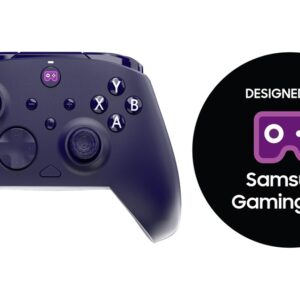
Designed for Samsung Gaming Hub is a new partner program that Samsung announced at CES 2024. To better understand the new program, it is essential to understand what Samsung Gaming Hub is. […]

Microsoft plans to remove several long-standing apps from its Windows 11 operating system. Besides Wordpad, a dedicated RTF editor, it has picked the Steps Recorder for removal. Steps Recorder started out as […]

2024 will be an interesting year for web browsers. Google will make changes to its dominating Chrome web browser that may affect part of the browser's userbase negatively. There is the move […]

Microsoft is already making it difficult to keep up with the different Windows builds and versions that the company releases. There are feature updates, Moment updates, cumulative updates, optional updates and even […]
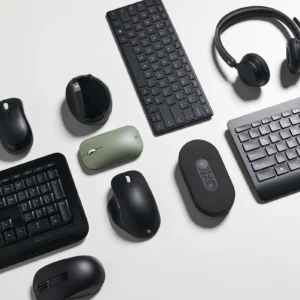
Microsoft announced in April 2023 that it would discontinue all Microsoft-labeled accessories in favor of its Surface brand. While Microsoft offers some accessories under the Surface brand, it is offering a limited […]

Google enabled Tracking Protection for 1% of all Chrome Stable users as part of the company's greater plan to drop third-party cookies support. Microsoft has now confirmed that the 1% may run […]
Google picked 1% of all Chrome installations today and enabled a feature called Tracking protection in them. Unveiled in September 2023 and then announced officially in mid-December 2023, it is the first […]

Microsoft announced today that (many) future Windows 11 PCs will ship with a new key on the keyboard. The Copilot key is the first major change to the keyboard since the introduction […]

Files is the default file manager on many Android devices. Last year, the company launched a new feature that added an Important tab to the application. Limited to India, it scanned the […]

France-based iodé has established itself as a viable option in the smartphone privacy and sustainability niche. The company develops iodéOS, an operating system compatible with many Android devices, and sells devices from […]

Lan Mouse is an open source program for Windows, Linux and macOs that allows users to control multiple devices using one mouse and keyboard. Development focus is on Linux and the versions […]

Microsoft has renamed its Microsoft Edge web browser for Android and iOS to Microsoft Edge: AI Browser. A visit to the Google Play Store or Apple App Store page of the browser […]
Most online streaming services started to offer plans with ads recently. These plans are separate on Neflix, Disney+ and many other services. Amazon will soon start to display ads for all Prime […]

Development of Windows slowed down in the second half of December due to the Holiday season. Still, the first half saw the release of several new Insider builds. The overview begins with […]

The European Union plans to make changes to the "cookie law" that it introduced several years ago to give its citizen more control over tracking and advertising on the Internet. While it […]

NewPipe is a streaming frontend for Android that supports services such as YouTube, Bandcamp or Soundcloud among others. It is a privacy-friendly ad-free player for media published on these sites. Up until […]

Marginalia is not your typical search engine. Major search engines like Google Search or Bing Search are becoming vessels to push advertisement and sites that push advertisement. Yes, that is a generalization, […]

Rumor has it that Microsoft is going to release the next version of Windows in 2024. Named Windows 12 right now, as Microsoft has yet to announce the final name of the […]
Current integrations of AI in web browsers rely on remote connections to servers. This is where the processing happens. Tools like Microsoft Bing, Brave's Leo or Google Bard require that connection to […]

Remember the movie Groundhog Day? Bull Murray plays a rather self-centered weatherman who finds himself in a time loop on Groundhog Day. Windows administrators may have similar feelings to Murray's in regards […]

A class-action lawsuit against Google Chrome's Incognito mode tracking was filed in June 2020. The plaintiffs claimed that Google was using cookies, analytics and tools on Google and non-Google websites to track […]

Nokia 2660 Flip is a new Nokia phone that has made digital detox its mission. While that is one reason for a purchase, there is a surprising amount of other uses for […]
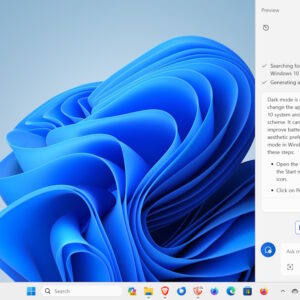
When Microsoft released Windows Copilot to the masses, it promised that the new AI feature would help users control Windows 11. When users got their hands on Windows Copilot, they noticed quickly […]
