
4 Tools To Extract Multiple Zip And Rar Archives

Many files on the Internet are compressed to reduce the time it takes to transfer them to users requesting them, and to cut down on monthly bandwidth bills.
A negative aspect of this is that the files need to be decompressed on the user's computer system before they can be used. This happens automatically at times, for instance when websites compress some files to speed up transfers and reduce bandwidth costs,
Standard unpackers like WinRar, WinZip or 7-zip are able to handle most of the operations with ease.
They usually fail on the other hand when it comes to extracting lots of archives, especially if those are stored in multiple folders.
This article reviews four specialized programs that are capable of extracting multiple archives at once.
Extract Now
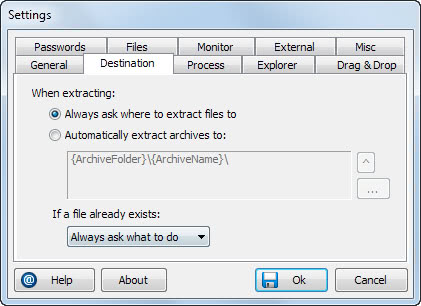
Extract Now is the only program of the four that has been reviewed before by Ghacks. That was back in 2007. The developer has continued to develop the software and extended its functionality by a lot.
The basic functionality however has remained the same. Archives can be added for extraction by dragging and dropping folders or files into the Extract Now interface, or by selecting them in Windows Explorer and using the context menu link to send them to the program.
- Supports major archive formats
- Easy drag and drop operation to add files that you want extracted.
- The program runs recursively through folders so that you can extract archives stored in different folders in one go.
- It can delete archives after successful operation.
- You can associate all archives in Windows Explorer for easy access.
- Options to extract archives into the same directory or another folder.
Extract Now supports a variety of formats including zip, rar, gzip, tar, iso and dozens of others. All archives that have been found can be extracted automatically or by clicking on the Extract button in the main program interface.
The software comes with lots of options that make the whole extracting process more comfortable. Extracted archives can for instance be deleted so that they do not have to be deleted manually in the end.
Extract Now is compatible with 32-bit and 64-bit editions of most Microsoft Windows operating systems.
UnPacker

Unpacker uses a completely different design but provides almost the same functionality that Extract Now offers. The program does not support drag and drop though, but selection of files or folders from the file browser in its interface.
- Can add archives inside archives to the queue directly.
- Set thread priority
- Check against SFV files
- Scan directories for new archives automatically
- Scan hard drives or folders recursively.
Selected folders are scanned for archives which are then automatically displayed with selection boxes to select some or all for extraction.
A major limitation of Unpacker is that it only supports rar and zip archives. These two formats make up the majority of compressed files on the Internet, but it may lead to the occasional manual extraction of unsupported archives.
Unpacker comes with a folder watcher that can be used to monitor folders for new archives. New compressed files are then automatically unpacked by Unpacker.
Scene Unpacker

Scene Unpacker is limited to the rar format. It has been specifically designed for so called scene releases which are normally distributed as rar archives.
A folder can be selected in the file browser. The program scan that folder and subfolders automatically for rar archives. Any rar archive found is then listed in the interface so that it can be extracted easily.
The application seems to have troubles recognizing rar files correctly since it added several jpg images that ended with numbers as archives as well. This alone makes it rather impracticable to use unless it can be ensured that images are not located in the rar archive folders.
Scene Unpacker requires the Microsoft .net Framework. It can be integrated into the Send To menu for extra context menu integration.
The Scene Release Unpacker (SCRU)

SCRU, just like Scene Unpacker, have been specifically designed for P2P downloaders. It is basically a background program that can monitor multiple directories for new archives and process them automatically whenever they are discovered.
The app is complex as it provides lots of features that require configuration. It supports all the basic options one would expect like shell integration or logging. Advanced features include configuring different profiles and filters for specific usage scenarios.
The Scene Release Unpacker supports both rar and zip archives. It requires the Microsoft .net Framework 2.0 and can be downloaded from the developer website.





















Thanks for this. Extract now is perfect.
Bitser (http://www.bitser.org) also has this functionality from the context menu
PJ, thanks for the link, I will take a look at the program, have never heard about it before. Thanks for your contribution.
I have been using Extract Now for a few years; it is easy to use & quick.
Extract Now and Unpacker are good, but I prefer Universal Extractor, which can extract even .exe-s and .msi-s.
Missed 7zip
Supported formats
Format Compressing Decompressing Filename Extensions
7z X X 7z
ZIP X X zip
GZIP X X gz gzip tgz
BZIP2 X X bz2 bzip2 tbz2 tbz
TAR X X tar
LZMA X lzma
RAR X rar
CAB X cab
ARJ X arj
Z X z taz
CPIO X cpio
RPM X rpm
DEB X deb
LZH X lzh lha
SPLIT X 001 002 …
CHM X chm chw hxs
ISO X iso
UDF X iso
COMPOUND X msi doc xls ppt
WIM X wim swm
DMG X dmg
XAR X xar
HFS X hfs
NSIS X exe
ZIP
7-Zip creates fully ZIP compatible archives. Anyone can decompress these files by any ZIP compatible decompression utility. During compression 7-Zip can use one of the following ZIP compression methods:
0 – Store
8 – Deflate
9 – Deflate64
12 – BZip2
The current version of the 7-Zip can extract any files from ZIP archive that were compressed with one of the following methods:
0 – Store
1 – Shrink
6 – Implode
8 – Deflate
9 – Deflate64
12 – BZip2
Files compressed with other ZIP compression methods can’t be extracted by the current version of the 7-Zip. But these supported methods are the most popular today, and therefore 7-Zip can decompress most ZIP archives. To extract files compressed with non-supported methods you must use some other ZIP utility.
7-Zip supports the Zip64 extension of ZIP format.
The current version of 7-Zip doesn’t support Zip multivolume archives.
LZH
7-Zip supports LZH archives only for listing, browsing and decompressing. 7-Zip supports -lh0-, -lh4-, -lh5-, -lh6- and -lh7- methods.