
Flash Cookies Cleaner

Flash Cookies are files that can be stored on the user's computer system. They are often used for tracking purposes but also to store preferences and session data, for instance to save games on online gaming sites. These cookies can be deleted by visiting the Flash controls on the Internet that Adobe makes available there, or by using third party programs like CCleaner.
What makes them particularly nasty is that they are - usually- not removed when you delete the cookies in your web browser. That's actually the main reason why they are used for tracking purposes, since most Internet users do not know that they exist let alone how to delete them.
The portable software Flash Cookies Cleaner is another program that can be used to quickly remove all cookies created by Flash applications from a computer system.
The software program will automatically analyze the system and display all Flash cookies that it finds during the analysis in its interface.
A click on the Delete button will remove all Flash cookies from the PC. There is unfortunately no option to remove only selected cookies from the system.
Users who want to delete specific sites that have placed Flash cookies on the computer system need to use the Adobe web controls instead to do so. This is recommended for users who play online games or visit websites that save preferences and settings in Flash cookies.
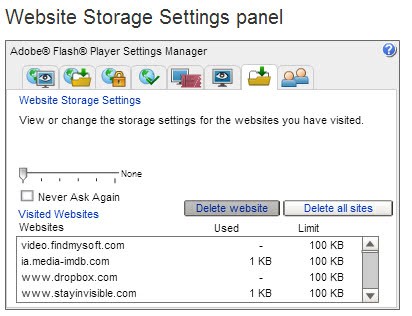
Here you can select individual cookies that you want to delete from your PC. Please note that you need an Internet connection to access the page, which may not always be available. The portable program is a useful alternative to Adobe's Internet-only solution to remove cookies from an operating system. The program does not need to be installed which makes it ideal for a repair disc or USB Flash Drive.
Flash Cookies Cleaner can be downloaded from Softpedia.
Advertisement


















Simple and best. thank you. i am using mackeeper to clean my computer regularly. will check with this easy to use tool as well :)
Rob.
An alernative is the flash cookie killer. get it here http://litschi.de/php/phpBB3/download/file.php?id=654
thanks for the information but i take exception with your methods described here. there are directories created of the websites that are not removed by using the settings manager. what that means is that there are folders of some.embarassing.website.dot.com within the hidden directory. try explaining how that folder got there. the settings manager and cleaning software may clean the cookies but the folder remains.
furthermore, there are two hidden directories containing data. one called .macromedia and one called .adobe.
considering the fact that the settings manager fails to actually remove the folders and the fact that there are two directories i would call adobe untrustworthy, insidious, and even evil. the settings manager is just a smoke screen to fool people as far as i’m concerned.
the only effective way to remove any flash data is to find the two hidden flash folders and delete them. they will be recreated on the next site one visits with flash and must be deleted again and again.
because of this insidious behavior adobe deserves all the libel and slander it is currently getting in the news. we the people need a substitute for flash now.
A good software…have been using it for awhile. The URL, however, is a download site, which is certainly not carrying the latest version, and only has the “All Windows” version (Microsoft Windows). The homepage for the Flash Cookies Cleaner is: http://www.hotcleaner.com/?f=fcr . On this page are: a download selection for Microsoft Windows (XP+Vista+W7), one for Firefox (XP+Vista+W7+Linux+Mac), and one for Chrome (XP+Vista+W7).