
Microsoft Outlook Data Export Add-In
Outlook Data Export is a free add-in for Microsoft Outlook 2007 that enables you to export data from Outlook to various formats.
Microsoft Outlook is a desktop email client that is part of the Microsoft Office software suite. The email client does not come with a lot of options to export data like emails, notes, appointments or contacts to other formats for use in applications or backup purposes.
That's where the Microsoft Outlook Data Export Add-In comes into play. The free add-in adds the means to export data from Outlook to various other formats so that they can be imported into other applications or processed directly.
The add-in is compatible with Microsoft Outlook 2007 and will install a new toolbar into the application after installation. It will also install various runtimes that are needed to run the Outlook add-in.
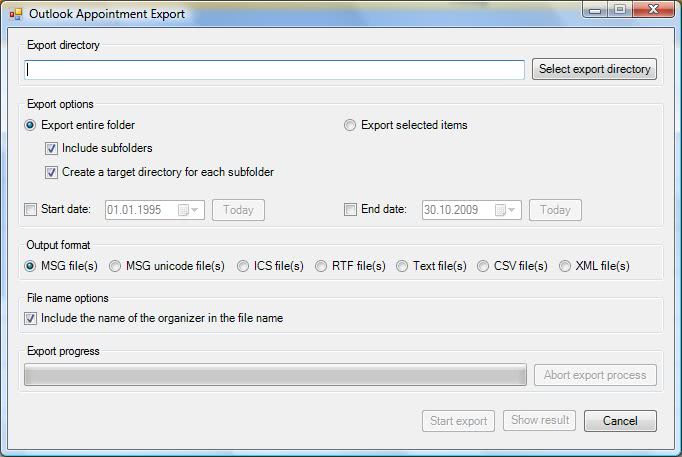
The options to export the data from Microsoft Outlook is then available from the new toolbar. It is here possible to export Outlook emails, notes, appointments, contacts or tasks into the following formats: MSG, unicode MSG, RTF, TXT, CSV, ICS, vCard, HTML, XML
Outlook Data Export
The user can either select an Outlook folder or single items for the export of the data. Outlook Data Export can be downloaded from the program's page over at the Codeplex website. It is only compatible with Microsoft Office 2007.
Update: The Outlook Data Export add-in for the mail client seems to have been removed from the Codeplex website. The project homepage returns a not found error when you try to open it. One of the reasons for this may be that Office 2010 and soon Office 2013 are both offering better exporting options when it comes to data.
Outlook 2010 for instance supports the exporting of contacts and mailboxes from within the program interface. While it is still fairly limited in comparison to the formats that the Outlook Data Export add-in supported, it is better than no option at all.
Another option that you have is to backup Outlook data using Mailstore a free for personal use program that you can then use to import into another application or another version of Outlook.





















Runs, but doesn’t export my notes. Only one. Perhaps it is having trouble dealing with subfolders?
I put it in and it seems ot work.
But for some unknown reason, it insisted on installing .NET 3.5 SP1, even thought it was already installed!
What about export of Account Settings. If you have multiple accounts, is there any add-in that can export account settings ?