
Microsoft Outlook Mail Time Zone Plugin

Time zones play an important role in email conversations. Not so when mailing a friend or colleague in the same region but when mailing someone who is living in another place of the world. Expecting a direct response from someone when it's late at night their location is one of the problems that can occur.
It does not really matter if an online email service such as Gmail or a desktop email client such as Mozilla Thunderbird or Microsoft Outlook are used; Most, probably all, do not display information about the recipients timezone in the email client.
Sender's Time Zone (via Technospot) for Microsoft Outlook changes that for Microsoft Outlook as it displays information about a sender's time zone when replying to emails.
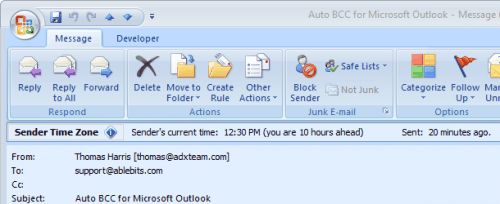
The plugin for Microsoft Outlook requires no configuration after the installation. It will automatically display the sender's current time and the time zone difference in hours ahead or behind when replying to email messages in the email program.
Sender's Time Zone is a plugin for Microsoft Outlook 2007, Outlook 2003, Outlook XP (2002) and Outlook 2000.
Update: The most recent Sender's Time Zone update has added support for Outlook 2010 as well. Please note that the plugin is no longer free. A free 15-day trial version is available which you can try out to see if it is a suitable addition to Outlook.
Note that you can now use the Outlook add-in to customize a contact's timezone in case it is not detected correctly by the program. That is for instance important if messages are transferred through an Exchange server as you may see the server timezone and not the contact's zone in this case. You can change the timezone of contacts easily in this case to correct the display when you are about to send emails. You will also see information when emails have been sent if you are browsing sent emails in Outlook.
Advertisement


















Would be nice if it worked in the preview pane.
After downloading this plug-in, I was poking around and saw this other Outlook add-in:
======================
Silent BCC for Microsoft(r) Outlook(r)
Monitor every outgoing email in your company
Do you want to be in the know of every email that leaves your company? You can easily achieve this with Silent BCC for Outlook. Once installed, the plug-in will deliver you BCC copies of all messages sent from all user accounts of a given PC. No actions on the sender’s side are required, they may not even know about it!
=======================
Whew! Never knew this could be done. Beware.
This looks useful!
ok now i know what time is at senders’
now what about the subject of the email….Auto BCC…without any add on…is that possiable?