
Soft2Base, Download, Install Multiple Freware Apps At Once

I sometimes take a look at PCs of friends and family, usually because something is not working and they asked me to, and to a lesser extent when they bought a new PC. It is often the case that the PC is not equipped with the right programs, no solid web browser, no text editor, data transfer program, security program and so on.
One of the tasks that I do over and over again is to install the programs that I came to rely on to those computer systems. For that I open the program's website, download it and install it afterwards. This takes some time, considering that it is not usually just one application that needs to be made available, but many.
Soft2Base is similar to previously reviewed applications like AllMyApps, Essential Software Installer or Ninite, by offering to download and/or install selected applications at once.
The program displays a set of configuration options on startup. Here it is possible to select the application language, program interface language and download / installation options. It is for instance possible to configure the program to perform silent installs, install only newer applications or download the programs only without installation.
The next screen displays the supported programs sorted in categories. A pull down menu on top offers templates, like complete, minimum or custom, that auto select applications in the listing.
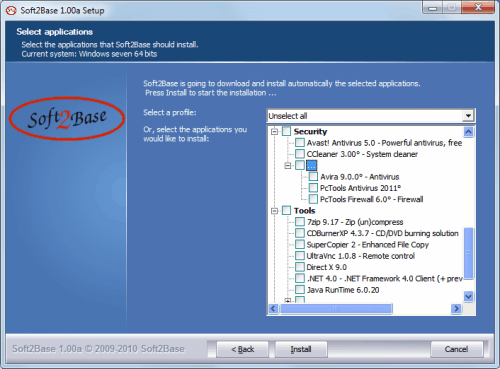
Many popular applications are available, from iTunes and VideoLan in the multimedia category, over Open Office and Notepad in the Desk category to Firefox, Flash Player, Avast, 7-Zip or CCleaner.
The selection is good, but several applications that I'd personally install are missing. The incredible burning software ImgBurn is missing, as are Google Chrome, Opera and True Crypt among others.
Still, the available applications can be put to use, and all it takes to download and install them on the system is to select them and proceed by clicking on the Install button. I have checked the versions of some applications and they were always the latest available versions.
An installation log can be displayed at the very end of the process.
Soft2Base Download and Compatibility
Soft2Base is available for download at the developer website. The portable software is compatible with most Windows operating systems, including Windows XP, Windows Vista and Windows 7.
Update: Soft2Base is also compatible with Windows 8. The most recent version of the application ships with an updated interface that makes things a lot easier.
Categories such as multimedia, messaging or security are displayed on the left side of the interface, while the programs that you can install using the application on the right.
Colored icons indicate whether a program is not installed on the system, installed on the system but requires an update, installed and identical (meaning up to date), or more recent.
You can hide programs from the listing, for instance programs that are already installed. It is possible to select one or multiple programs for installation.
As far as installation options are concerned, you can disable silent installations which is the default setting, or select to only download the programs but not install them.
Advertisement


















Useful-looking utility, but while I can usually dismiss the odd warning from VirusTotal, 4 warnings were enough to have me playing safe.
Right, some AntiVirus are complaining about the auto-update of the application list. This is using a connection to internet and AV dislike that.
BTW, the Soft2base development machine is an Ubuntu box to avoid viruses ;)
Martin, excellent presentation of the tool ! Great job.
Google Chrome is available already in 1.00 and I note your kind suggestions for the missing ones.
There is now an USB mode so that you can install again and again without downloading installers from each machine :)