
RT Windows 7 Registry Tweaker

Most configuration changes in the Windows operating system are written to the Registry. Practically all tweaking tools are doing the same, and the RT Windows 7 Registry Tweaker is no exception to the rule. Inexperienced users may be intimidated by the design of the application, as the developer has decided to lump all tweaks together in the main interface.
Experienced users on the other hand will like the direct accessibility of all tweaks and setting changes that are offered by the Registry tweaker. Lets take a closer look at the user interface of the program and the tweaks that are offered.
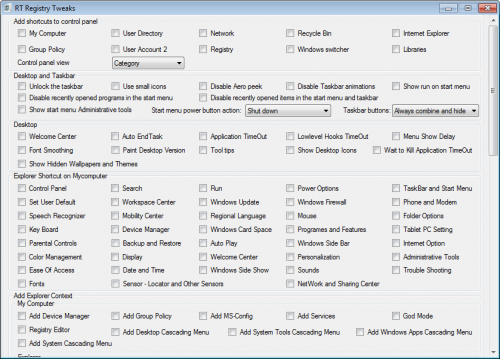
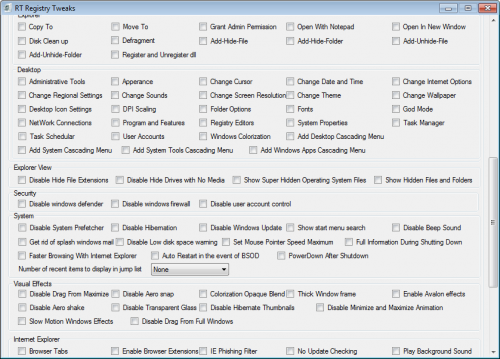
The screenshots above show all of the user interface. As you can see, options are tightly packed, and divided in groups that are hard to distinguish. some users will probably go as far to call the interface messy, maybe even a usability disaster.
But usability is only one aspect, and the program could still prove to be very useful if the features are right and interesting.
The Registry tweaks are sorted into groups such as Desktop and Taskbar, Security, System, Visual Effects or Internet Explorer. Tweaks are applied by clicking in the checkboxes of individual entries in those groups.
Another problem arises for inexperienced users as there are no explanations or detailed information about the tweaks. That may not be a problem for some (like Disable Aero Shake or Use Small Icons under the taskbar group) but for others it may very well mean additional research before the user knows what a tweak actually does (Enable Avalon effects, disable drag from maximize or tool tips under desktop).
Do not get me wrong though, the options offered are very extensive, with the majority being about adding shortcuts, context entries and disabling features in the operating system.
A reboot is required after the modifications have been made. It is possible to kill the explorer process instead and restart it to avoid having to reboot or log off and on again. The program offers to create a system restore point before applying any tweaks.
RT Windows 7 Registry Tweaker offers a lot of different tweaks which is the biggest strength of the program. The developer should consider adding at least some color to the program interface to better distinguish groups of tweaks, and some tooltips so that the tweaks are explained in the program.
Windows 7 users who want to take a closer look at the tweaking software can download the latest version from the forum post over at the RT forum. The program is compatible with both 32-bit and 64-bit editions of Windows 7.
Update: The program appears to be no longer available on the site it was published on. I suggest you take a look at our Windows 7 tweaking software overview for alternatives.
Advertisement


















More users need to be educated about the Win7’s “Godmode”
http://www.zdnet.com/news/uncovering-windows-7s-godmode/378247
I actually like the interface. The program is simple and easy to use.