
Outlook Blocked Attachment Unlocker

Microsoft's popular desktop email client Outlook blocks specific attachments by default, in order to increase the security of the system. File attachments with extensions such as exe or reg will be blocked by the email program to avoid unnecessary dangers to the system. This sometimes however blocks legit file attachments from being accessible after they have been received by the user.
It is possible to change the file extensions, for instance by zipping the files, to bypass the Outlook attachment filter. Then again, there are other options including the possibility to add blocked file extensions to the whitelist so that they are not blocked by Outlook anymore.
We have discussed those manual options that require editing the Windows Registry in the articles Add File types to the Microsoft Outlook Attachment Manager and Enable blocked file types in Outlook.
Registry editing is on the other hand not the most comfortable option when it comes to unblocking specific file types in Microsoft Outlook.
CodeTwo Attach Unblocker is a Microsoft Outlook add-in that adds a new tab under Options to unblock specific attachment file types.
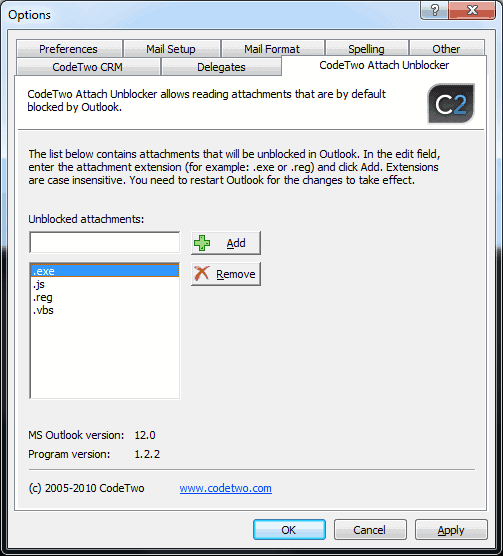
The add-in consists of a simple form that can be used to add or remove file extensions in Outlook. File extensions can be added in the form .ext, and appear in the list of unlocked attachments in the program.
All unblocked attachments can from that moment on be saved and opened like all other standard file extensions.
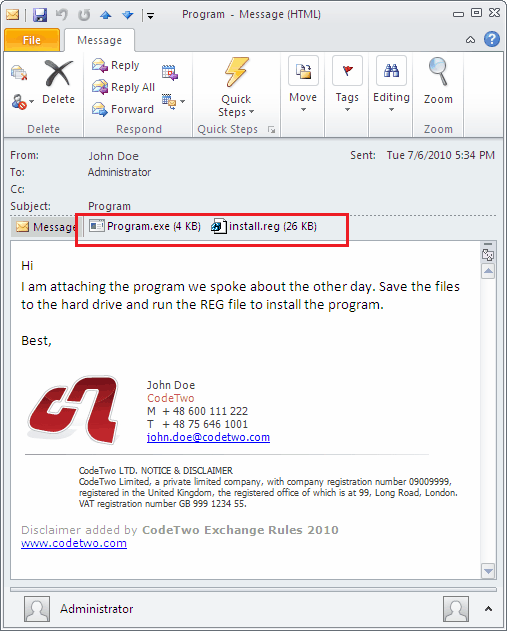
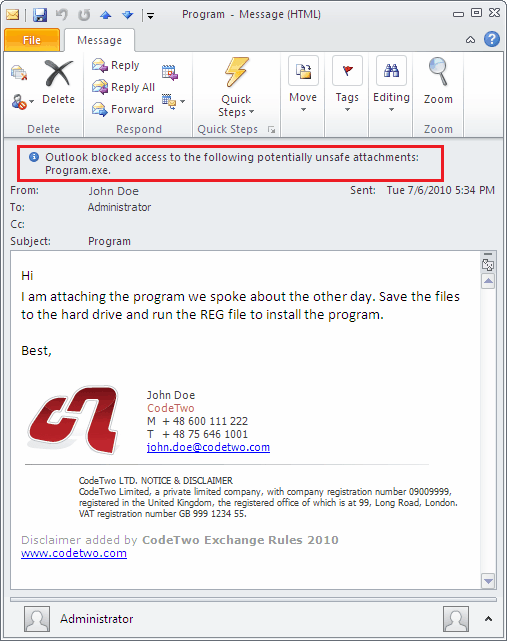
Blocked attachments cannot be viewed, opened, saved or forwarded. Whitelisting them in the add-in ensures that they become fully accessible in the email client.
CodeTwo Attach Unblocker is compatible with all the latest Outlook editions released by Microsoft. The program is available for download at the developer website.
Another program that can be used for this purposes is Outlook Tools, which offers far more options than CodeTwo Attach Unblocker.
Advertisement


















