
Free Real-time Network Connection Monitor

ConnectionMonitoring is a portable real-time network connection monitor for the Windows operating system. It is basically an alternative option to popular portable applications such as Curr Ports or Open Ports which is displaying the TCP / IP network connections in real-time on top of that.
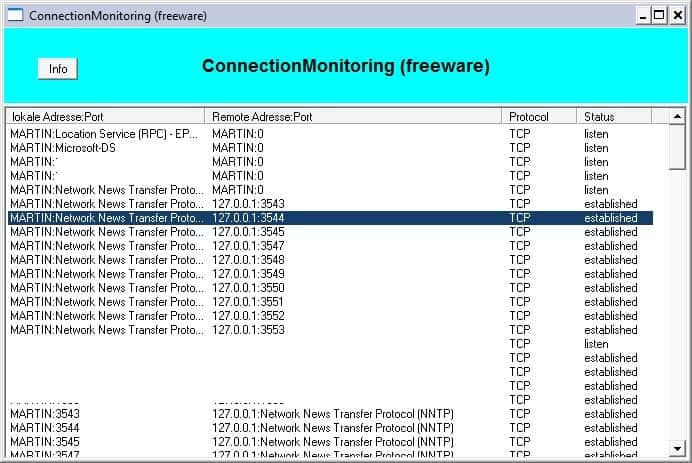
ConnectionMonitoring displays all network connections (incoming and outgoing) upon startup. It lists locale and remote addresses and ports, the protocol used by the connection and the status of the connection.
Changes, meaning new or closed connections, are automatically displayed in the program's interface as they happen.
The network connection information that are displayed by Connection Monitor are basic but useful for a quick overview.
The program itself lacks information that are displayed by applications such as Curr Ports, most notable the process ID and process that are using that network connection. It is therefore difficult to identify the running processes with Connection Monitor alone.
Curr Ports and Open Ports as well are therefore the better alternative for users who would like to identify the process that are connected to the local network or a remote location.
ConnectionMonitoring is a free download at the developer's website. No compatibility information are displayed on the website or in the application. It worked fine on a Windows XP SP3 test system.
Update: Connection Monitor is no longer available, the website is returning a 404 not found error. We suggest you use one of the alternatives, Curr Ports or Open Ports, which both display real-time connection information as well. Curr Ports for instance is a portable program for Windows that displays a system's incoming and outgoing connections sorted by process or service. It is one of the easiest to use programs in this regard. Check out Who is connected to your pc right now? for a detailed review of the program.
We have uploaded the latest working version of the application to our own server. You can download it with a click on the following link: (Download Removed)
Note that we don't support the program in any way.





















does this mean another operater can view or has hacked into my phone or laptop? As this ‘network connection monitor’ has come up on my phone, and I don’t understand what it means.
So does this log when connections are established and lost too, or is it just a very mildly useful ‘current connections’ display?
It only displays the connections in realtime, as far as I know.
Great info – thanks!