
Antivirus software Uninstaller AppRemover

AppRemover is a free program for Microsoft Windows devices that allows you to uninstall antivirus software from the operating system.
The uninstallation of security software such as antivirus programs works pretty much like any other software uninstallation. While it works just fine most of the time, it can happen that you run into issues when you try to remove a security application from your PC.
If the removal fails, you may find yourself in a troubling situation as security software is integrated deeply in the operating system usually. This can led to all kinds of issues, for instance that you cannot install new security software, or that the operating system may not boot anymore or throw errors on start up.
Some antivirus companies have created special removal programs for that situation that will delete any file or Registry key of the software on the system to remove it completely from it.
We reviewed antivirus software removal tools in our overview not long ago and suggest you check it out for additional alternatives.
It is also possible to rely on third party applications like Revo Uninstaller which have been specifically designed to remove traces from any installed program on the system including files and Registry keys created during the installation or operation of the software.
AppRemover

A rather new option is the universal antivirus software uninstaller AppRemover which can remove dozens of security programs from a computer system.
Update: AppRemover is no longer available. You can download the program on third-party sites like MajorGeeks, but it is not really recommended as it has not been updated since 2015. A better way is to use the aforementioned Revo Uninstaller or comparable solutions instead. In case you wonder, Opswat, the makers of AppRemover, have integrated its functionality in the company's commercial Metadefender Endpoint Management application. End
The main advantage for users is that they do not have to hunt down the removal tool for the specific application (some developers offer several tools that only work with specific editions, or rely on it as it may not even exist).
The portable software program is compatible with Microsoft operating systems from Windows 2000 to the latest Windows 10 version (including 64-bit editions). It can be run right after download. It scans the computer system for security software programs it supports, and displays all that have been found in a list. It is possible to remove all or only selected ones from the system.
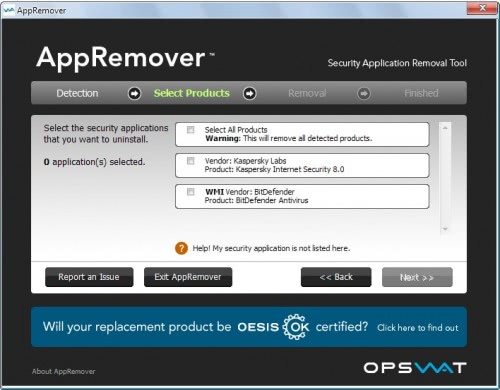
Antivirus and security software programs from many popular developers are supported by the program including applications created by AVG, Avira, F-Secure, Kaspersky, Lavasoft, McAfee, Microsoft, Panda, PC Tools, Sophos, Symantec and Trend Micro. It is very likely that the currently installed program is among the supported ones.
The free version of the application supports file sharing applications such as uTorrent and Deluge, backup applications and toolbars as well. It will detect installed file sharing apps to provide you with the same removal options.
The AppRemover website lists all supported programs sorted by operating system. The page is a good starting point as you can use it to find out if the software that you want to remove is supported by the application. The latest version is available for Windows and Mac systems.
Verdict
AppRemover is a nice to have program as it enables you to uninstall antivirus solutions and some other program types from the operating system in one go.




















When I tried to download AppRemover Comodo Internet Security Pro would not let me because it detected a virus within this program and identified it as “WIN32.jeefo@66574” so if you are thinking of downloading this program perhaps you should do some research on this virus first. (better safe than sorry)
good software but it doesnot remove eset and F-secure from my pc.
50% good remoral
this site is good
Not only does AppRemover remove in-depth security applications, but one thing I find interesting as well is that it cleans up failed uninstalls with deep registry scanning. Obviously a required application when removing security softwares, even if major security software providers now propose specific applications to remove their own software. I had used a Karspersky tool for deep (true) removal, and still I had to spend over an hour on the Registry to manually cleanup some references… AppRemover then would have been a blessing.
dont need any service now please cancel stop popping up on my computer
Just a warning, based on personal experience with this app (i don´t think it was the app fault).
Before attempting to uninstall any of the supported apps, do a complete backup of your data. If by chance the antivirus (in my case AVG Free) is not properly behaving (my reason to uninstall) due to a possible data corruption for poweroffs and system crashes (i had a few bsod and reboots due to micro fan not working), it might “destroy” your MBR (my case) in the process rendering an unbootable machine. I had to reinstall Windows and luckily my data was still there, but your mileage might vary.
Nice one! It’s always hassle to maintain bunch of different cleanup tools.
Doesn’t seem to support Comodo products (at moment) but otherwise list of stuff it handles is nice.