
Free Backup Software and Best Windows Backup Software Programs

Backing up data regularly should be one of the most important tasks of any computer user; yet only a minority is doing it thoroughly and regularly. The rest is flirting with disaster as there are numerous incidents that can delete data on computer systems.
The most common ones are hardware failures, which can mean damaged hard drives but also (partially) unreadable CDs or DVDs, computer virus attacks but also human error. If you have ever met someone who partitioned the wrong hard drive you know that the latter can be cause for great frustration.
Backups are the single most effective method of preventing data loss on computer systems. The following article lists the 10 best Windows backup software programs (according to me).
Tip: You can check out our best free drive backup programs for Windows listing as well. Some of the programs below support backups of entire drives or partitions as well, but the linked article focuses on these exclusively.
EASEUS Todo Backup Free
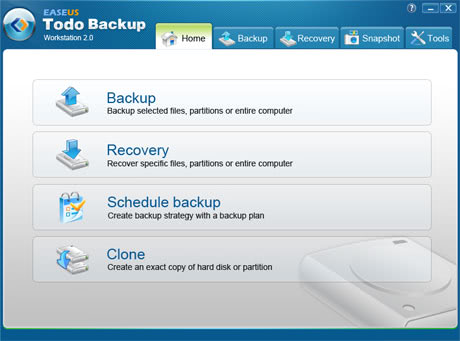
The Windows backup software has just recently been released as a new version. The application can backup files, folders, partitions and complete disk images.
It offers recovery options, cloning, disk wiping, image integrity checks and a scheduler. Without doubt one of the most popular and feature rich backup programs for the Windows operating system.
Core Features:
- Supports local and cloud backups.
- Can backup and recover files, hard disks, and partitions.
- Supports disk cloning.
- Supports migrating the operating system to a new disk.
- Full, incremental and differential backups supported.
- Supports a variety of hardware configurations including RAID, UEFI boot, MBR and GPT disks.
You can read a full review of Easeus Todo Backup here.
Cobian Backup
Cobian Backup is a free backup software for personal use that supports both local and remote backups.
The software is constantly under development by the developer which means that features are included regularly. Some of the key features include full, differential and incremental backups, file compression including the popular 7-zip format plus strong encryption for data security.
Core Features:
- Backup files and directories.
- Can save backups to the local system, network or FTP servers.
- Low resource usage.
- Comes as a client and server version.
DeltaCopy

An Open source backup solution supporting incremental backups, one-click restore options, task scheduling and email notifications. Some advanced options include ssh tunneling and connecting to rsync daemons.
It makes use of a server client system. One or multiple backup servers can be created on computers running Windows by installing the server version on these computer systems. The client will be installed on the any computer system where files should be backed up regularly.
The free backup software supports authentication, scheduling and connection by IP or hostname.
Core Features:
- Supports incremental backups.
- Network and local backups.
- Lightweight in comparison to other solutions.
- Supports operating systems up to Windows 7 officially.
Cucku Backup Discontinued
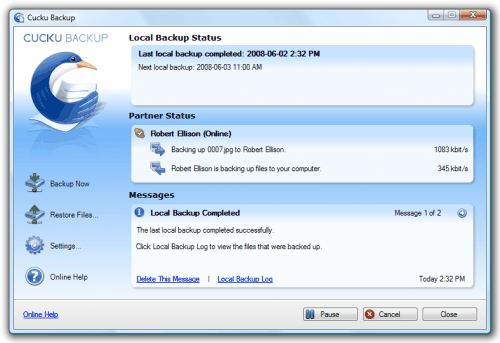
Cucku Backup calls itself social backup. It provides local backups but also backups on friend?s computers. It supports complete and continuous backups and can automate the remote backup process to take that of the user's shoulders. All files that are backed up use encryption algorithms to ensure data safety and integrity so that the backup partners cannot see the file names nor contents of the files that are send over to their computer systems.
It works best in computer networks but can also work over the Internet if enough time or upload bandwidth is provided.
Backup Maker
The free backup software Backup Maker provides extensive backup capabilities. It comes with a standard and expert mode to suite both the needs of experienced and inexperienced users. The software supports full and partial backups, local and remote backups, selection of a backup execution interval and execution on certain events like USB detection or start and shutdown.
All in all an excellent software program to backup files on the Windows operating system.
Core Features:
- Backup to local hard drives, FTP, network devices and discs.
- Full and partial backups, back up only changed files.
- Auto-backup when USB Flash drive is inserted
Ace Backup

Powerful free backup software that supports multi-versioning, backups to local and remote locations, file compression and encryption.
Core Features:
- Supports versioning.
- Can back up files to FTP, discs, and local hard drives.
Microsoft SyncToy

SyncToy is offered by Microsoft as a free download for the Windows operating system. It can be used to easily synchronize data between computer systems.
The program offers five different synchronization options that the user can choose from including a preview option before starting the process.
Core features
- Focuses on data syncing instead of backup jobs.
Mozy
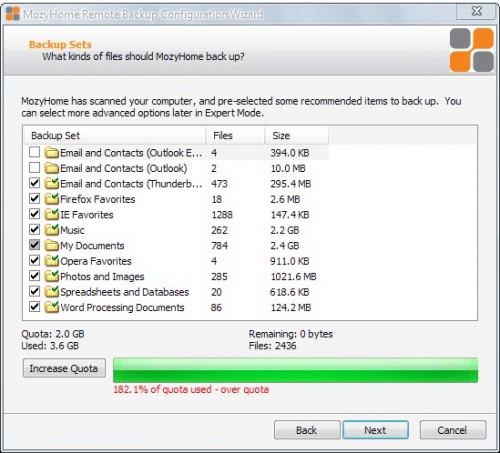
Mozy is an online backup solution that offers backup clients for Windows NT based systems and Mac OS X.
Registered user get 2 Gigabytes of free space with the option to sign up for paid accounts for currently $5.99 for 50 Gigabytes, or $9.99 for 125 Gigabytes.
Several pre-configured backup sets are populated after installation of the backup client including bookmarks, documents and multimedia files. These can but do not have to be backed up. Expert mode provides access to the full file system to pick files or folders to backup directly.
Core Features
- Online backup service.
- Space is severely limited, and expensive.
Personal Backup Discontinued

A free backup software for the advanced user that provides great file filtering options. It comes with the usual set of features including local and remote backup creation (including SFTP), file compression and encryption, status reports and log file generation.
Allways Sync

Another software that has been primarily designed for file synchronization that is also supporting file backups to a local drive, over a local network or the Internet.
It works on a per directory basis and can be installed on as many computer systems as the user desires. The software comes as a setup or portable version.
Core Features:
- Focuses on synchronizing files.
- Supports local and network sync.
- Can sync bi-direction, and n-way.
- Supports data loss prevention algorithm.
Comodo Backup Discontinued

Another free backup solution for Windows users. Comodo Backup can backup files and folders on a local computer system to other drives, network locations, ftp servers and removable media.
Backups can be scheduled and notifications can be send to inform about completed backup jobs. Other features include compressing backups, data recovery options, support of multi-session backups and incremental backups.
DriveImage XML
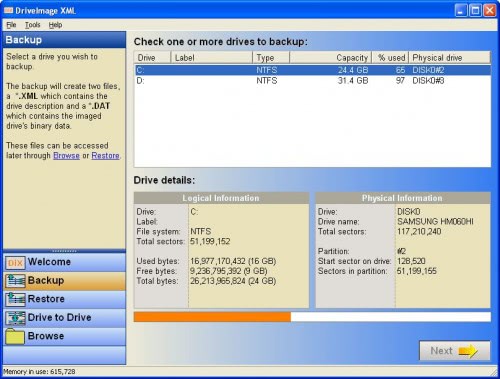
DriveImage XML is more a drive imaging software than a backup program. It can however be used to backup a full hard drive or partition to another drive.
It uses the Volume Shadow Service to create exact backups during runtime. It is afterwards possible to restore the backup either from within Windows or with the use of a boot disk.
Core Features:
- Drive backup software that backs up partitions and entire drives to image files.
- Browse backups, and extract files from images.
- Restore images to the same, or other, drives.
Macrium Reflect FREE Edition

Macrium Reflect is a file backup and disk imaging solution for the Windows operating system. It comes with all the bells and whistles one would expect, from extensive options to backup files to scheduling features, encryption and password protection to protect the data from third parties, 32-bit and 64-bit operating system support, logging, a Linux based Rescue CD with network access and options to save the backup to network drives, USB storage, Firewire drives or optical drives.
Core Features
- Backup the system partition, other partitions or entire drives.
- Supports differential images.
- Clone disks.
Areca Backup
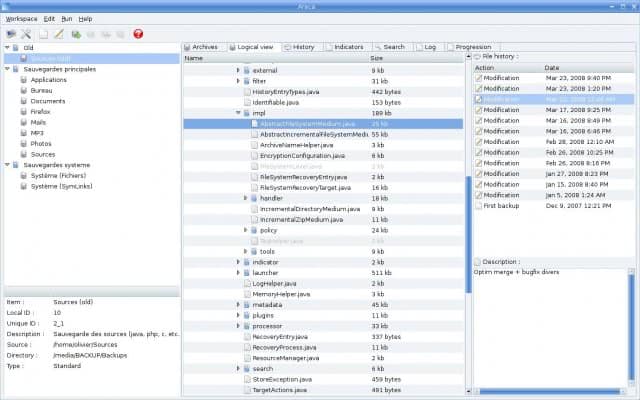
Areca Backup is a free open source backup solution for Windows. It supports incremental, image and delta backups on both local drives and ftp servers.
It basically allows you to select a set of files / directories to back-up, choose where and how (as a simple file copy, as a zip archive, ...) they will be stored, and configure post-backup actions (like sending backup reports by email or launching custom shell scripts)
Core Features:
- Supports local and network drive storage, and FTP.
- Delta backup support, as well as incremental, differential and full backup.
- Reports.
The verdict:
The choice of the correct backup software depends on several factors including the data size, the frequency of backups or the local computer infrastructure. It is therefor not possible to point at one application and crown it the best free backup software.
Update: A lot of new backup applications have been released in recent years. Here is a selection of the programs that have been released in that time:
Mailstore Home Backup - A specialized backup program to backup emails. It supports both desktop email clients as well as Pop3 and SMTP servers. The program is very versatile and free. The new version is available as a portable version as well, ideal for an USB stick.
Macrium Reflect Free - This is a disk imaging software that can create a mirror image of a disk partition or complete hard drive. The free version is relatively limited in functionality.




















Backup software Macrium Reflect Free is being retired as from January 1, 2024.
https://www.ghacks.net/2022/11/27/backup-software-macrium-reflect-free-is-being-retired/
Thanks Martin Brinkmann, you got me at Free and Functional!
You may look at Backup Cow(www.backupcow.com).It is a free software help me backup data to another computer via LAN or remote network.Also,I can create a group that friends of mine can download and share photos between multiple PCs.
Iperius Backup is another good alternative, recently on the scene: http://www.iperiusbackup.com.
There is a free version quite complete, and the advanced edition can make Google drive backup, FTP and disk images.
I prefer to use inbuilt windows 7 backup option.
My favorite Windows backup software tool is Argentum Backup from http://www.argentuma.com/backup.html. The easiest and fastest I ever tried on my Windows 7 and Windows XP computers. Cheers!
i love reading comments on backing up our “stuff”. the key
words here are backing up. each one to his own method
and some are better than others but as long as you are
backing up your stuff you are doing great. thanks ghacks
for hi lighting some good ones
hellow how are u
Backing up is easy, restoring is another thing. There are so many vendors out there that it’s hard to know which one’s actually work and will work with your level of understanding them. For me, my favorite is using a batch script with robocopy. The script looks like this:
robocopy K:\ G:\ *.* /E
It copies and overwrites everything from the K:\ drive to the G:\ drive. It’s file level and very rudimentary but it gets the job done. Otherwise I’m liking some of the personal backup solutions listed here. They seem good for a personal desktop computer.
Hi — It is time for an update of this article, please. I like all the comments — well, not ALL the comments. Upgrading from XP 32 bit to Win7 and wanted to bring over my Acronis True Image Home 10 (not 2010), which is a now unsupported Oldie but Goody. Was willing to shell out a full $20 to get Acronis for the 64 bit system but the reviews were HORRIBLE and beautifully and damnably written so I am bummed and need to find other backup software. Truly, 90%+ of people don’t do backups. And of the 10% who do, probably 90% of them don’t understand the whole imaging thing to get your bootable and OS mirrored. Anyway, The HORROR. So, Martin, maybe please update your article. Maybe even include non-free ones because paying $20 is so worth avoiding $20,000 worth of disaster. At some point, I just punt and grab an OK software. Easeus Todo or Cobian are in the running, but someone said Paragon might be good but these reviews are too old to be actionable. Peace, Bobby
Can someone please advise me on the best free backup software I can use to backup to a Windows Server 2008/R2. I need a software that can backup an entire drive with the capability of also scheduling only changes to the drive to be backed up when needed. Also something that I can restore my files from.
Thx
I just founded a business software database comparison . Check out the Backup and storage categorie, 41 software have been listed http://backup-storage-software.thebsdb.com/
after reading a ton of comments, still can’t decide what software would i be using to backup my files….
Well, having done a quick read of some of the previous comments, I find myself in a different category. I suppose the quality of mypcbackup is in the eye of the user. My needs are simple, compared to what I am reading, so my reaction to My PC Backup is very positive because it solved a problem for two years at a reasonable price. Warren
still one of the best roundups on the web.
There are so many great options, here’s what I’ve downloaded:
areca, Puresync, toucan, comodo backup
:
Even after almost 3 years, your posting about free Windows backup software is still useful. Servicing home businesses who have tight budget to purchase licensing for professional version of Windows backup, the list of your free backup versions is very valuable to them. Of course if they really read the TOA, these free versions are for personal usage only.
I’m trying to find the best way to backup XP. Windows Backup software requires a floppy drive, I don’t have one, so I’m leaning to Clonezilla to backup to a USB stick.
Just found your site. GHacks. Great thread –
I would NOT RECOMMEND Acronis True Image 2012. Program is full of bugs, resource heavy, freezes keyboard/mouse during backups and slow. Does not work correctly on external (NAS) storage and if you want to complain about a bug… they only offer paid support after the first couple of weeks. Shame, as earlier versions were substantially faster – seems like they build a nice GUI but the core program does not work fully.
For me, the best I’ve found is Crashplan, which is a proper backup solution, minimizes disk space needed for the backup, is reliable and allows multiple backup destinations, including local drives, offsite backups over the net, all for free, and with a crashplan subscription, backup to the cloud.
In selecting a replacement for Windows 7 Backup and Restore (W7BR) I would like to avoid as many of W7BR’s problems as possible. In particular:
1) W7BR apparently won’t backup a user-added library (i.e., which is not one of the four built-in Windows 7 libraries.)
2) If W7BR fails to backup any file, no matter how singular and insignificant, it considers the whole operation as if it never happened. Thus, despite months of regular weekly backups, and finding the most recent files included, it still says “Last backup: Never.”
3) Problem (2) forces me to manually verify that the backup was indeed done — so far for the promise of W7BR automation.
4) But I can’t blindly trust that the backup was done — there were instances it wasn’t.
5) The backup time appears as the time the backup file is accessed after the actual operation.
6) The Explorer-like facility associated with W7BR bahaves
unlike Windows Explorer. On Windows Explorer, on the other hand, the backup file behaves unlike a normal file/folder.
7) W7BR cannot distinguish a file that has been moved to another location from a new or a modified one. Thus it creates redundant copies of the same file, one in the original location and one in the new location. Also, it treats renamed files as new files and keeps files that have long been deleted.
I’d be grateful if someone helps me select a backup software that aviods all or most of these problems. Thank you.
Try out Genie products. It seems they have been in the game for a long time.
They have a free product too (look in the footer)
http://www.Genie9.com
My favorite for some years is Super Flexible File Synchronizer. It is not free, but you can try it out free for 24 days of use. That is 24 weekly backups if you want. With one licence you can use it on all computers you manage.
I have chosen it mainly for the preview screen. I always check on the preview screen what will be deleted, which files are updated, which files are new. My backup is not only a measure to mitigate against technical problems or loss or theft, but also a warning against ‘strange’ things happening on my laptop, and a means to let go of disposed files in a controlled manner.
I don’t mind paying a few bucks for this kind of software, because I am depending/relying heavily on it.
The support behind SFFS is great.
SFFS is indeed very flexible.
Every half year I do a full binary check on all of my backups.
which is the best for running an incremental copy every night, for example?
I’d like to specify the folders, but let the backup SW figure out what files changed and back them up to an external USB drive. Thanks.
Many More Free backup software programs are available online.
and how to Download—>
Search “free Backup Software Download”….
Since I always use Amanda backup software and always found it to be amazing.. because I don’t need to choose what files I want to backup each time and where to put them.
I am using backup to make sure I keep two copies of the websites and other business information I store on my computers. Thanks.
I also used paragon for some time now and it has really been fun,
FBackup is a very good alternative too (free), you’ve mentioned it on https://www.ghacks.net/2009/06/17/fbackup-plugin-based-windows-backup-software/
This is almost an exact copy of http://www.hackillusion.com/2011/02/top-10-windows-data-backup-software.html (or they copied you?\)
Mike look at the publication date. Mine is from 2009.
It rubs me up the wrong way when people include things like Synctoy and others listed here which are clearly NOT backup programs when the Title of the article clearly indicates “Backup” programs!
that depends on the definition of backup, does it. If I use Synctoy to sync files with an external hard drive, then files on that external hard drives are backups of the original files, or are not they?
I have used SafeCopy backup and i have no complaints about it.They offer cost effective services and they are so efficient.This backup software is so compatible with windows and on the other hand,Mozy is also a good backup software but the price really discourages me at times.
Best yet…FreeFileSync…http://sourceforge.net/projects/freefilesync/
Hi
I agree: FreeFileSync is the best. ALL other software I tried was not able to versionize or even backup my files over LAN – way, way to slow.
Olaf
I am using Microsoft SyncToy, and it is really a nice one.
If you have a Western Digital Hardisk you can get FREE WD Acronis backup from WD.. it dosn’t do incremental backup but apart from that is full featured.. Also Acronis has a free drive monitor that alerts you when time to do a backup Just dont monitor Critical Events, there is a CPU overuse bug.
I love ghacks.net. You guys always provide the best information. I am using backup to make sure I keep two copies of the websites and other business information I store on my computers. Thanks.
Christopher thanks so much for your comment.
The biggest difficulty I have found over many years in computer support is convincing computer users of the importance of purchasing a relaible backup solution. They understand the importance of backing up but seem to be too confused with all the different options, features & prices which further delays implementing a solution. I now recommend online solutions to my customers for it’s ease of use, security & cheap pricing
It would have been great if you had included a table with features showing what each program supports or don’t. That would have helped a lot more in the comparison vs this pretty insipid “review” that includes only just rough thoughts and no details.
Joe interesting idea, I might do that. Problem is that such a list needs frequent updates which I probably do not have the time for.
Safecopy will backup multiple computers on a single for only 50 bucks a year.Which makes it so cheap.
For multiple computer backups,i use Safecopy backup.
Cuckuu backup is closed.
Thanks for the information, have removed the link from the page.
You might want to take into consideration another very easy to use yet comprehensive piece of software named “Easeus Todo Backup Home”.
Find general backup considerations and implementation hints on:
http://www.gandraxa.com/implementing_files_backup_plan.xml
Safecopy backup works better for me.And it is a good backup software too.I think they forgot to mention it above.
I always use Data Safe X 4.0
I’ve always found it to be amazing.. because I don’t need to choose what files i want to backup each time and where to put them… i do that once.. and tag a portable hard drive.. and then whenever I plug that hard drive in, Data safe detects it and backs up my files….
I totally recommend it. :)
Dug
In regards to commercial software, ShadowProtect seems to do a pretty good job. It allows you to backup the whole drive using full, incremental and differential. You can mount these backup files to your Windows Explorer and then selectively restore individual files. You can also restore a complete system from any of these backup files. You can schedule the backup to run as fine as 15 minute intervals and you can set a policy to only keep the most recent x number of backups. In my testing it compresses a 30Gb server down to about 17Gb and this only increases slightly if you have incremental backups every hour for a week. While I use Windows server, I expect it would work just as well on Win7, but needs to be tested.
Full system restore is a bit of a process, and it can restore to different hardware. I have tested this with a Windows 2003 server onto VMWare and it appeared to work pretty well.
If you can afford to pay for a product I would recommend you check this one out as well.
eh
what about ZenOK.com?
We are using Cobian Backup for file backup and it works just perfect.
@author – The Cucku Backup Project was shut down on September 15th 2010, follow this link to learn more: http://www.cucku.com/cucku-shut-down.aspx
Very good list, data is the most important thing :D
These are all great but i have used carbonate.. i didn’t see you list that one. I have used two of the other ones that you list also. Pretty good selections.
I don’t know if your promised next review ever happened but I cannot emphasize how much Syncback is missed on this list:
Besides usual backup and data synchronization, it offers the most extensive list of advanced features (but usually useful, if you backu up your data regularly) I ever seen.
One of them that makes it stand out is the USB-device self detection of which external hard drive/pendrive you’ve just connected and which profiles (tasks) are connected to it and should start immediately (if you chose previously so).
For instance, as a photographer who also loves his music and films, I have three separate jobs for synchronizing every one of those three categories among two machines and a common, big external hard drive.
So whenever I’ve been working on said files (creating, changing, deleting) and plug the hard drive into one of the machines, SyncBackSE detects the disk via its label or even serial number (!) and asks me if I want it to update from and to the hard drive – or even does it as a background process without asking me anything – depending on how I set it when first creating the job.
Also, 2BrightSparks, its developer, very generously offer the option of using it (for personal use) several computers (five I think) without paying a single penny for the additional machines as it is the case with most of the other commercial offers listed here.
what about AllSync? (http://www.allsync.info)
supports backup and synchronization of file and folders. many nice features like folder monitoring…
can any one tell me how SyncBack works?
I am surprised because i didn’t saw Dmailer BackUp Software in the list, and is better than half of them .
Please review your list update it and make sure that all softwares in the top deserve their place there
I have used a few of these and stuck with Ace backup. This has saved me twice from losing everything. I just want to reiterate that it is MUST to use some type of backup program and plan or you will be sorry. I know in today’s age you can simply upload everything but then you have to worry about privacy of your info. Great review on all products!
Try Data Vault Security Backup been using it for months now and is fantastic and great value. Really quick and really efficient.
Areca is good in my opinion.
I have to agree with people saying that Acronis is bad choice. I have tried True Image and also Backup & Recovery to backup to either FTP/SFTP server and both of them had flaws.
I have to say that Backup & Recovery from Acronis was most complete but this one also did some weird things. With True Image though. I made a backup to http://FTP... configuring FTP location was extremely difficult, it said “Processing” all the time and messed up my backup path by adding @date@ and other tags between IP addresse.
I got over that but when I did my first backup with it using maximum compression it was not able to recover it. That is all the proof I need from a BACKUP software to say that it is bad.
Acronis Backup & Recovery was better in that sense however since it did backup validation instantly after finishing backup. I was not satisfied with not having a feature to restore single files from snapshots though that are stored in a server that is being accessed by SFTP and this far I haven’t been able to find anything else that can do that. Maybe it is too much to ask but I haven’t been able to find anything like that with FTP support though.
AllSync is my first recommendation for the average user: http://www.allsync.info
I use goodsync. I like the option, when i insert my external HDD GoodSync automatic start to backup or sync. Very flexible application.
You might also take a look at CrashPlan: http://www.crashplan.com. It has a free version and works with Windows, Mac, or Linux. Can back up locally to external media, to another computer on the local network, to a computer attached to the Internet, or to a remote backup service–and they offer a cheap one of those as well.
There is also a paid version that offers continuous backup, while the free one backs up once a day.
Acronis Sucks,it really needs a rocket engineer to work on it , i trieda couple of backup products the new Genie Timline 2.0 and Backup4all are the only ones that live up to their names i recommend one of them.
Hi
I liked your reviews some time ago and liked them i think there is alot more to be offerd today by Free software i recently have started using Dmailer Backup since xcopy and robocopy now i wont go back, you must see the program i cant believe it is free.
http://www.dmailer-backup-software.com
i look forward to more of your great reading.
i think syncback is good…
Hey Acronis f**** you! Your product does not work. And whoever writes your help files is an arrogant uppity ass, with weak communication skills, lacking the ability for ‘plain speak’, filling the air with jargon and confusion.
Acronis shills; this is an article on free back up software. Why don’t you all get together and form a circle.
I have also had many problems with Acronis TI. DO NOT USE IT, IT IS BAD SOFTWARE. There is plenty of FREE alternatives that work MUCH BETTER than Acronis TI does. One of them is Macrium Reflect Free Edition. Since I use that I have no problem anymore backing up and restoring my system to my likes. Hope that helps and simply forget about Acronis, it is truly bad software with many bugs and errors. For example the latest version would always overwrite the latest backup image instead of creating a new one even though I had explicitly checked the settings to make a new full backup every time it backs up my drive. So you see it is really bad stuff. Forget about it. The Acronis hype is over!!!
Hey guys, I just found this via google search. I will soon acquire some new computer hardware, and will be doing a clean install of Windows 7 Home. I’m looking for a software I can ue to backup games etc, such as World of Warcraft. if I had kept all my patch files it would not have been such a hassle. I’ve considered spliting the directory with WinRar and then piecing it back together on my freash install tho i’m unsure about registry settings and the like. If anyone else is in a simular situation I have recently discovered steam allows back-up and reinstall of all games within it’s library which is pretty neat!
Thanks for any help.
Brandon.
Mozy is crap.
Hi
Another free one i have trialled in a corporate envirnoment Data Replicator 3 from Synology.
One off, schedule and synch backups are possible as werll as possibilify of backing up open files specifically PST’s.
I hope someone can give me some advice. I have a 2 external hard drives plus my C drive that I want to mirror to a 1TB external hard drive. Every time I think I have found something to use I am disappointed. I am looking for a software that I can use that has 1) automatic backups 2) support for multiple drives 3) ability to choose what files are backed up and I want it all without compression – straight file copies.
Any advice????
I have tested both of these and found them to be easy as well as complete with filters needed to do almost any backup job.
http://www.altaro.com/easy-backup-software.php
Better known as Ooops Backup.
This one is from Germany. You might have to translate their web page.
https://www.ascomp.de/index.php?controller=start
PS: Most of us use Windows as our operating system and this should be a factor when designing a utility !
I have tried many backup software but 1-Easeus ToDo Backup does not backup to a smaller 10GB hard disk, eventhough the used (source) files/os were 3.5GB (Total HDD 30GB). This is true of Self Image which threw up errors and would not restore. Acronis is the same, will not just backup the used sectors but wants to bakup and restore entire drive & crashes most of the time. The objective should be ability to backup and restore used OS and/or used files on a PC and transfer them to another external drive/CD/DvD/USB and Restore like for like, used sector by used sector! The above do not. What are the chances of most people having exact Hard drives (GB) for backup? Minimal, most of us dont! Does anyone one know better, know a way after all it is 2010?
Acronis true image produced BSD about once an hour. I tried everything to prevent it, analysing the BSD reports, various advice forums, etc. The only thing that stopped the problem was to remove every trace of Acronis from the pc.
It’s pretty obvious Acronis Cronies are trolling the comments section of any back-up review: Oblivious also as to why Acronis was not included in the list.
Thanks for the review Martin.You’ve provided a good reference for considerations.
Acronis is the best. Ive been using it for a couple of years now and have restore at least 25 full computer images with no problems. I restore computer alot because i test software and cracks with viruses from torrent sites. Virus software does not suit me I’d rather due a full system restore. And acronis does a beautiful job and did i mention its fast. Basiclly around an hour to restore. One to two hours to create the whole computer image.
Acronis has zero tech support, no phone support, email never gets answered. Ripp off !
Well, eventually it does. After screaming about losing 5 weeks of data and emails.
But then they have NO utility to rescue any data from their most current TIB file that didn’t restore.
Many email responses and then even a phone call.
But no fix.
does anybody know how to backup data more than 300 GB fast?
Anyone heard of Robocopy? NOTHING is faster.
I used to use Robocopy which is great. For miroring folders to a server DeltaCopy is faster, and reduces the load on the network.
I have used Norton Ghost for about eight years. The more the program matures, the more it can do. That’s what I swear by.
What abt SOS online backup ?
I use Acronis True Image…..Very robust & stable….You can take a sector by sector copy of the whole hard disk or the currently active image. you can schedule regular backups to an external hard drive, do incremental backups etc…
i lost one hard disk but was a cinch writing the the backed up image to another hard disk….
worth every penny you pay for it….
For off site backup, AB2L.com works good. Simple, cheap, and prevents against backing up corrupt files or files that have been modified by something without authorization, like virus.
I use GRBackPro Professional Backup Software for Windows. This is a really smart software, plain of professional options and very well supported. I’m asking myself why you have not listed it. Find it at http://www.grsoftware.net
What part of “free” did you not understand???
You very much sound like that of a shill…
And unlike my intentional twist on my grammar, yours is weak and transparent.
which supports ntfs change log feature???
“which support ntfs log feature”…
No, AIMstor uses a filter driver. NTFS log filter will only tell you what files have changed, not the data.
The problem with log approach, is with something like a PST file, you would need to transfer the whole file. With a filter driver, you only need to transfer the changed bytes thereby reducing backup time. Also because the backups are stored in an incremental fashion, if you decide to keep different revisions of your data (highly recommended), then you actually only store the original file and the differences.
Considered reviewing AIMstor by http:\\www.cofio.com . It does Backup , Replication an Archiving all in our package. Free license available for smaller configurations.
good post..as it is a basic need of every windows user as these days many spyware and adware virus are hitting the pc..you need to have any backup software so you wont lose your important data..
wow. what kind of window its that? ^_^
Acronis suffers from a major flaw: disk defragmentation between incremental backups (whether between the first full backup and an incremental backup, or between consecutive incremental backups) causes the resultant .TIB file to be up to twice as large as it would be had no defragmentation been performed on the disk between backups.
This problem still exists in version 12.0 of the Acronis TrueImage products. Customers have been complaining about this problem since version 7, circa 2004. See http://www.wilderssecurity.com/showthread.php?t=37401
As yet, I have not seen an explanation as to why Acronis has not fixed this problem. Other products do not suffer from this limitation. If the problem is the unavoidable result of sector-based backups, then Acronis should redesign the product such that it does not use a sector-based approach to creating incremental backups. (Full-disk and partition backups would, ideally, continue to use a sector-based approach.)
In other words, if you are dead-set on using Acronis’ products, be sure to disable scheduled/automatic disk defragmentation on your computer.
The definition of a backup software, versus a file copying software, is that EVERY SINGLE BYTE can be restored. I professionally set up W7 system for instance, can take several days of work to re-install all the software, re-apply maintenance, and the big one, RECONFIGURE the software the way you like it. I have better things to do with my time. So simple minded file copying solutions are not adequate for those whose data is important. Sector based back up software by design will backup any changed sectors, so don’t say TI is broken. I use ShadowProtect, a professional solution that is easy for beginners. Can restore ALL of your disk’s contents, even when you can’t boot. All sector based backup softwares is affected by Defragmenters. Turn off Defrag. Or Defrag and then take a Full Backup.
just tried GFI Backup – Home Edition 2009
it’s free and works great
next review you should test it too
Which one of these would do a better job of keeping any monitored modified files in sync with a USB external drive as opposed to constantly backing up ALL files on each run?
I currently use Windows 7 RC and I use the backup feature with Windows which allows for drive and system images to be created, albeit slowly. However, I need a program that can not only create drive images compatible with Windows but also just backup any modified files or directories instead of all of them every time the backup runs. I understand the principle of running a backup is to reliably save your system’s status but I would just rather have the utility copy over any changed files to my USB drive to keep the backing to a minimum.
Another way this could be resolved would be if anyone knows a way I can use my external drive to keep an exact copy of an internal drive much like a RAID setup.
Automatic Backup 2 Local
Anon, did not try SyncBack but will include it in my next test.
How about SyncBack?
Martin, the final results are in. None of the freeware backups succeeded in making a compressed files full backup to multiple DVDs in my informal test. Three commercial backups failed the same test. None of the eight trial ware commercial backups tested would backup to DL media. Paragon Drive Backup 9 provided a usable drive image and Migo PC Backup 10 did a full compressed files backup, both to multiple DVDs. Sorry Mule, Acronis trial ware download would not install.
Mule, thanks very much for the factoid on Acronis. However, I need to hear from someone who has actually taken a compressed files full backup, of at least 25GB from HDD, to completion on multiple DVDs, preferably double layer. Most file backups claim to do this but I have not found one that actually performs. Maybe I’ll give up and get another external hard drive and hope it doesn’t quit like the last one.
Acronis will backup to multiple files of the size you specify …
mule
Cobian, Personal Backup, Ghost, Backup4All Pro4, and Paragon all failed to make a compressed files full backup to multiple DVDs. Does anyone know, for certain, of a program that will actually do this?
Winows 7 Backup and Restore makes reliable DVD Backups.
Acronis True Image is the best data or drive image backup software. It ain’t free but worth every penny you pay for it….. It has saved me so many times. Be sure to take regular incremental backups. You have whole lotta options in there deciding what types of files to backup by file extension, folders, commands to execute after backup, encrypted backups etc etc….
Have you ever seen Uranium Backup ?
I think it should appear in the list, it has a lot of options and it is really stable !
http://www.uraniumbackup.com
I’ve been using SafeCopy, http://www.safecopybackup.com, for a few months and am super impressed with the ability to backup all my Mac and Windows computers into a single account. It also has a nice iPhone App and Smartphone interface for mobile access to my files. I switched from Carbonite and haven’t looked back. -Troy
I like Acronis for backups, specifically True Image. I used to use Ghost but switched to Acronis and haven’t looked back. It offers flexibility and I also find the browse capability handy to be able to pick and choose files or folders to restore from my archive.
Thanks for these informative tips on software back-ups. It is very important to back-up your files and data to ensure recovering of lost files in the future.
where is Norton Ghost ? I thinlk its the BEST backup/restore software. Easy to use and errors free.
Ghost 15 is an unfinished program with errors, that Symantec dosn’t seem to be able to fix. E.g. Error ED800012.
macrium reflect is pretty good too.
what other software can do a full disk backup that can be restored from a cd boot disk. (I’m using bartpe + macrium for that).
if only the free version allowed exclusion of certain folders.
what about acronis?
Hi Martin, nice review. But you forgot to mention SafeCopy backup http://www.safecopybackup.com. For my personal computers, I’ve been using SafeCopy. In particular I was able to backup USB drives, share files and backup both my Mac and PC with one account. I’m very happy with it and it may be worth checking out.
I prefer http://syncplicity.com/ for online backup and sync.
What about Macrium Reflect? It’s capable of cloning and backup. Anyone out there have any experience with it?
I also have recently entertained Clonezilla. I don’t trust it yet, but I’ve downloaded it. With it’s popularity, I am suprised not to see it on the list. Before I start trusting it, I would be curious to see what your thoughts on it are, Martin. I use Acronis TI now, but have been looking for a good, free bare metal backup.
I should not have named it “best” but “good” or “popular” instead. Yes there are other applications that are nice. Clonezilla is used for cloning partitions or hard drives. It can be used for backup purposes but that is not its main purpose. It is however a nice software. Did not add Acronis to the list as it is not free.
I really like Personal Backup and Cobian Backup if I had to pick two from the list of ten Windows backup software programs. Mozy is nice if you want to backup data that is not huge in size, say a few hundred Megabytes. I use it to keep data in a remote location for emergencies, i.e. computer gets stolen. Does not help you then to have a backup on an external drive if the thiefs take that as well.
acronis true image workstation and server
No love for Carbonite? It does what Mozy does by faster, easier, and more cheaply.
Carbonite is a poorly constructed product. It is grossly inefficient and is a huge resource hog. Just look at system resources while it is running or not and it will rank at the top of CPU and memory usage.
Could be the most hyped pile of crap I have ever seen.
Last I checked, Carbonite WILL NOT back up external hard drives. And they don’t tell people this (it should be in flashing red letters on their site). So most people relying on Carbonite will eventually lose a lot of their data.
It tried to concentrate on free solutions and Mozy offers 2 Gigabytes while Carbonite none.
Don’t forget Areca… it’s open source, and works great….
Hi
Just for information : there is now a plugin for Areca-backup named ArecaVSS that adds volume shadow copy support to areca (ie ability to copy files that are locked by the system or other programs – eg outlook pst files)
Regards
Can’t say enough about Cobian…have tried various solutions and keep coming back.
I prefer Idrive for offline storage… it will backup ALL files and it has some great features (i.e. file versions, incremental backup, etc.).
Wonderful suggestions and great info. Thank You
After doing extensive research with all of the above mentioned backup solutions personally I have come to the conclusion to use the Freeware version of Macrium Refelct.
Please note that there is a huge difference in backup solutions that just copy your needed files to a safe location and backup solution that actually make a complete backup/image of your drive including the MBR (= Master Boot Record) that is needed to actually boot your system once you put a backup image onto your drive or partition
I think that should have been mentioned in this article as the term “backup” is generally perceived as a “safe and clean copy of the system OS” that can be used to restore the system once that messes up. Took me some time to see that Cobian and others actually cannot be used to restore system backups, but only restore files. Perhaps it would be useful to write a post about backup image software and make it clear that it is only being used to keep the system safe in contrary to backup software that simply copies files inside a working OS.
So Macrium Reflect backs up my system/OS drive in no time, 5GB in 1.5min, and also has a very useful plugin for either a Linux or BartPE boot cd. I simply formatted my system drive/partition, installed the OS from scratch, then all the software and settings I wanted and finally made a bootable backup image of all that and saved that. You can either save it to a USB drive, a DVD(s) or another bootable partition. Like that when the OS messes up I can use this clean backup. For people that do not want to use a cd to get into the Linux or BartPE you can simply create a small partition and make that bootable so that when you start your system you are being asked if you like to boot into the recovery PE or into your normal OS. Just look up “boot BartPE from Hard Drive HDD” for that info.
Altogether a very handy solution to backup your system without having to worry afterwards. And it does not even matter if the partition or drive does not have exactly the same size it did when the backup image was created like in DriveImage XML. As long as the image fits on the drive it will be running in a couple of minutes. Macrium Reflect has been around for a couple of years but with everyone hyping Acronis (that really messed up and shot my smoothly running OS many times) it was hard to find, but since I discovered it I won’t choose any other and on top it is 100% freeware.
yeah, i agree with you about macrium reflect. i have also been using it of years and it is simple, fast, and it has saved my butt several times. i like to try new stuff and sometimes my system gets pretty screwed up. but as long as i have a macrium image i can be back just fine in ten minutes.
This comment sounds very curiously like you are trying your best to plug this software. If not, thank you for the comments based on your research.
As the author mentions, the normal use of the word backup does NOT imply that images of drives are created. In the case of a drive failure, you do need to start by reloading the operating system. This is why it is important to have the original installation media or restore discs from the computer vendor.
Although this software you talk about does drive images, it is not a very interesting backup software, as it does not allow you to backup individual files and folders. This means that you can ONLY backup and restore the entire hard drive. Although this is a nice way to avoid reinstalling Windows, it is not an acceptable means of backup.
Imagine you have a couple of files… File1 and File2. File1 is on your drive, then you do a backup with your drive imagine software. You then create and work on File2 for a couple days. At the end of the week, you take another drive image. Somewhere before taking the new image however, you accidentally deleted File1. Since File2 does not exist on the last drive image that you have, you would have to overwrite ALL of the changes made to the drive and take your whole computer back in time in order to get File1 back. File2 dissapears, as well as everything else that you’ve added, changed, downloaded, etc. As you can see, not real practical for actually protecting your files!
The second user said that “backup” means safe copy of OS that can be restored. That sounds like a drive-level backup, and that’s not the typical meaning of backup at all. The proof is in the pudding: the article talks about 10 backup solutions and most of them use the term “backup” and don’t have that feature.
@admin
system tells me this is a duplicate comment but I don’t see it coming up so here I try again.
@geva
Macrium Reflect is not my software and I am not trying to “plug” it. I am only a happy user of it and can only recommend it. Tried a lot of others and they never reached Macrium’s level, being 100% Freeware.
If the drive (hardware) itself fails I do not need to reload the OS from the vendors restore or install disks. I can simply boot into the restore menu with BartPE and the Macrium plugin and put the OS back on, given the drive is big enough. This also works on other machines if the same drivers and components are used in that machine. No need to go through the long process of first installing the OS and drivers and so on. If the drive fails, simply buy a new one and put the latest backup on it, done.
Your example of File1 and File2 sounds very curiously like you are trying to imply that computer users are very dumb to say the least. In your scenario (I don’t accidentally delete random files on my OS..) you can simply copy the latest version of File2 to another partition or folder that will not be overwritten if you restore a system image, then put the latest system image on and hence restore File1 and then copy File2 back to where it was and you are done and save and lost no files at all. Very simple.
In your example you also seem to imply that computer users store all their files on one drive with one partition only. That is a very very very bad way to set up a computer. Everyone will tell you that if you only have one drive make a separate partition for the OS and another one for your personal/work data. Make regular backups of the OS with drive image software like Macrium and keep your personal/work data save on the other partition. The backup software described by the author in this post can then be used to backup files and folders of personal/work data but not to actually save you from re-installing your system OS after a virus or crash.
Most good software does allow users to configure the settings folder, so you can install it to your c drive (partition) and have the settings for it on your d drive (partition) for example. Firefox’s profile manager is a good example for that. Like that you can in this example keep browser history and settings as well as other data configured with the software as otherwise of course all settings would be overwritten after a system restore. Read about “firefox.exe -p” and creating a profile folder to understand this example better if you have difficulties understanding.
So you see no need to take your computer back in time, loose files and what not. Only thing one does need is a tiny bit of brain to avoid copying old backups over new files like you are suggesting in your scenario with only one drive and one partition.
Remember, keep your personal/work data on a separate partition or drive and install your OS to another separate partition or drive. Never store your personal/work data on the OS drive/partition, that will inevitably lead to loosing personal files. Then you can use drive image backup software for the OS and simple backup software for the drive partition with your personal/work data. Altogether very safe I find. This has worked great for me so far and I am not planning on changing a solid running system ;)
@sam (3rd comment from top)
Yes unfortunately this is very confusing. When writing about a term that can be used in various meanings it would be good writing style to actually exactly define the term backup and backup software before having people go download, install and test and only then find out that a true backup function is completely missing.
Although RoboCopy is a great tool and has LOADS of functionality, it cannot do a lot of what you are looking for. It is a really powerful high end copy tool, not a drive imaging tool, nor a versioning repository, nor does it have anything to do with bootable restoration CDs.
Learning what RocoCopy can do, and how it works is very simple as it comes with a very comprehensive Word document user manual. This should be on the Resource Kit CD with the RoboCopy.exe.
Restoring C from a Backup after a faulty install? Ever heard of windows system restore? That’s why it’s there.
As for learning robocopy, you first need to learn batch programming, but if you want to know the tags:
1) cmd
2) robocopy /?
——————————————————————————-
ROBOCOPY :: Robust File Copy for Windows
——————————————————————————-
Started : Wed May 12 01:00:47 2010
Usage :: ROBOCOPY source destination [file [file]…] [options]
source :: Source Directory (drive:path or \serversharepath).
destination :: Destination Dir (drive:path or \serversharepath).
file :: File(s) to copy (names/wildcards: default is “*.*”).
::
:: Copy options :
::
/S :: copy Subdirectories, but not empty ones.
/E :: copy subdirectories, including Empty ones.
/LEV:n :: only copy the top n LEVels of the source directory tree.
/Z :: copy files in restartable mode.
/B :: copy files in Backup mode.
/ZB :: use restartable mode; if access denied use Backup mode.
/EFSRAW :: copy all encrypted files in EFS RAW mode.
/COPY:copyflag[s] :: what to COPY for files (default is /COPY:DAT).
(copyflags : D=Data, A=Attributes, T=Timestamps).
(S=Security=NTFS ACLs, O=Owner info, U=aUditing info).
/DCOPY:T :: COPY Directory Timestamps.
/SEC :: copy files with SECurity (equivalent to /COPY:DATS).
/COPYALL :: COPY ALL file info (equivalent to /COPY:DATSOU).
/NOCOPY :: COPY NO file info (useful with /PURGE).
/SECFIX :: FIX file SECurity on all files, even skipped files.
/TIMFIX :: FIX file TIMes on all files, even skipped files.
/PURGE :: delete dest files/dirs that no longer exist in source.
/MIR :: MIRror a directory tree (equivalent to /E plus /PURGE).
/MOV :: MOVe files (delete from source after copying).
/MOVE :: MOVE files AND dirs (delete from source after copying).
/A+:[RASHCNET] :: add the given Attributes to copied files.
/A-:[RASHCNET] :: remove the given Attributes from copied files.
/CREATE :: CREATE directory tree and zero-length files only.
/FAT :: create destination files using 8.3 FAT file names only.
/256 :: turn off very long path (> 256 characters) support.
/MON:n :: MONitor source; run again when more than n changes seen.
/MOT:m :: MOnitor source; run again in m minutes Time, if changed.
/RH:hhmm-hhmm :: Run Hours – times when new copies may be started.
/PF :: check run hours on a Per File (not per pass) basis.
/IPG:n :: Inter-Packet Gap (ms), to free bandwidth on slow lines.
/SL:: copy symbolic links versus the target.
::
:: File Selection Options :
::
/A :: copy only files with the Archive attribute set.
/M :: copy only files with the Archive attribute and reset it.
/IA:[RASHCNETO] :: Include only files with any of the given Attributes set.
/XA:[RASHCNETO] :: eXclude files with any of the given Attributes set.
/XF file [file]… :: eXclude Files matching given names/paths/wildcards.
/XD dirs [dirs]… :: eXclude Directories matching given names/paths.
/XC :: eXclude Changed files.
/XN :: eXclude Newer files.
/XO :: eXclude Older files.
/XX :: eXclude eXtra files and directories.
/XL :: eXclude Lonely files and directories.
/IS :: Include Same files.
/IT :: Include Tweaked files.
/MAX:n :: MAXimum file size – exclude files bigger than n bytes.
/MIN:n :: MINimum file size – exclude files smaller than n bytes.
/MAXAGE:n :: MAXimum file AGE – exclude files older than n days/date.
/MINAGE:n :: MINimum file AGE – exclude files newer than n days/date.
/MAXLAD:n :: MAXimum Last Access Date – exclude files unused since n.
/MINLAD:n :: MINimum Last Access Date – exclude files used since n.
(If n < 1900 then n = n days, else n = YYYYMMDD date).
/XJ :: eXclude Junction points. (normally included by default).
/FFT :: assume FAT File Times (2-second granularity).
/DST :: compensate for one-hour DST time differences.
/XJD :: eXclude Junction points for Directories.
/XJF :: eXclude Junction points for Files.
::
:: Retry Options :
::
/R:n :: number of Retries on failed copies: default 1 million.
/W:n :: Wait time between retries: default is 30 seconds.
/REG :: Save /R:n and /W:n in the Registry as default settings.
/TBD :: wait for sharenames To Be Defined (retry error 67).
::
:: Logging Options :
::
/L :: List only – don't copy, timestamp or delete any files.
/X :: report all eXtra files, not just those selected.
/V :: produce Verbose output, showing skipped files.
/TS :: include source file Time Stamps in the output.
/FP :: include Full Pathname of files in the output.
/BYTES :: Print sizes as bytes.
/NS :: No Size – don't log file sizes.
/NC :: No Class – don't log file classes.
/NFL :: No File List – don't log file names.
/NDL :: No Directory List – don't log directory names.
/NP :: No Progress – don't display % copied.
/ETA :: show Estimated Time of Arrival of copied files.
/LOG:file :: output status to LOG file (overwrite existing log).
/LOG+:file :: output status to LOG file (append to existing log).
/UNILOG:file :: output status to LOG file as UNICODE (overwrite existing
log).
/UNILOG+:file :: output status to LOG file as UNICODE (append to existing
log).
/TEE :: output to console window, as well as the log file.
/NJH :: No Job Header.
/NJS :: No Job Summary.
/UNICODE :: output status as UNICODE.
::
:: Job Options :
::
/JOB:jobname :: take parameters from the named JOB file.
/SAVE:jobname :: SAVE parameters to the named job file
/QUIT :: QUIT after processing command line (to view parameters).
/NOSD :: NO Source Directory is specified.
/NODD :: NO Destination Directory is specified.
/IF :: Include the following Files.
Dear Martin, LovesFLSun and everyone else.
I have been doing research and come to find that Robocopy can be used in many different ways. It looks like you know your way round Robocopy and so I would like to ask you if you know of a good place on-line where I could learn to use Robocopy?
All I would like to do is a full backup of my C drive on a regular basis and be able to restore my computer to various stages/versions of those full backups. For example if I happen to install software that is faulty and perhaps cannot be un-installed any more. I would like to be able to re-create the C drive from a full back I have made before I installed such faulty software. How can that be done and how do I make it happen on a regular basis?
Is it also possible to make a recovery disc with Robocopy that I can insert on startup of my computer giving me options to choose from various backups I have made to be restored to my C drive?
Which one of the above software does have such recovery disc/start-up utilities included please?
So far I have been using a copy of Acronis True Image (full version with serials found on the net) but I find that it indeed does have many bugs that people complain about that have not been fixed. Unfortunately the longer I use it the more bugs it starts to have and so I am looking for a solid backup software. So the most popular one is not necessarily the best one out there. Fact is that Robocopy is quite powerful and super lightweight at the same time. It is just a matter of learning how to use it. Can you help?
Does anyone else know of a good tutorial site for Robocopy in consideration of making full backups and giving options for a recovery disc/start-up utility?
Thanks to you Martin for this informative post! Been testing a lof of different backup software lately and find I am still not 100% satisfied, perhaps you and others that read this comment can help?
Regards
I tell you all, Robocopy wit a simple batch file and a task scheduled. Nothing is easier or faster. You know, not even a task, just make it a habit.
Supprimer Bacup du 2-1-01-19
Zoogmo is closing on Dec 31st