
Add a Calendar to Thunderbird

A friend of mine is still using Outlook at home and I was wondering why he did not switch to a more secure email client such as Thunderbird. His response was that Thunderbird was missing a calendar and that this was a feature that he needed.
I cannot deny that there is no calendar in Thunderbird natively available in the Thunderbird email client, but there is an extension called Lightning which adds the functionality to the email program. Lightning which is still in development adds complete calendar functionality to the email client.
The extension adds itself seamlessly into Thunderbird. It displays events in a small right sidebar that it adds to the main window of the application. You also find a new Events and Tasks menu at the top that you can use to configure and use the calendar.
You can open the calendar view either from the new menu or with the shortcut Ctrl-Shift-C. The calendar opens up in full view then on the screen giving you options to add or edit events or browse the upcoming events.
It displays the events of the next seven days by default directly at the top which is convenient. You can filter evens by time or name using the menu at the top.
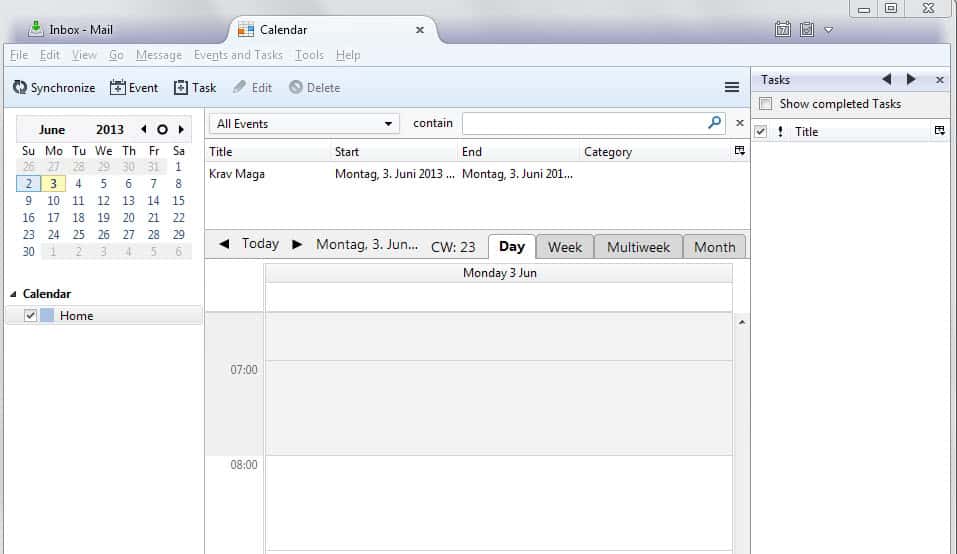
You create a new event with a double-click on the calendar. The extensive configuration menu lets you add the following data to it:
- Title.
- Location.
- Category.
- A specific calendar (e.g. Home, Work).
- Start and end date and time.
- If is repeats.
- Reminders.
- Description.
You get options to invite attendees, attach files and define whether it is a private or public event. Tasks are created in the same way. The only difference is that you can add and change a status.
You can import iCalendar (.ics) and Outlook CSV calendar information into Lightning, and also export events and tasks in the same way.
The program is missing an option to sync the data with Microsoft Outlook. Check out the tips section for information about that.
Lightning adds its own options tab to the Thunderbird preferences. Here you can configure important features including:
- How reminders notify you. Lightning can play a sound or display a notification on the screen.
- Add or remove event categories.
- Change the start of the week, the work days and when they start.
- Select a date text format.
Lightning for Thunderbird is a great extension that adds calendar functionality to the email client. While it is a bit complicated to sync the data with other calendars, it is possible to do so using add-ons.
Tips
- You can sync Lightning with Google Calendar if you install the Provider for Google Calendar extension.
- Exchange 2007 or 2010 users can sync calendar and task data with Lightning if they install this extension.
- You can color code specific event categories in the calendar to improve their visibility.
- Lightning displays the current day by default when you open the calendar. You can change that behavior so that the week, multiple weeks or the whole month is displayed instead.
- You can create another calendar with a click on File > New > Calendar. This can be useful if you want to separate work and spare time calendars, or calendars for two different jobs.



















Lightning does not support Outlook calendar events what you have to do is open outlook, open the event and save it as iCalendar (*.ics) file, then you can import that file into lightning, very painful. if you need outlook calendar events I would say stick with outlook.
hi,
how do you import a outlook calendar into lightning? could not find any instructions?
Hi,
I have seen your above posting and tried installing lightening into my Thunderbird. Its installed well. But the funtionality is not proper. When I click on Add button of Calendar tab, opens a dialog box and then nothing happens. The month view doesn’t work, i.e month view is not displaying anything. I am not able to get any kind of help in this. Help needed please.