
Analyze Computer Systems With Kaspersky's GSI Parser

The report then needs to be uploaded to the GSI Parser website once the report has been generated. The online parser will analyze the report and display various information about the computer system in the web browser.
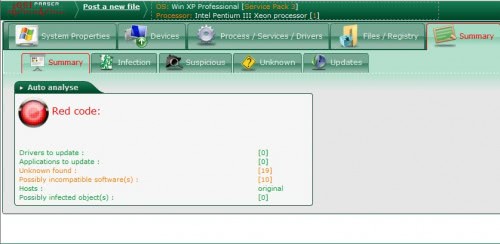
The report is divided into various tabs on top. A summary is displayed on the first page to give the user information about possible problems. The detailed reports in the other tabs usually consist of files and paths plus some additional information like the name of a program or developer. Some details can be clicked on to get more details in a popup window.
Kaspersky's GSI Parser displays many information in the various tabs which might sometimes be hard to interpret for inexperienced users. They are usually a good start to perform additional research on search engines to find out more about a specific file or problem.
Advertisement


















What txt fiile does it upload?
I have tried several times and always get the following error –
” The file could not be recognized. Please check it is a valid GSI file. ”
I have checked the desktop ZIP file and looked for a report.txt but cannot find.
John