
Synchronize Contacts Between Thunderbird And Gmail

If you use both the email client Mozilla Thunderbird and Google Mail (Gmail) you may need a way to keep both address books in sync so that they can be accessed from both software programs. It's unfortunately not that easy to synchronize the address books with the default options at hand.
The Thunderbird add-on gContactSync tries to make it easier by providing an uncomplicated way to synchronize the contact data. You have to enter your gmail login credentials details into Thunderbird after installing the add-on and make some configuration changes, for example the interval of the synchronization.
Some of you may not like the idea of using your credentials for this, but it is unfortunately the only option in this case.
Thunderbird unfortunately saves contact information in a format that is different from Gmail's format whcih means that you need to make adjustments to avoid issues in this regard.
By default, each informational bit about the address, like street and zip code are sorted into different lines in Thunderbird. This means that users have to change those information in Gmail to fit the layout in Thunderbird.
That's a bit problematic especially if a lot contacts with address information have been added to Gmail. The process is explained in this flash tutorial. Once that has been done the Google contacts can be imported into Thunderbird and the Thunderbird contacts can be synced with Google Mail by dropping them in the new address book that gets created in the process.
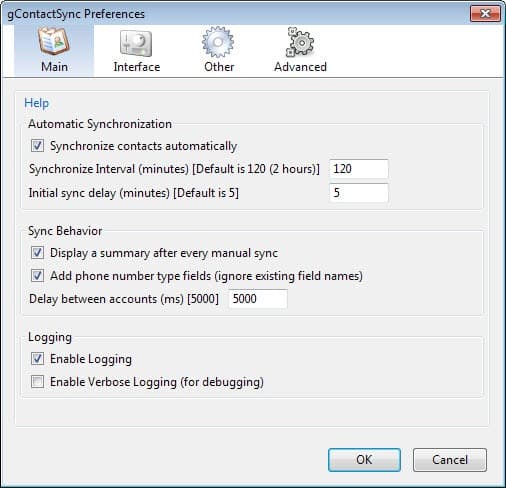
As far as options go that the extension makes available, there are plenty.
- Main handles synchronization related settings mostly, but also logging and the summary display after manual synchronizations which you can disable here.
- Interface determines which extension options are displayed in Thunderbird, and which are not. By default, everything is displayed.
- Other defines the extended properties of the synchronization, for instance custom fields.
- Advanced finally offers backup options, and options to clean old preferences or reset all synced address books.



















Have not seen a comment relative to this flaw on any of the links, but I may have missed it:
Auto syncing between TB 11 and Google does not occur if a contact in Google or the mobile phone does not contain an email address. This forces the user to remember to input a dummy email address for those not containing one. Early in the game Google supplied a dummy email address if one didn’t exist, but this is no longer the case. This is using the TB extension Google Contacts 0.6.40. Does Zindus or any other extension behave differently?
This is Josh again. Based on the feedback from the review here and others based on it, there is a newer release (beta) that does not require any extra work to sync postal addresses and syncs groups with mail lists. If you already reformatted addresses those will work, too. It directly synchronizes with the postal addresses in Gmail.
http://pirules.net/gcontactsync/tutorial/index.html
And Martin, you did get the ball rolling, thanks. ;)
Hello all,
This is the author of gContactSync. The extension is still in the testing stage, so if you have any feedback or find bugs, please let me know joshgeenen gmail com. An improved test release that fixes a few bugs and supports synchronizing mail lists with groups is coming very soon.
Josh
Zindus too. Working great for me once gotten over the initial sync. If your thunderbird is a fresh install, then there won’t be any issue.
I’m also a zindus fan—and yes, the only problem seems to come from duplicates between the two systems. Once you’re past that initial stage? You’re set.
I have been using Zindus for a couple months now, and I am completely satisfied.
The only hassle is during the first sync. Zindus will not sync unless your Thunderbird contacts are unique in terms of email address.
Caschy Zindus looks pretty nice especially because it seems to sync everything automatically without having to manually change the Gmail contacts.
I’ve written about this myself, but this looks like I much better solution than my own. I’ll have to update my post. thanks,
Hi Martin,
Zindus is a good add-on too ;)