
Get System Information with PC Wizard

It sometimes is a good idea to check the PC components that are installed. This is extremely important in my opinion if a third-party assembled the PC for you, or if someone else had it for repair. The core reason here is that it can very well happen that a PC that you buy does not ship with the advertised components.
It is extremely difficult to find out about it, for instance if the cpu is a different model or the video card not the advertised one.
While tech-savvy users may know where to look to display the information, less-savvy users may prefer to use a program that displays all the information to them on start.
PC Wizard is a portable software that displays hardware related information in an easy to use interface. The overview lists the most important components such as CPU, Motherboard, RAM and Hard Drives. Every component has its own menu which displays additional information. The CPU tab for instance displays information about CPU frequency, temperature and cache.
If you want to make sure that the PC components are all legit and not replaced, just check the summary page and compare it to the brochure or receipt that you have received when you bought the computer.
I do use these information to search for firmware or bios updates for some of the devices installed, motherboard and DVD drive for instance. It is sometimes hard to remember those cryptic device numbers that the manufacturers seem to love so much. The fan and temperatures menu is pretty useful as well, I mainly use it to check the temperatures of my computer to make sure it does not overheat.
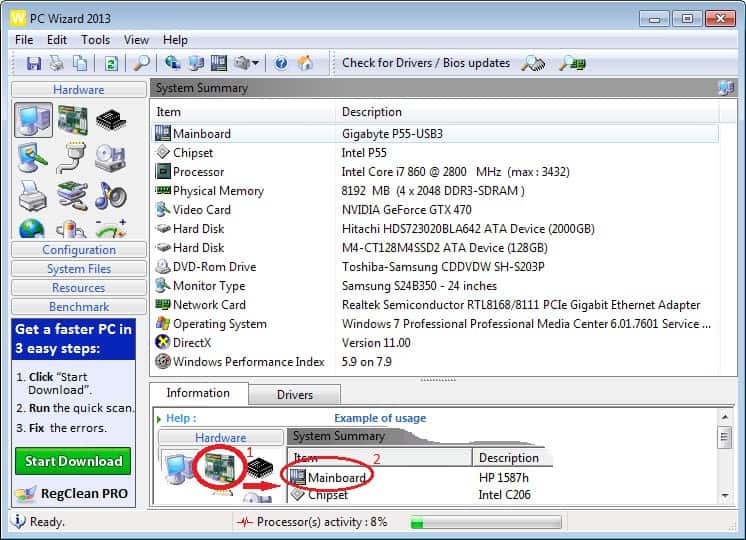
Four more tabs offer information about System Files, Resources and the Configuration of the computer. There are literally dozens of menus in each tab offering information about startup items, DirectX, Processes and Threads, the Boot.ini and Memory Resources.
It does offer an immense amount of information which can be useful for some advanced users. I however mainly use the Hardware tab to get information about installed hardware, but if you are after other information, you will find it listed here as well.
You can check out the developers website which lists all the hardware information that the program supports. Since it is a portable program, it is handy to have around as you can run it from any location to find out all there is to know about a computer system's hardware.














I would recommend SIW, SIW has all the information about probably everything in your cpu.