
Reduce the folder size of Thunderbird to free up disk space

Today when I wanted to install a new program on my version of Windows I noticed that I only had 50 Megabytes of storage left on the partition. This was troubling as I had only Windows installed on the drive and a couple of applications, which certainly should not fill the 10 Gigabyte partition to the brim.
So, I checked for the largest folders and files on the partition and discovered that the Thunderbird email client was using more than 3 Gigabytes of space in the application data folder on that partition.
I only had about 100 mails in the mailbox at that time but the size of the folder itself was listed with 500 Megabytes.
That's a lot of storage for 100 mails. I remembered that Thunderbird did not delete the mails right away even though they had been deleted from the trash or spam folder.
What happens when you delete emails is that they only get flagged but kept in the mailbox until it is compressed.
This was the cause for the discrepancy between the meager amount of mails and their size, and the big huge mail folders on my c: partition.
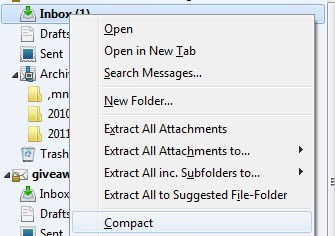
The solution nevertheless is pretty easy. All that needs to be done is to compact the folders which removes all deleted mails immediately. I was able to reduce the folder size of my Thunderbird folder from a size of more than three Gigabytes to 300,000 Kilobytes freeing up valuable disk space on my main partition.
Just right-click a folder and select compact this folder to remove all deleted emails and keep only emails that are visible in Thunderbird. You could check the Disk Space option to automatically compact folders if that saves a defined amount of kilobytes (You find the option under the advanced tab under Network & Disk Space in the Thunderbird options).
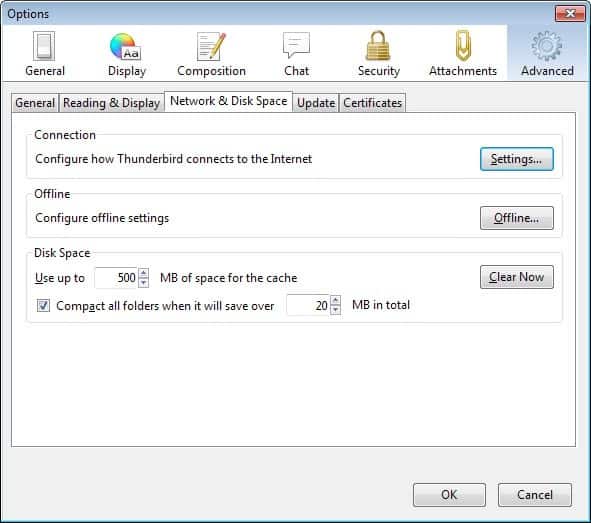
Here you can define the threshold in Megabytes that Thunderbird will use to determine whether to compact mail folders or not. Make sure the "compact all folders when it will save over" is checked.
If disk space is low on your computer, reduce the 20 Megabyte value further, for instance to 5 Megabyte. This effectively means that Thunderbird will compact a folder whenever 5 or more Megabyte of data can be freed up by doing so.
Prime candidates for the compact command are the inbox, trash and sent folders of each mailbox that you are using in the email client.
Advertisement


















Note: As of Thunderbird version 5, compact happens automatically.
Try this freeware http://www.mindgems.com/products/Folder-Size/Folder-Size.html
it is really good and contains no adware or spam!
wow, this is great, thanks!!
Thanks a Lot it is working fine now.
thanks Martin! I was astonished afret deleting half of my emails and seeing that folder size didn’t reduce!
I have been using Thunderbird with an extension called Xpunge –
deletes the trash folder and compacts ALL folders.
Dynamite extension !!!
Miles
I wasn’t realize that deleted email still exist on my disk, now I have more space on my disk. Thanks for info.