
Copy and run Floppy Boot Disks from USB

Ghacks got slashdotted yesterday and I had to enable caching to make the site run fast as usual. I'm sorry if you experienced troubles connecting to my website, those should be solved by now.
When I was installing Windows XP on my new computer that had only SATA drives I had to use a floppy disk to load the SATA drivers because Windows did not have them onboard at that time.
I had to buy a floppy drive, floppy disks and create a bootdisk and load the drivers from that disk during setup.
You can use freeware programs to optimize the process. Most computer systems come without floppy drives these days, and while you may not need to load drivers manually anymore during Windows setup, there may be situations where this is still a requirement.
Copy and run Floppy Boot Disks from USB
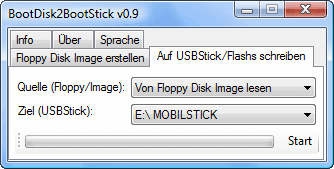
I'm now going to review two freeware programs that emulate floppy drives and let you copy and run the bootdisk from USB.
The first freeware is called Bootdisk to Bootstick, which lets you copy the contents of a floppy disk or virtual floppy image to an USB stick. The USB stick remains bootable just like the floppy disk is.
This is great if you do not have a floppy drive anymore but need to boot from floppy because your manufacturer is offering the tool / driver only as a bootable floppy disk. This is often the case for drivers for older PC hardware.
Update: The site is no longer available. We have uploaded the latest release (from 2011) to our own download server. Note that we have done so for archiving purposes only, and that we don't support the program in any form. You can download it with a click on the following link: (Download Removed)
Virtual Floppy drive is used to emulate a floppy drive making it possible to create bootable floppy disks without having a floppy drive connected to your computer. I still remember the old days when a program would only create a bootdisk if a floppy drive was present. If you did not have a floppy drive or disk inside it would not create the much needed bootdisk. This belongs to the past now and Virtual Floppy may have lost much of its use due to that.




















great info, trying it now. hope it works, I’m at wits end!!! lol
cool tip! many thanks!!!