
MetroIE: Run Internet Explorer 10 Metro Under Windows 7

It was only a matter of time until software developers found ways to bring features of new or upcoming Microsoft Windows operating systems to previous versions of Windows.
One of the first features that got ported to Windows 7 is the new Metro version of Internet Explorer 10 that Microsoft will ship with the upcoming Windows 8 operating system.
If you have followed the coverage of Windows 8 on this site you know that the operating system will ship with two different versions of Internet Explorer. Both use the same core but are different in many regards otherwise.
Users can access the standard Internet Explorer 10 browser on the desktop, or the Metro Internet Explorer when they are in the Metro interface of the system. The core difference? Metro Internet Explorer has been optimized for touch based devices like tablets. The browser is started in fullscreen automatically and uses a minimalist interface with barely any user interface elements. It is also more secure because it does not support plugins and other unsafe elements but lacks functionality because of that.
MetroIE
Update: The website where the program has been made available is no longer available on Deviant Art. It appears that the project has been canceled; downloads are no longer available and there is no alternative. End
MetroIE, available in an early beta version, ports that version of Internet Explorer to the Windows 7 operating system. It seems that users need to have the latest version of Internet Explorer 10 which is currently available as a developer preview. IE 10 final will ship with the Windows 8 operating system.
The web browser is only available for Windows 7 and Windows 8, which explains why MetroIE is also only compatible with Windows 7 and not Vista or XP.
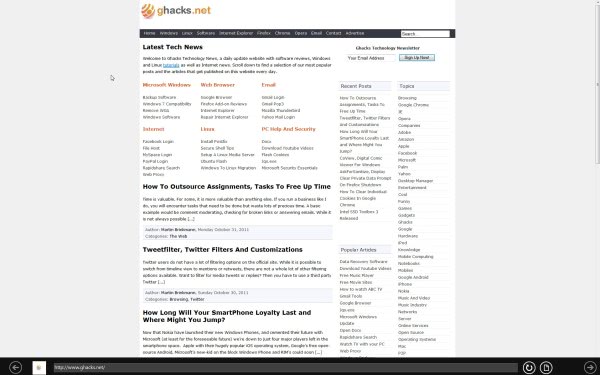
MetroIE is a small portable file that Windows 7 users can run to get the metro style Internet Explorer 10 browser on their system. The browser starts in fullscreen and looks in many regards like the original available in Microsoft's Windows 8 Developer Preview. Here is a fullscreen screenshot of the browser in action.
Users basically have access to the address bar and a few basic browser controls after the browser is started. It does away with the taskbar and other elements of the Windows desktop. Users who want to exit the fullscreen mode need to right-click the address bar and select exit from the context menu. Pressing the Windows button switches to the desktop where everything is available again.
It happened once that the address bar disappeared and that I had to kill the process using the Windows Task Manager. From a user's perspective, it is safe to say that most Windows 7 users won't like the slim web browser as it is time consuming to switch back to the standard desktop. It may have its uses on kiosk PCs or public PCs where users need to be limited though.
Windows 7 users can download the latest beta of MetroIE from the developer's Deviant Art website. The application is part of the developer's bigger Origami project which tries to port the Windows 8 start screen in metro style to the Windows 7 desktop.














Why would anybody want to run IE10, aka Internet Exploder, currently under development, on Win7?
IE8 AND 9 are bad enough and they’re both Final versions!
Has anybody figured out why NO other Browser uses ActiveX, while Microsoft doesn’t have enough smarts to ditch it?
I’ll stick with Firefox, thank you very much! :)
My top pick 1)IE 2)Firefox 3)Chrome 4)Opera and I use all of them everyday. Really cool browsers.
Screenshot is too small :(
You are right, it is indeed small. Sorry for that.
There’s a Firefox Add on called Imagine Zoom that will permit you to right click on Any image and resize it to your liking!
Actually, it’s called Image Zoom and not what I posted.
Should have checked before hitting “Submit Comment”!!
Great tip and great Firefox add-on.