
DNS Jumper Updated, Switch Domain Name Servers Effortlessly

Back in 2009 I reviewed one of the first public versions of DNS Jumper, a portable program for Windows that allowed you to change the system's DNS with the click of the mouse button. The application back then was released during the "dns craze" where Google and other big players like Symantec entered the market to become providers. The program had its flaws, especially the inability to add your own DNS providers to the list and the lack of information about each server needed fixing to make the program more versatile and comfortable to use.
The developer recently has released DNS Jumper version 1.0.4. The new version shows many improvements justifying a new review here on Ghacks.
When you start the program now you will notice that it looks completely different from the version reviewed in 2009. You can select one or all network cards of the computer system in the pulldown menu at the top. A refresh button is available to scan for new network cards.
The Choose a free DNS Service menu lists dozens of DNS providers. If you select a provider from the list you will see the IP addresses of the servers in the program interface. Even better, you can click on the check response time button to benchmark all domain name servers listed in the application.
You can add DNS services manually to the list of providers with a click on the + icon in the interface. All you need to do then is to enter a DNS Server Name and the two server IP addresses.
Another interesting feature is the ability to benchmark all servers for speed. A click on the Fastest DNS button runs the benchmark (again) with the option to switch to the fastest server in the end.
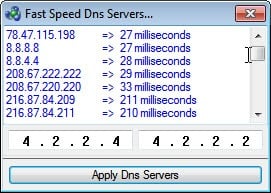
A click on Apply DNS sets the currently selected DNS Service as the DNS provider for the selected network adapter. The program can backup the settings to restore them at a later time and flush the DNS.
The developer has improved the program noticeably by correcting the issues of the old version. Windows users can download the portable freeware DNS Jumper from the developer website. The program is compatible with 32-bit and 64-bit editions of the Windows operating system.
Advertisement

















It is very strange EddyGeek , Dns jumper is more than 500.000 times downloaded and First time I hear that problem, please try it on another Windows 7 machine
Hi Martin,
I also run Win 7 64-bit and could not get this app to test my current DNS provider. Another app I use, “DNS Benchmark” by Steve Gibson is able to. If you have not, I suggest you try this app. It provides a few other important bits of info beyond speed.
great tool, but I’ve been wondering how this kind of app work, just click apply, nothing change.
Maybe you need to start it with elevated rights?
i am admin and already disable uac.. try run as administrator and everything doest seem to work.. that what make me wonder.
That is strange. It worked on my Windows 7 64-bit system.
Thanks for this, Martin. I have what is a basic question but one which needs clarifying for me.
I am one of three devices using a Thomson router to connect. When a program such as DNS Jumper assigns me a new DNS, I have always assumed that the router will continue to use its own default DNS … would this be correct?
Does my connection therefore gain limited benefit from the switch until I configure the router to also switch to the relevant server?
Any clarification from yourself (or any helpful soul) would be greatly appreciated! Many thanks, Mike
Mike, the network card DNS overrides what is configured in the router. If you do not have a DNS set for the network card the one assigned by the router will be used.
This is good news… thanks for the quick and helpful response, Martin – much appreciated.