
MozBackup Updated, Backup Firefox

Firefox 4 users have two backup options at hand when it comes to creating backups of the web browser (or more precisely their user profile); They can make use of the built-in Firefox Sync to backup passwords, bookmarks, the history and open tabs, or a local backup solution. The latter has the advantage that additional data can be backed up
that is not supported by Firefox Sync. It is for instance not possible to backup extensions and their settings with the current version of Sync.
One of the most popular Firefox backup solutions, MozBackup, has been updated recently in preparation for the Firefox 4 final launch. Previous versions of the backup software are already compatible with Firefox 4, but the developer has improved support in the new version. Mozbackup 1.5 has been released as a beta preview with the promise that the new final version will be released before the Firefox 4 release.
Several issues have been fixed in the beta release, among them backup improvements for profiles with a size of more than 4 Gigabytes. It is unlikely that many Firefox profiles cross the 4 Gigabytes mark, which indicates that this particular change largely benefits users of the email client Thunderbird, considering that all mailboxes and attachments are saved in the profile directory.
How to Backup Firefox with Mozbackup
It takes just a few steps to backup all Firefox data with Mozbackup. I suggest you download the portable version of the backup software from the developer homepage, as it is flexible and can be put on an USB stick.
Mozbackup scans the computer for supported products and displays all that have been found in a list. Portable versions of Firefox and other supported programs, or installations that have not been recognized automatically can be backed up by selecting Portable applications from the menu. It is then necessary to use the folder browser to add profiles from the hard drive to the backup application manually.
The available profiles are displayed in the next step if a recognized installation has been selected.
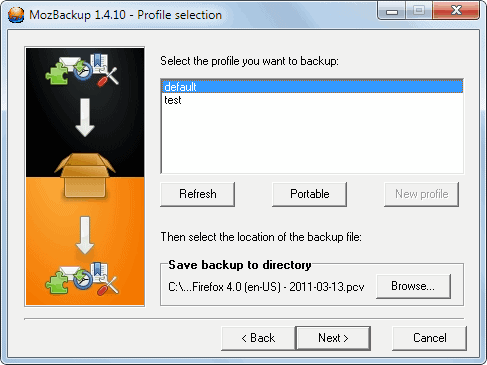
A click on next opens a prompt with options to password-protect the backup file. It is usually a good idea to add password protection to protect the data from unauthorized access. It would otherwise be possible to access all profile data directly, including saved passwords, bookmarks, the browsing history, extensions and list of downloaded files.
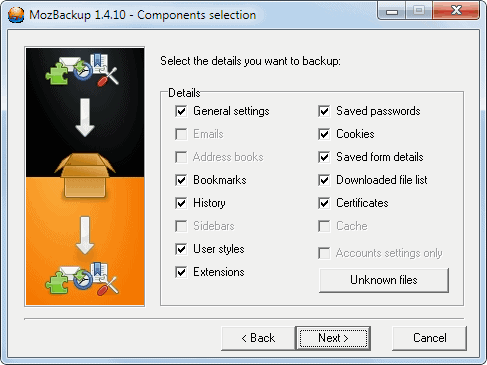
Mozbackup then displays a list of available modules that can be backed up. Everything is selected by default with the possibility to uncheck modules that do not need to included in the backup.
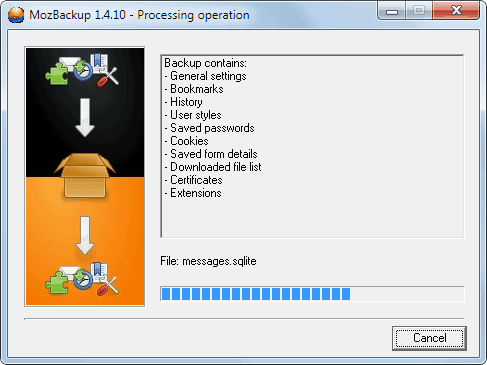
The backup is stored in a single file. You need Mozbackup to restore it at a later point in time.
Firefox users can download portable versions and installers for the latest stable and beta version of Mozbackup directly from the developer website. Mozbackup is only compatible with the Microsoft Windows operating system.
Advertisement

















it’s not being developed anymore.
i ca’t backup my cache
Sorry but FEBE is not available for firefox4 and mozbackup is windoze only afaik.
xmarks sync has that nasty and annoying feature of making a backup and restoring that “unsorted bookmarks” of firefox. it even restores multiple copies of it!! hence i dumped xmarks.
i hope this tool will not do the same.
IMO better than FEBE, ’bout time it got updated. I’ve used both and this one works better.
Simple 3 steps backup..
Go to the Firefox profile folder.
make a zip file of your full Firefox profile.
save it at your dropbox folder. (on-line backup)
Ron
Hey, that reminds me: I installed FEBE some time ago and never used it. Time to cut it loose. Mozbackup, on the other hand, gets used with every format.
Thanks for the heads up on this.
This is the BEST of the BEST. It always restores the saved backups without fail and to the same state as saved.
Martin, I really appreciate your blog! I can always trust what you write about.
I’ve used this for as long as I can remember. It’s a fantastic tool.
I use FEBE but i ll give this a try.