
Free Face Recognition Software Blink! Improves The Windows Login Process

Most Windows users need to log into the system before they can access their system account. Some single computer users configure Windows to log in automatically, which is comfortable but not very secure. The free face recognition software Blink! offers a way to log in that is both secure but also comfortable.
The main requirement is a webcam, as it is used by the software to recognize the user's face. Faces need to be registered and associated with Windows profiles. This step is best undertaken right after installation of Blink. It is a one time process to setup the face recognition system properly.
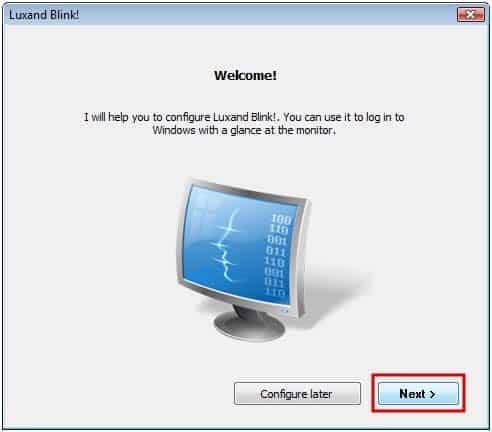
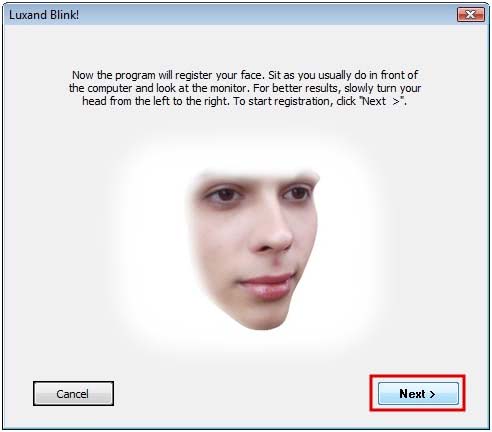
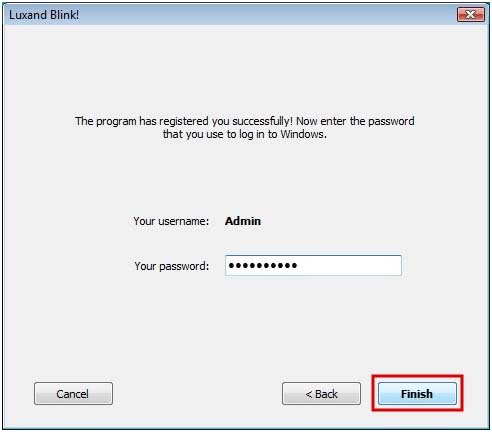
Two basic steps need to be completed for every user account. The user needs to look into the webcam during the configuration, so that Blink can add the face to the database. Once the face has been recognized the Windows username and password need to be supplied. Those are then automatically used by Blink! to log in the user if the facial recognition was successful.
From that moment on, registered users can log into Windows by looking into their webcam. This works on fresh starts, on locked computers, after hibernation, standby and every other possible computer state.
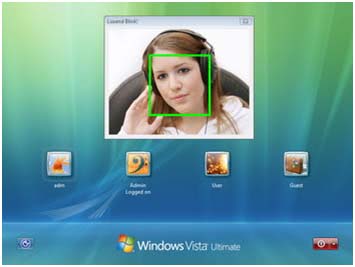
It is however still possible to log in normally by entering the password of the account with the computer keyboard. That's a fallback if the webcam happens to be not available at that time, or the face recognition software fails to recognize the face of the user.
Blink! can be disabled at anytime, which takes effect on the next login attempt. The software is freely available for personal use. Downloads for 32-bit and 64-bit editions of Windows Vista and Windows 7 are provided on the developer website.
Advertisement


















There doesn’t seem to be a free for personal use download on the website.
Works well, only problem is, if someone has a photo of you, be it on their phone or a physical photograph, the software is bypassed with the image.
download link?
I think is not free any more, because I can not finde any link on the website of developer, it is a shame
theres no free on the developper site….
Any suggestions for a program like this for Windows XP?
All this does is deceive us into willingly endorse the continued erosion of our civil liberties even further. If we start accepting such programs, how much longer will it be before they start persuading us to accept the chip underneath our skin?
And what is wrong with a chip underneath the skin? All of the things you carry in your pockets will, one day, be within you at all times. Read Feed by M.T. Anderson.