
ShapeShifter, Lightweight Windows Clipboard Replacement

The clipboard acts as a temporary storage location for data that is copied to it by a computer user. The standard Windows Clipboard can only store one entry, which gets overwritten every time new data is copied. That makes some operations, where multiple sets of data need to be copied more complex than necessary.
ShapeShifter is a lightweight Windows Clipboard replacement that comes with a few extras that not all alternative clipboard managers offer.
The software works with the standard clipboard commands. Ctrl-C will copy data into the clipboard, and CTRL-V will paste it again. This works with text, media, files and any other kind of data. Even program specific data formats are supported by ShapeShifter.
The clipboard manager stores all data sets in the program database. To paste a specific set, the user would press CTRL-V for some time, which opens the selection menu. Here it is possible to select one of the clipboard entries with the cursor keys on the keyboard or the mouse wheel.
Letting go of the keys pastes the selected data set into the active window or program. ShapeShifter displays additional information about each Clipboard entry in the selection menu. Each entry is represented by an icon and additional information including the program it was copied from, to improve the identification of each data set in the menu.
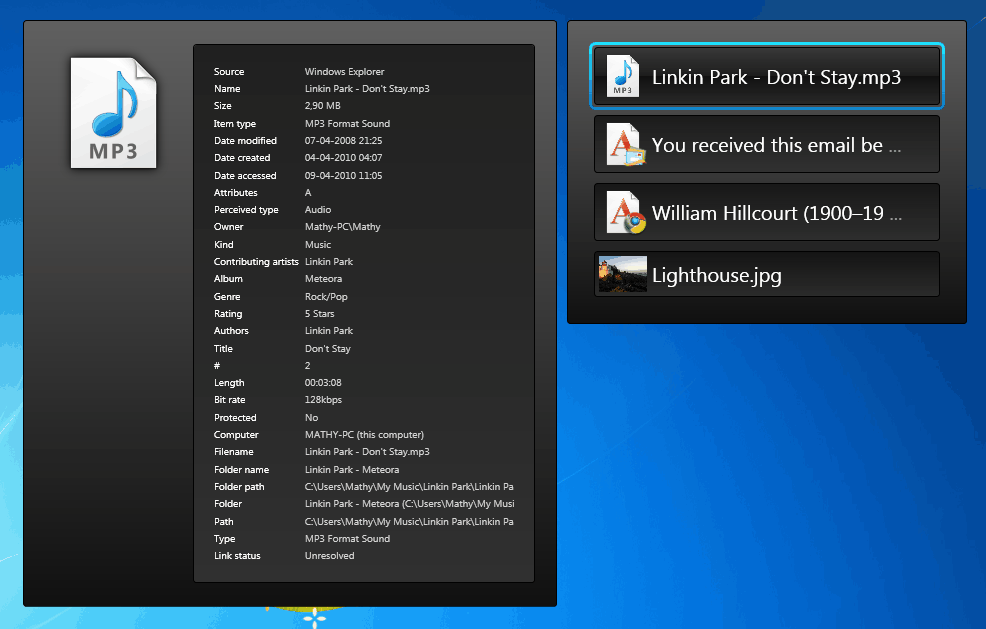
ShapeShifter's memory usage is relatively low when minimized in the System Tray, and peaks only shortly whenever the selection menu is launched.
Windows users who are looking for a solid Clipboard replacement for their operating system should give it a try. The program is offered as a 32-bit and 64-bit edition at the developer website.
Update: The Shapeshifter website is no longer available and it seems as if program development has been discontinued. Interested users can download the latest version of the clipboard manager from Softpedia.
Update 2: Shapeshifter has been resurrected, you can find the updated review of the Windows Clipboard manager here.
Advertisement

















Good day. I just installed Shapeshifter and am finding it very useful and quite intuitive.
As a friendly suggestion, it may be just a bit more intuitive to have a mouse scroll event while hovered over the pop-up UI (on a held Ctl-V) also change the selected clipped snippets to paste on release (in addition to the up/down arrows). I’ll just implement it via an ahk script in the interim.
Thank you for a very nice product!
-t
Since the Developers site is down, the Usage Guide link in the Right Click menu of the application doesnt work.
Doesn’t anyone have or know where to find a usage guide for this Program?
It doesn’t seem to be working for me
When I press/hold CTRL+V it just paste the last text copied, over and over… no menu pops up with the option to select text previously copied text.
You need to have pasted more than 1 item in order to switch between them. Or else your clipboard will just function normally.
Check out Shapeshifter 4 at the same link. We just launched it, and it is completely rewritten from scratch.
Ande, thanks for your error report. It is multi-monitor friendly, but we only tested it where our secondary monitor is to the left of the primary monitor.
Maybe the issue is only occuring if the secondary screen is to the right of the primary screen?
Could you contact me at admin(at)flamefusion.net please? I’d be very much interested in solving the issue, and to invite you to our public testing group.
Installed ok on windows 7 ultimate 64.
When I hold down ctl-v, The display of the first item is almost off the right end of my main screen, and the additional entries only show the left outline on the right side of the screen. One additional monitor is to the left of my main monitor.
Is this multi-monitor friendly? My main screen resolution is high, is this a problem?
thanks,
Martin, such function already exists. When you hold down CTRL + V, hit Delete to delete a single item. Hold down Delete for 500 milliseconds (half a second) to clear the whole list.
I’m not exactly sure what you mean by the CTRL-V[1-0] hotkey thing. Would you like that to copy suggestions 1 to 10 at the same time?
Eram, Shapeshifter is entirely portable. It consists of only a single executable file! If you have .NET Framework installed on the computer you want to run the program on, you can just give people the file here: “C:Program FilesFlamefusionShapeshifterShapeshifter.exe”. Due to our development policy, every Flamefusion program consists of a single executable, with no external DLL (Dynamic link library) files.
Martin, I like especially your feedback (even though the delete item was already implemented – you couldn’t know that). Is there any way I could get you to join the Flamefusion private testing group?
If you are interested in that, send an email to admin(at)flamefusion.net, and reply there. I’d be honored to let you in – we need more people like you.
It is asking for .NET 4, so yeah, a single request: make it portable. Windows has always suffered with installations. I’ve been running a pretty slick Win7 x64 system because of portable software. Of course I’ll install the needed ones, but stuff like this, I would rather use something standalone. There are good portable alternatives, such as ClipX or Ditto. Shapeshifter is just above those in the interface plane….
Ive recently installed it because of this blog. And its actually GREAT! it is better then the normal clipboard of windows. Ive also noticed that everyone needs it. Im using it more then i tought i would!
this is VERY recommended for everyone
Hi there!
Thanks for making a review of our program, Shapeshifter. We appreciate it! Anyone can leave comments on this blogpost for any improvements they may want in the upcoming versions. We’ll try to implement as many of them as we can.
Mathias, thanks for stopping by. The program needs an option to clear items from the clipboard manager (best would be selectively and clear all). Keyboard shortcuts to paste contents directly would be nice as well, e.g. Ctrl-V-[1-0], to paste the first to tenth entry in the clipboard directly.
Hey Martin!
I just wanted to let you know that those requests are being implemented, and that we re-launched Shapeshifter to version 4 after a long period of time.
There were things about version 3 that didn’t work out so well, so we rewrote the whole system.
Here’s a new screenshot. Please make a new review, or update the screenshot in the existing one. http://flamefusion.net/Content/software/shapeshifter/screenshots/1.jpg
Oh, and note the new settings!
Here’s the download page (same as before): http://flamefusion.net/Software/Shapeshifter
Works currently only on windows vista and windows 7.