
Microsoft .Net Framework Setup Verification Utility

The Microsoft .net Framework is a software framework that ships partly with Windows and can be installed otherwise on newer versions of Windows at the very least.
All modern Microsoft operating systems come preinstalled with a version of the .net Framework. This is for instance the case for Windows 7 which comes with Microsoft .net Framework 3.5, or Windows Vista which ships with the .net Framework 3.0.
Some programs that are developed for the Windows operating system make use of the framework, but they function only correctly if the required .NET Framework version is installed on the device.
If it is not, the program may refuse to run or install, or you may get an installation prompt for the required version of .NET.
Verifying that the .net Framework has been installed correctly is an important task especially in business environments, but also for users who experience error messages or other problems when they run programs that depend on the framwork.
Microsoft .Net Framework Setup Verification Utility
The Microsoft .Net Framework Setup Verification Utility can verify all installed .net Framework versions. It will only display those frameworks that it detects during its initial scan of the installed versions even if other versions may be installed (but are corrupt for instance and thus not reflected in the listing).
This limitation to only displaying installed versions can be overridden with a command line parameter.
netfx_setupverifier.exe /q:a /c:"setupverifier.exe /a"
The program can also be run in silent mode which will process the command without showing the graphical user interface.
netfx_setupverifier.exe /q:a /c:"setupverifier.exe /p "
The program will start the verification process of the selected .net Framework after selecting one of the available options in the pulldown menu and a click on the Verify Now button.
The result will be echoed in the graphical user interface. More interesting for most users is the log file that is created by the program. This log file contains detailed information about the verification steps.
It will for instance display all the files that are installed with the selected net Framework and their status.
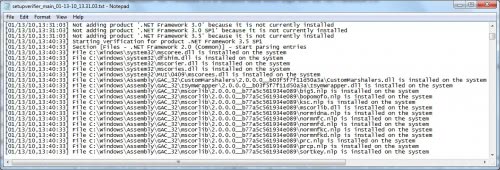
This log file can be used to analyze problems which usually come down to missing files or Registry entries.
The Microsoft .Net Framework Setup Verification Utility can be downloaded from the developer's website over at MSDN. The website contains additional information and command line parameters.
Update: The program has just been updated. Check out the new Microsoft Net Framework Verification Tool here.




















