Create Photo Maps With 93 Photo Street

Many people who like to travel are taking photos of the locations they visit. The photos are then usually added to photo albums along with stuff that was bought or taken on the trip (maps, bills, tickets). The software 93 Photo Street offers another possibility as it can be used to create photo maps on the computer. Photo maps are combinations of maps and photos that have been taken on locations of the map.
The photo maps that are created with the software program can then be published on the web or stored locally. 93 Photo Street is a Java application that is available for Windows and Macintosh operating systems. Users need to import both maps and photos into the software to create the photo maps. Included in the photo software are US road maps which makes it easier for users from the United States (or those that visited the country) to create photo maps.
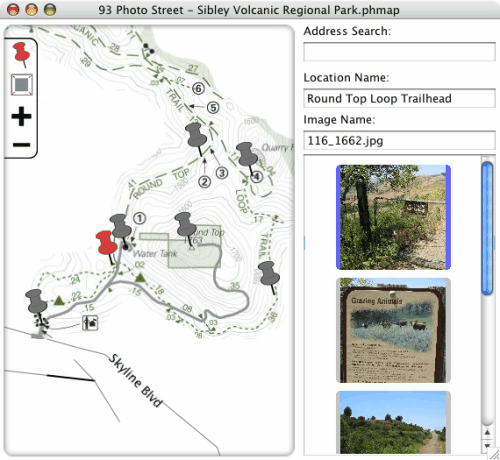
The photo map creation process is pretty straightforward. It begins with the import of a map and photos. The map is instantly displayed in the application. Pins can be dragged onto the map which represent locations of importance to the user. Photos can then be added to these locations on the map along with a short description (name) for the location.
93 Photo Street supports posting the finished photo map to Typepad or Moveable Type web blogs or to create a generic file using web templates. The generic file can then be launched with any web browser making it ideal for local storage or as static content on Internet domains.
Advertisement