
Select All Emails From Sender In Thunderbird

Most users of the email client Thundebird - and most likely users of other email clients as well - sort their emails by date.
There are other means of sorting emails though like sorting them by subject, sender, priority or attachment.
If you sort your emails by date you might have noticed that this is not the best way of cleaning your email inbox. Most users like to select all emails from a specific sender and move them to another folder for archiving purposes.
If you want to do that in the Thunderbird email client you may need to change the way emails are sorted and displayed to be effective. It is usually enough to click on a column header, from for example, to change the sorting parameter of all emails in the select folder. While that is quite easy to do, there are other ways to achieve the same goal that may even be easier.
The Gather The Sender add-on for Thunderbird makes this process more comfortable for instance.
Gather The Sender adds a new entry to the right-click context menu in Thunderbird. The new entry can be used to select all email messages in the same email folder from the same sender.
It therefore takes two clicks (one right-click on an email and one left-click on the "Select the mails from the same sender" entry) to select all emails from that sender.
This is an excellent way of archiving emails and cleaning the inbox of the email client. Gather The Sender is an add-on for the Mozilla Thunderbird email client. It is compatible with all Thunderbird 2.x and later versions.
Update: Please note that the add-on is listed as compatible with Thunderbird 12 or earlier. It loads fine in recent versions of Thunderbird on the other hand. I have tested it using Thunderbird 31 and it loaded and worked fine in the program.
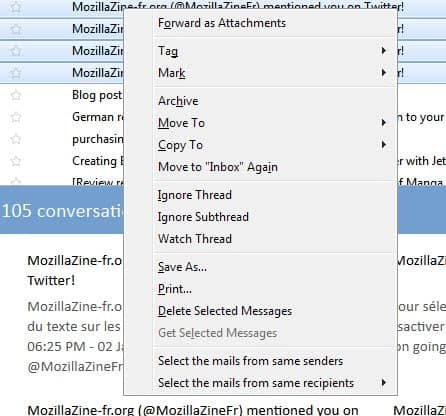
There is also a new feature included now that you may find useful. Instead of selecting mails from the same sender, you can now also select mails sent to the same recipient using the to, cc or bcc field.





















While I appreciate the work that has gone into “Select All Emails From Sender,” I’d like something simpler: a “Select All” button. Currently I have to click on “Edit,” Then “Select,” then “All.” I want a simple ToolBar “Select All” button that I can one-click to selct every message in a particular folder. Anybody know of such?
GaryK
Certainly an useful add-in for Thunderbird. I am very much in need of it as my in-box is crowded with numerous unnecessary emails from a few , particular senders.