
Sharing is easy with Gmail!

Since the introduction of the Gmail Labs settings to all users sharing in emails has been much easier, and I think somewhat overlooked.
There are a few things you can do to tweak your inbox to make your life a bit easier, to enable you to share videos, images and more with your friends and co-workers.
Just head on down to your Gmail account, click on cogwheel > settings, go to the labs tab and you'll find a load of options, here are just a few you can use which are great.
Note: Google may add or remove lab experiments at any time from Gmail. Some may be integrated natively in the application, others removed without word of warning.
YouTube Preview
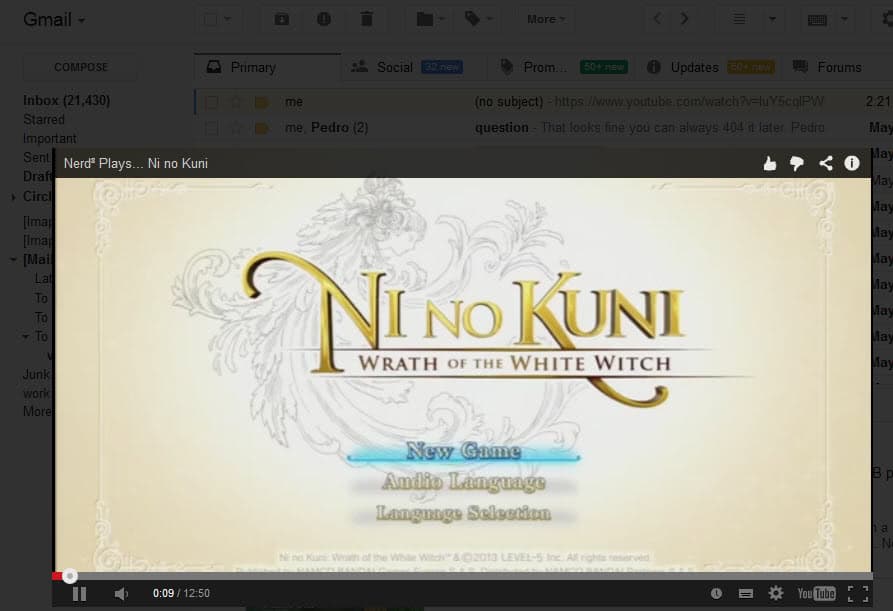
This really cool feature puts YouTube videos right inside your email. If you receive any link pointing to a YouTube video the actual video's thumbnail will be shown in the email (words for multiple links), and clicking the thumbnail will enlarge the player so you can view the video right there. I am always looking for ways to streamline my work (and my fun), and this is a real time saver. (Update: Google has integrated the feature directly which means that it is active by default for all Gmail users).
Image Previews
The same system above is implemented for Picasa, and Flickr images, again, making image sharing much less painful. If you receive a wad of links you don't need to click through each one (especially since many filenames are like dsc11902.jpg), this way you get a small preview right away.
Show everyone where you are
Update: This feature is no longer available.
If you have a signature enabled, you can add your map location to the bottom of all your emails. Very handy if you have your own company, or if you want everyone to get to your party on time.
There are a number of other labs features you can try out, let us know which one you use, and which one you like most, I think in terms of usefulness the YouTube one wins my award.





















Good stuff to know..