
Analyse your hard disk and stop wasting space

Your hard disk space may seem increasingly small but you may not be aware what is taking the space. I, for example, subscribed to dozens of podcasts but naively overlooked them when trying to clear space. In fact, they took up 5GB of space!
Whilst disk space is no longer seen as a problem, considering 1GB only costs about $0.20! However, I find it an issue on my MacBook where I only have 120GB of space and it can't easily be expanded.
Finding hogs could be quite a task. Naturally, trawling through every directory is impractical, so automated tools must be used to find large directories and files. Software exists on most major operating systems to graphically show which folders are large and how large they are.
 In 2005, gHacks reported about WinDirStat. This is freeware that shows how big directories are. WinDirStat displays everything in the C:\ (etc) drive, colour coded for the first level directory (e.g. Program Files or Windows), and on tiers below that it is divided as blocks. This is a easy to use visualisation. WinDirStat runs on all Windows operating systems from 95 (w/IE5) to Vista!
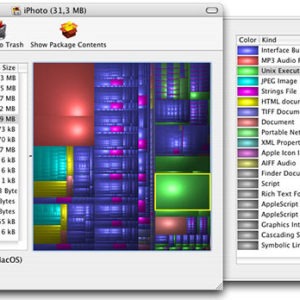
An OS X alternative to WinDirStat is Disk Inventory X. It is essentially identical to WinDirStat using a slightly different layout to display the sizer distribution of the selected hard drive. GrandPerspective is another program with essentially identical option, also available for Mac OS X
Another option is JDiskReport is a Java-based piece of software which analyses disk usage using pie charts. Presumably this will work on Windows, OS X and Linux.
It analyses the space usage of files and directories on the system, displaying folders on the left that you can click through to check the types of files and other information easily using the program. Keep in mind though that you need Java to run the program on your system.




















See also the new QDirStat:
https://github.com/shundhammer/qdirstat
Link to SpaceMonger:
http://www.sixty-five.cc/sm/v1x.php
Other interesting free software is sequoia, you can find in:
http://w3.win.tue.nl/nl/onderzoek/onderzoek_informatica/visualization/sequoiaview/
spacemonger (ver 1.4) for the win