
Thunderbird Email Address Crawler

Update: Please note that Email Address Crawler is not compatible with the most recent version of the Thunderbird email client. The extension was last updated in 2010 and that is the main reason for the incompatibility.
You can force compatibility even in the latest version of Thunderbird by installing the Disable Add-on Compatibility Checks extension in the email client first. Update end
The email client Mozilla Thunderbird comes with the option to import address books from various other email clients like Microsoft Outlook, Eudora or text files.
There is however no automatic way to import contact information from a set of emails. Why might that be useful? Imagine having to communicate with a group of users. You could import their contact information into a new address book from emails that you have previously received.
The Email Address Crawler add-on for Thunderbird does that. You can point it at any mail folder in Thunderbird and import the contact information into any address book automatically. Just right-click on any folder and select the crawl folder for email addresses option to do just that.
The add-on comes with a few filters to make the automatic import more reliable. It is possible to specify if mails should be imported from the To, From or CC fields and if there should be a minimum amount of emails from a person before they are imported.
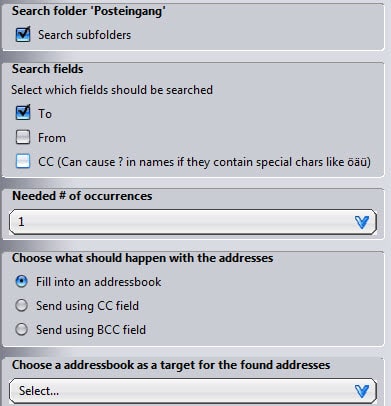
The add-on will automatically select the most complete email if different versions are available meaning that it will prefer Full Name email@address.org over email@address.org
The add-on provides an excellent way of creating new mailing lists by importing contact information automatically into address books from folders in Thunderbird.
It works best if you are using different folders for different topics, for instance by using mail filters to move mails automatically in select folders on arrival.
Advertisement


















OH MY GOD COULD NOT FIND THIS ANYWHERE YOU JUST SAVED ME AN HOUR OR TWO OF ADDING 100s of contacts one by one
Thank you, really.
– Eric