
Macrium Reflect Disk Imaging Free Edition

Something that is introduced as "The fastest disk imaging software" is definitely worth a review here at Ghacks especially if a free version of the software is provided to anyone.
I honestly did not know about Macrium Reflect before when I spotted the entry on it on the Delicious hotlist. A quick research showed that it was most likely due to the articles published at Lifehacker and Download Squad that once again (unintentionally of course) pushed an application on Delicious after publication.
Macrium Reflect
Macrium Reflect is a disk imaging software for Windows XP, Windows Server and Windows Vista that's available in 32-bit and 64-bit versions.
Update: more recent versions of the backup software are also compatible with never versions of Windows. You can check out our review of versions 5, 6 and 7 of Macrium Reflect for a rundown on what is new and changed.
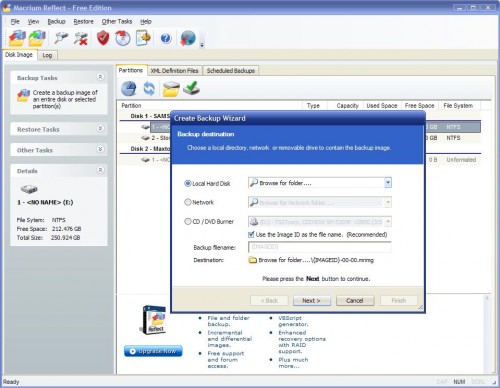
The program can backup partitions or entire hard disks even when Windows is running, which is definitely a nice to have feature. The backups can be stored on another hard drive, network drive or optical drive which is probably not the best choice if the size of the data is bigger than ten or so Gigabytes.
The backup can be compressed to save space which will in turn increase the time it takes to create the backup. You have the choice between no, medium or high compression with medium being the default value. Two additional options are noteworthy: the option to choose between an intelligent sector copy which will not copy the Windows Pagefile and Hibernation file, or an exact copy of the selected hard disk or partition.
The second option that you have allows you to set a maximum file size which can be set to automatic or user defined. The automatic file size will use the file system of the partition to determine the size.
The full edition of Macrium Reflect has a few features that the free does not have, especially incremental backups are worth to be mentioned.
It's also worth to note that the computer has to be restarted before the first backup can be started. I tried it without restarting and received an error message but it worked fine after the first restart. A backup of my Windows partition with 38 Gigabyte of data did not take longer than 18 minutes to create which is definitely fast; not sure if it's the fastest software though. The size of the backup on the hard disk was 29.4 Gigabytes afterwards.
Another important step is the creation of a rescue disk to be able to recover the backups when it's necessary to do that. The last feature that deserves to be mentioned is the option to browse backup images in Windows Explorer as if they were normal partitions. Great if you want to pick a file or folder from the image.
Closing Words
Macrium Reflect is a powerful drive and partition backup program for Microsoft Windows. The free version of the backup software comes with lots of features and options, some of which are usually only found in commercial applications.
Now Read: Our overview of the best backup software for Windows



















I have used both Macrium Reflect and DIXML and in my experience DIXML takes *way* longer to backup. For the above scenario of 39 gigs, it would take several hours, at least on my system, while MR uses about same as poster, ie 20 minutes. It’s even faster than Acronis, which uses about 1 hour for same size data.
Although it does say it needs the Internet to verify the license code, the Free Edition does install and work on standalone systems. The recovery-cd doesn’t need Internet access either. You should be safe with using this product, even when the server is not available.
Since this does have a scary licensing issue (What happens if the server is down? Or the company disappears?), what’s the advantage over Drive Image XML?
Rarst yes I noticed that as well.
Linuxeventually I cannot comment on the speed of the applications, both seem to provide similar features though.
Martin, how does this compare to Drive Image XML?
Refused to work without internet connection to licence server. Exactly last thing i want to worry about in drive image software is how do i connect it to net.