
Thunderbird Tip: Import and Export Mail Filters

It can be quite a task to run Thunderbird on more than one computer, or even run Thunderbird on one computer with more than one mail account as it can cause problems as well at times.
Filters are one of the problems that you may experience when you are using Thunderbird. Mail filters can be global filters that filter all incoming mails, or mail account filters which only filter mails that are sent to the account in question.
One of the issues that you may experience when you use multiple copies of Thunderbird on different computer systems is that the filtering may work differently.
Since there is no option to export filters natively, you need to either create them manually on each computer, use a backup tool such as Mozbackup to create a backup of the profile, or an extension that enables you to export and import mail filters.
Thunderbird Message Filter Import/Export
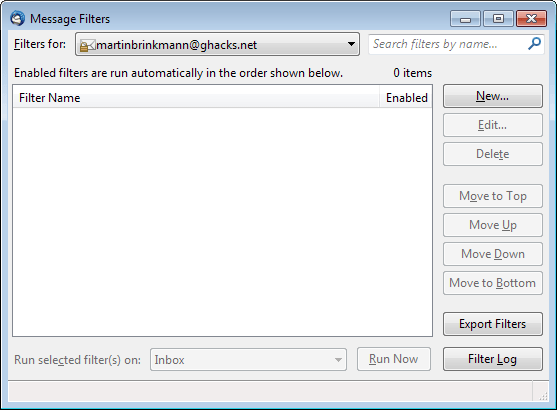
The Thunderbird add-on Thunderbird Message Filter Import/Export provides you with options to export mail filters from one account or computer to another computer.
Update: Please note that the extension mentioned in the paragraph above does not work properly anymore in the latest versions of the email client. You can use Thunderbird Message Filter Import/Export Enhanced instead which is a port of the extension.
The only difference to the original is that it is compatible with the latest version of Thunderbird, everything else remained the same. Update End
The add-on adds an Export Filters button to the Tools > Message Filters window. Just select the account that you want to export filters from and click on the Export Filters button. All you have to do is select a name for the filter file. I suggest you use the mail account name for it, but that is up to you.
You need to make available the saved files on the new computer. Filters are imported by selecting Tools > Import filters from the Thunderbird menu.
Verdict
Thunderbird Message Filter Import/Export Enhanced provides you with the means to export and import message filters of Thunderbird instances. This is useful if you make use of message filters in Thunderbird, and use multiple devices with Thunderbird.




















It didn’t work for me – the download file was corrupted.
There is a great solution here:
https://support.mozilla.org/en-US/questions/1131776
This add is not supported in the latest thunderbird version
But where the Import button???
I cannot find the Import button too :