
How To Add A New Email To Your Hotmail Account

When I signed up for my Hotmail email account I used a custom email address. As a consequence, I never received a "real" Hotmail email address. While I was able to create Hotmail aliases, I could not really use all the features associated with an account on the site as I used the third party mail address only to verify the account.
Yesterday I started to look into the issue more closely to figure out if there was an option to create a new Hotmail email address from within an existing account. It took some digging through Hotmail's page layout to find the page where new email addresses can be added.
Open the Hotmail main page and sign into your Hotmail account if you are not already signed in. You should now see the inbox and the frontpage of the account.
Locate the Options link in the top right corner and select the more options link from the context menu. This opens the main account control panel where you can configure the majority of account related settings. Click on account details under managing your account. Hotmail may ask you to enter your account password again before the next page is displayed.
Click on the your email addresses link under other options. This opens a page listing all linked email addresses and aliases. A click on add an email address allows you to create a new Hotmail or Windows Live account, or to link a third party account to the Hotmail account.
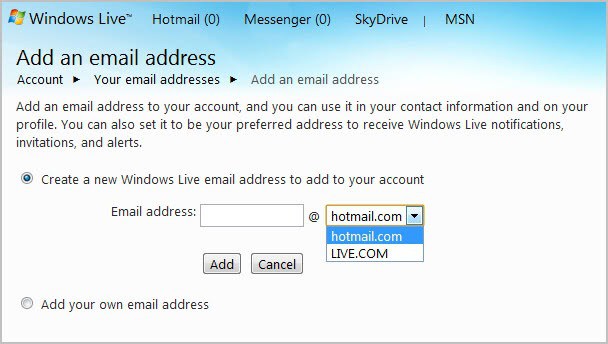
Just enter a new account name and select whether you would like it to be a hotmail.com or live.com account.
The address is automatically added to the account and you can start using the account right away.
You can alternatively open the following link to create new Hotmail email addresses right away. This opens the mail overview page right away where you can add or remove email accounts.
Advertisement



















I want set up new account e mail ???
how do i wipe my account and start up a new account
unable to find options on new hotmail/nicrosoft home page of my email account, can you help?
After reading the blog, I noticed that the instruction to create a Alias email within your Hotmail account was wrong.
The way it works is by moving your cursor over the Hotmail Inbox and highlight it. Then you see a little star sign to the right of the highlighted Inbox.
You click on it and a sub menu appears. There you select “Create a Hotmail Alias ” and the rest is self explanatory.
Ok so I added a new email address too and now I too am unable to see my original address. It’s like it renamed by old address to the new one. When I try to log on to the old address it says that I can’t and when I try to set that one up again it says that email address is already taken.
Do you know if there is anything I can just switch back (rename) to my old address?
My alternate email address I originally added is no longer active and I can not access it. I am not seeing any option to contact hotmail in order to tell them of this situation so it seems I’m not able to even access the email to get the code to reactivate my hotmail.
What are my options in this situation, other than to create a brand new hotmail?
Thanks again. Needed another email address. Your article came just at the right time. :-)
You are welcome ;)