
Facebook Messenger, Chat and Notification Client For Windows

Update: Facebook Messenger is no longer available for Windows. Facebook is only offering it for Android, iOS and Windows Phone currently. We have removed the link to the (now defunct) download page of the Windows Facebook Messenger.
First information about Facebook's plan to release their own instant messaging program appeared on a Facebook support page about a month ago.
Facebook Messenger for Windows, according to that page, offers chat, messaging and notification functionality. The program was initially only available to a group of alpha testers but has since then been made available publicly as well.
Windows users who install the client on their system need to connect the program with a Facebook account before they can use its functionality.
A click on log in opens the Facebook website in the default browser. Here it is then necessary to log in, the client will automatically recognize the log in. Facebook notes that users need to enable the "keep me logged in" feature if they want to use the messenger after closing the browser.
Facebook Messenger looks like a bare bones version of Firefox. Users see three icons at top which indicate friend requests, messages and notifications. Facebook Ticker information and contacts are displayed below.
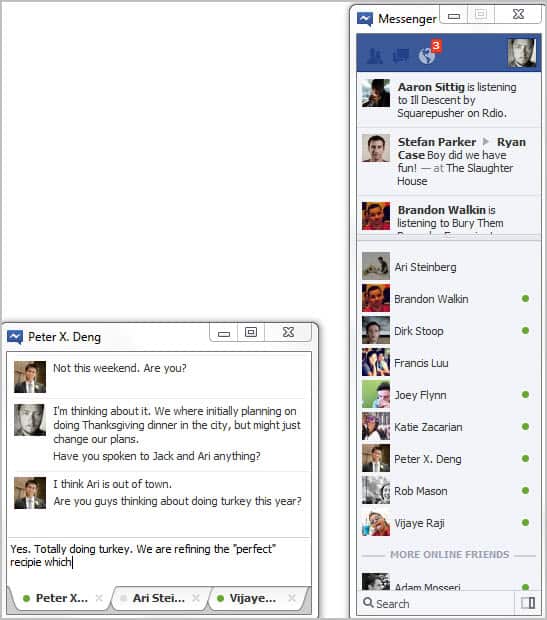
Chats open in a new window that is using a tabbed interface to separate different chats. The program is bare bones otherwise at the moment. The only other options provided are displayed in the system tray icon's right-click context menu. Here it is possible to dock the Facebook Messenger window to the right of the screen, and to turn off sound notifications.
Facebook Messenger did not work on a 64-bit version of Windows 7. The client worked fine on the other hand on a 32-bit version of Windows. It is not clear if the software is only compatible with 32-bit versions of Windows, or if a setting on the 64-bit test system caused the incompatibility. The player opened fine, but log in was not recognized on the 64-bit system.
Facebook users who use Windows as their operating system can download the messenger from this link.

















thanks alot, and can i get a job there please
Thanks alot, and can i get a job there pleas
I’m using 64 bit Win7. It works, but Firefox started to crash. I don’t know if it’s actually working or just giving me the screen without really updating.
I don’t see the point of using this. I barely talk to people on only one IM service at a time, usually a combination of Gmail, MSN and Facebook. And if the web UI for Facebook chat is anything to go by, this program will glitch just as often.
I was one of the people who got a notification to install this alpha messenger a few weeks ago. I must say I use it a lot. It’s been working great for me, having the app docked to the right side of my screen.
Yeah – no problems on my W7 x64 install / use….bizarre that they make you login via the webpage rather than the messenger app…
Also interesting: no special icon on taskbar – just the standard windows unrecoginzed app icon. And not sure about working….I’ve sent a few messages and no replies yet.
I’m using Win7 64-bit Pro and the Messenger works without any problems, maybe they changed something.
Will it utilize either xmpp’s ssl connection (instead of the plaintext auth currently), or at least does the login/chat go through an https channel?
It will be quit a laugh (total letdown) if there would be no 64 bit version.