
Download Microsoft Office Starter 2010

Microsoft Office 2010 is available in different editions just like the Windows operating system. There is Microsoft Office Home and Student 2010 or Office Professional 2010 for instance. And there is at least one version that is only available to OEMs: Microsoft Office Starter 2010. This version is usually only available for users who purchase a computer system at manufacturers who add it as one of the installed software programs that the system ships with.
The particular version of Office ships with basic versions of Microsoft Word and Excel, the two most popular programs. It is basically free but comes with advertisement to make up for that.
Office Starter 2010 is not available as a public download. The only way up until now was to buy a PC that ships with it to use it. Caschy now discovered that Microsoft stores Microsoft Office Starter 2010 on their servers. Downloads are publicly available and install the product on compatible systems. Compatible currently means that they will install on Windows Vista and Windows 7, but not on Windows XP or Windows 8.
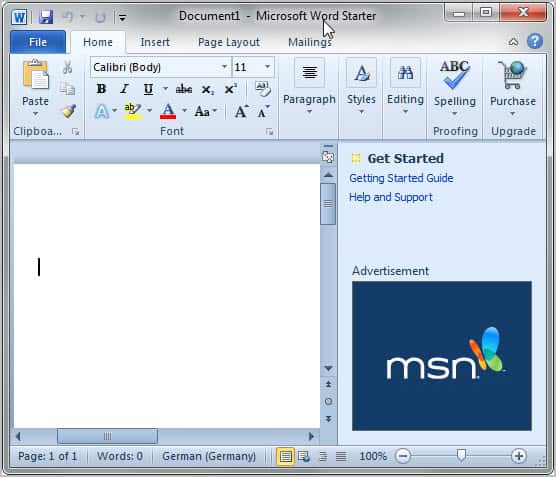
Here is a list of available versions that you can download:
- Microsoft Office Starter 2010 English
- Microsoft Office Starter 2010 French
- Microsoft Office Starter 2010 German
- Microsoft Office Starter 2010 Spanish
I only tried those four country codes. It is likely that Microsoft Office Starter 2010 is available in different versions. Just replace the LCID string in the web address, e.g. en-us with another one. You find a list of strings on this page.
Office Starter 2010 can be installed and used without entering a product key. Also interesting: It is possible to create a portable version of Office Starter 2010 from the program's start menu listing.
Office Starter does not offer all of the functionality that a "full" version of Office offers. It is however a suitable alternative for users who only need to do some light editing and reading.
There are definitely comparable solutions for users who do not want to use Microsoft Office. Among them Open Office, Libre Office or Google Docs.
Update: Microsoft has removed the download links from their servers. You may still find the program on software repositories.
Update 2: Download links are available again. Click here to start the download of Office Starter 2010.
Advertisement

















Just found out that Office 2010 Starter installs on WIndows 10 is still working after some installing some extra updates.
However I would like to download the install files, but I can not get the script to do so.
Does anyone still has the script to download Office 2010 starter offline?
the link you provided for the microsoft word 2010 starter was not available…just this month mine quit working after a microsoft update was completed…now i cannot open any of my old docs that were generated on word 2010…it tells me to go and purchase it…however i can still open the program but just cannot save it once i finished a document nor can i open my documents…what is up with this…this starter set came with my hp laptop 4 years ago and have never had such a problem…i dont want to go and purchase something i have had for free…any suggestions
it appears you might know a solution for a problem. I lost ws-2010 on reset w-8.1. I bought ms-office 2010. I can get the pen working, color and size of line, but i can’t get the ERASER to work, in word, (works in onenote, so forth, etc.). (the various icons are at ‘add in ribbon’, but they don’t match up easily (novice).) the tech at the online vendor doesn’t know yet. Anyway I have seen instruction videos were people are using (the, a) buy version w-2010, ‘SAME’ as pen and eraser (was) in ws-2010. this address next, here, is a very short video on just that–use of the pen and ERASER. how do I get instructions to set this up? or buy the program?
http://www.youtube.com/watch?v=U44Pum7e8mE
sincerely.
I have genuine Windows 7 Home Premium 64-bit. I had Office starter when i bought my laptop. Had to reinstall windows, so and now i have to reinstall this. But clicking on the click-2-run application file only puts it on the installed prgrams list i cant find the programs on the start menu help please!!!
How do I create footnotes in Word Starter.
I cant seem to get them although it can find existing footnotes.
Does Starter version not have the capability to inser footnotes?
Footnotes is a “premium” feature. You can find all the limitations of Office Starter in wikipedia.
Thanks for the link to the downloads script, SET-LANG en-us worked perfectly!
@Anonymous 1-17-12, 8:41am
You probably don’t have Windows Vista or Windows 7, it won’t work on Windows XP.
Hi,
Went after it… and here are my findings for those still interested in getting a copy :=
1 Grab the .zip from dropbox http://dl.dropbox.com/u/18033592/office2010_starter.zip
2 Extract the content to a folder (preferably)
3 From the extracted files (2) right click on “download.cmd” and chose Edit.
On the second line Set your preferred Language (SET LANG=en-en), save and exit.
4 Double click on the file you just edited to see a command prompt open.
5 Sit and wait till download finish. At the end you will be prompted for stting a bootstrat or something (didn’t record the exact words on the popup window). I accepted.
An example on a French Version shows a folder size of 451 MB.
Download time 15 min @ ~~ 350k/s-1M/s
Sorry double posting….
I have genuine Windows 7 Home Premium 64-bit. I had Office starter when i bought my laptop. Had to reinstall windows, so and now i have to reinstall this.
But clicking on the click-2-run application file only puts it on the installed prgrams list i cant find the programs on the start menu help please!!!
SET LANG=en-us works
Yup.. definitely works for me..
MS Office Starter is just right for me bec i only use the basics..
Thanks!
I downloaded this way, however I could not install it (nothing happened when I click on any of the exe files downloaded.
Download Microsoft Office Starter 2010 Setup link not working :-(
the office starter version has change
all your download links are dead
Thanks for pointing that out. I have removed the download links.
If it included both PowerPoint and OneNote, even with the ads, it might be a worthwhile product for some users. But without those two things, I usually just recommend that people install the open-source OpenOffice or LibreOffice; and then also make sure they have a Windows Live (with Skydrive, and Mesh, etc.) account so that they can, if they really need true Microsoft Office, just use the online versions in Windows Live.
Seriously… for MOST end-users, that’s MORE than adequate!
____________________________
Gregg DesElms
Napa, California USA
gregg at greggdeselms dot com
Is the setupconsumerc2rolw.exe (1.5Mb) that the links point to the right file, or is it a web based installer?
It is a web based installer.
Martin,
Thanks for sharing this information. I have been waiting for a while for someone to offer a decent price on Office Home and Student 2010 for my son’s laptop. Around these parts this runs around $99.00 for 1 license, and I was reluctant to spend that much knowing that he would only be using it sporadically. Office Starter 2010 will meet his needs just fine! I did note, however, that the installation reset Windows Update to “Install Updates Automatically”. He and I prefer “Check for Updates and Let Me Choose…”. No problem resetting back to our preferred option, but thought that you might like to know this. Thanks again for saving me some money!
John
Well spotted John, I personally think it is a no-go if software, regardless whether its first or third party, changes core system settings without at least notifying – better asking – the user first.
Great find!! I’ve been wondering if this would ever be available for download.
What worries me is the install exe is only 1.6mb… obviously it calls up another download during the installation, which MS could easily break if they discover we are downloading and installing this to much. Also means this is not an offline installation.
Dan you are right. The installer has to download about 600 megs during installation. If you go to Caschy’s blog you will find an offline installer batch file.
Hi can someone post a link to this offline installer? That would be helpful
Thanks
How do I get the English version of Caschy Blog. Have searched his blog and unable to find where to click for the English version.
There is no English version, try a translation service for that.
Exactly! Has anyone figured out how to download the complete installation package to keep offline?
You can create virtual Office ONLY on Vista or Windows 7 machine and use it again ONLY on Vista or Widows 7.
the ad shown in starter in not a great issue because i think the ad shown when u are using internet.so either close internet or control by firewall settings.
i’m still on Office 2003 on my job….
Nice find.
I got Office 2010 starter with my new Windows 7 laptop. Microsoft pays $5 to OEMs to put this Office version on PCs.
@ilev: OEM builders pay MS for installing and distributing this software (2$ or 5$) – that’s TRUE (or link to your info’s source).
And second information – it’s NOT FREE software:
“Microsoft Office 2010 Single Image with Office Starter 2010:
1) Payment Due for License: You must acquire a license for Microsoft Office Starter 2010 and pay for each copy distributed with a Customer System” (http://oem.microsoft.com/downloads/3DFE44DA-EA23-4965-BB14-17D1FB26140D/worldwide/Office2010/license/english/microsoft_office_2010_opk-all_up_download_license_agreement_english.pdf)
They actually pay to get this on PCs? Wow.
They’re banking on the probability that enough consumers would eventually upgrade to a paid version of Office 2010. I, for one, will not.
I’ve found my full version of Office 2010 also does not need a serial number to run. It does warn me that it will cease to operate after 3 years if no serial is inputted.
3 years or 3 months?
I would rather download Microsoft Office 2010 Professional Plus by torrent.
It’s a security risk.
Can you explain that please?
I find LibreOffice is OK for my needs but thanks for passing that on to us.
Great find! Even though I use another commercial office suite, nothing beats having a copy of the market leading MS Office as backup. I have used Office 2010 Starter and find it as good as the premium versions, barely noticing the limitations or even the sidebar (with MS ads).
But I have to check the EULA to see if I can legally install it in my company PC. I wouldn’t want the feds to confiscate my office PC for installing this “free” office suite.
Always wondered where we could download it :P
The downside of Office 2010 starter is that it creates an extra virtual CD-ROM drive as I remeber it correctly. But you can live with that :)