
Helium Audio Converter: Convert, Analyze Music Files

Helium Audio Converter is a free program for Windows that you can use to convert and analyze music files on PCs.
If your music collection comes from multiple sources like mine does, downloads, rips and online purchases for instance, then it may be a collection of different music formats and probably a few files that are not playing correctly or have incorrect tags.
Programs like MediaMonkey or Mp3 Diag provide you with tools to convert and tag music files.
Helium Audio Converter

Helium Audio Converter is a free program for Windows that can do pretty much the same. The program has been primarily designed to convert music files. The convert feature supports the following music formats: AAC, FLAC, M4A, MP3, MP4, MPC, Ogg Vorbis, Wave, WAVPack, WMA.
Encoder options are provided for each format that let you change the output quality or provide custom parameters the format supports.
It needs to be noted that all listed formats are supported both as input and output formats, making the program very versatile in this regard. Available tags are converted as well automatically by Helium Audio Converter.
The configuration takes less than a minute usually. You start by adding files or entire folders (with files) that you want the program to convert. If you are in a hurry, you can drop the root folder of your music collection into the program interface to have it converted in one go.
Helium Audio Converter lists all supported audio files in the interface by default, and displays information such as the full name, size, play length, or, if available, information about artist, album and title as well.
Conversion options at the bottom of the screen define the output folder and the output format. A click on Encoder options opens encoder specific options like the bitrate and normalization options if mp3 is the selected output format.
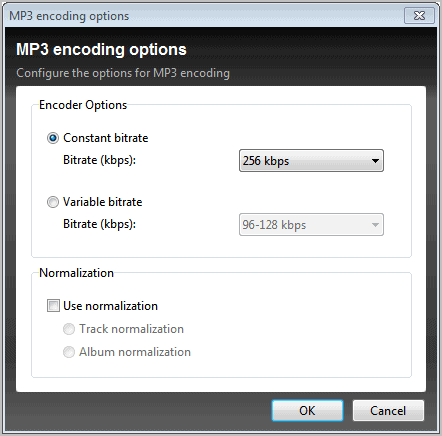
It is optionally possible to analyze the converted files after the conversion. This uses the program's built-in music analyzer. The analyzer is only available if the output format is FLAC or MP3.
The Analyse button at the top of the program window checks all music files in the list without conversion. A log is generated and displayed in the end that highlights erroneous music files in red.
There is unfortunately no option to repair the files, if possible, or information on what's wrong with the files.
If the files are mp3 formats, try Mp3 Val, a program that can validate mp3 files and repair errors that it detects.
Verdict
Helium Audio Converter is despite those issues a solid program that can supports a wide variety of popular music formats. For now, it is very useful as a converter, and not so much for analyzing music files due to the shortcomings of that procedure.
Windows users can download the latest program version from the developer website.
Update: The program is no longer available on the developer website. We have uploaded the latest version of the program to our own server from where you can download it to your system. Please note that we don't support the program in any way:Â (Download Removed)





















Helium Audio Converter does not Monkey’s Audio (APE) and this makes useless for me.
That seems interesting. It doesn’t look like it has as many features as xrecode, but I’ll still give it a try. I wonder if it supports multi-core parallel encoding or support for the Nero AAC encoder. I also wish that it offered a portable version.
The interface looks familiar. Reminds me of NCH Switch Audio File Converter.
I’ll definitely give it a try. Although I use Format Factory to do all my audio-video conversion.
I prefer to do the work myself… I use Cowon Jetaudio to convert to wav, normalize.exe to normalize, the Lame to re encode to mp3