
How To Search Multiple PDF Documents At Once

Most pdf readers provide you with a built-in search to find words or phrases in the active pdf document. But what if you want to search for a specific text or phrase in multiple documents? Sure, you could make use of Windows Search or another desktop search application to find what you are looking for; Or, you could use the advanced search capabilities of Adobe Reader or Foxit Reader to search multiple pdfs at once.
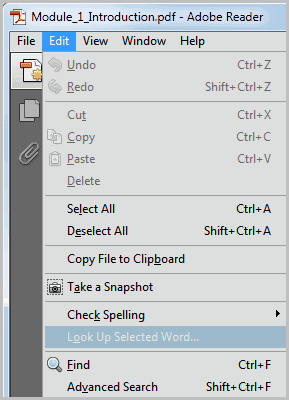
You can initiate a standard search by pressing Ctrl-f, or
selecting the Edit > Search option from the menu. Advanced Search on the other hand is triggered with the shortcut Shift-Ctrl-f or via the Edit > Advanced Search menu.
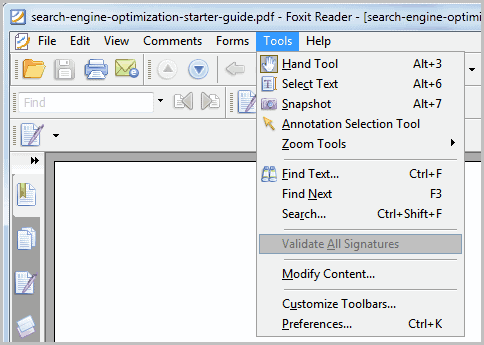
Adobe Reader is not the only pdf reader that can find text in multiple pdf documents. Foxit Reader, a free pdf reading alternative, offers similar options. Foxit Reader users can use the shortcut Ctrl-Shift-f or select Tools > Search to open the search form of the program in a sidebar.
Adobe Reader opens the advanced search options in a new window. Here it is possible to switch from searching the current document to searching all pdfs in a folder on the hard drive. The folder is freely selectable, with My Documents being suggested by default.
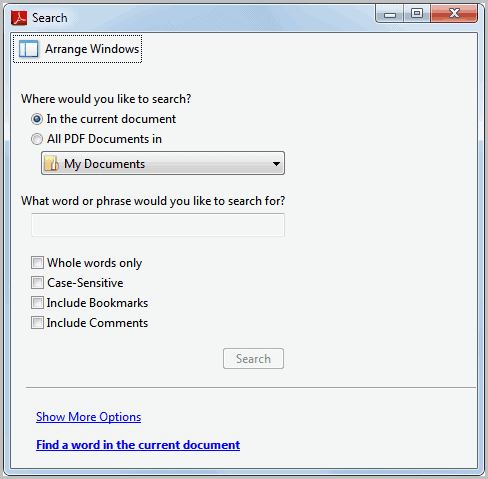
A word or phrase needs to be entered into the search configuration form window. Expert users click on the Show More Options link at the bottom to display additional search filters and options.
Here it is then possible to include comments, attachments and bookmarks in the search, or search for whole words or case sensitive words only.
The more options page can be used to add additional search criteria, for instance to only search documents that have been created before or after a certain date, that have been written by a specific author or that contain object data or images.

It may take a while to scan the contents of all pdf documents that match the criteria. Adobe Reader displays the results in the same window. Results are sorted by document, and every instance of the word or phrase is shown on a separate line. A click on a line opens the containing page in the main Adobe Reader window.
Foxit Reader's multi-pdf search options are limited in comparison. Here it is only possible to enter a search word or phrase, a directory that contains the pdf documents and a whole word and case sensitive filter.
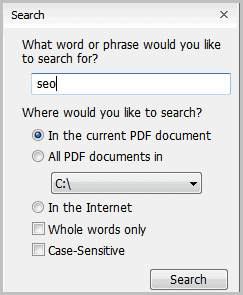
Search results are displayed in a sidebar in the application window, a click puts the focus on the containing page. The search terms are highlighted by both applications on the pdf page.
Both programs are capable of finding text in multiple pdf documents. Users who need the additional filtering options find Adobe Reader's pdf search more suitable as it offers more advanced options.
Are you using a different program or service to search for contents in multiple pdf documents? Let me know in the comments.
Advertisement

















THANKS A LOT, I was looking for this.
I found countless tutorials that are complicated and doesn’t work, but this is just pure gold. THX
Hi, is there a way to do semantic search in multiple PDF files?
I have Foxit 1.0 running on Ubuntu 14.10, the shortcut Shft+Ctrl+f just bring up the text search, also
my version does not have the search menu choice in Tools, does it require a pro version of Foxit ?
Anyone know what would be the equivalent command line arguments to open reader to the advance search box from a shortcut?
Big THX
Text Finding is also an reliable PDF search engine to quickly search for multiple PDF files .
http://www.textfinding.com
Hello,
Can you tell me if you know any way that we can search the note contents that added by Foxit reader or other pdf reader software?
I’m using Adobe X Standard and was wondering whether it is at all possible to search an instance of a word and then highlight every occurrence of that word in one go instead of having to go through and click on each instance and then highlight it? I’ve had an occassion where I’ve needed to do that and couldn’t find anything. Just wondering whether you can shed some light on this for me.
I’m just starting to use QIQQA to manage my research literature database (free pdf management software developed at Cambridge Univ) – I believe it has full text search of your pdf library including scanned documents which it automatically converts to text by OCR.
say i am reading a pdf file and find some word difficult and want to search in one click on internet is there any way please explain
Wordweb can do that: https://www.ghacks.net/2011/12/07/wordweb-pro-review/
Nice article. If I can add you can search within PDF text also online with services like http://findpdf.net Find PDF documents, share with friends and read online books, manuals and articles, all free.
Thank you, you are great!
If you need more than just searching or viewing, PDF Studio lets you merge, split, import batches of files into a PDF document, as well as annotating, digitally signing, and more. It’s way less expensive than Acrobat, and runs on Mac, Linux, and Windows, which Foxit doesn’t.
great post! as a heavy foxit reader and acrobat (pro) user, I was unaware of this feature – and sometimes I needed it
Thanks for the info. I didn’t know one can search multiple pdf docs.. with ANY pdf reader.
PDF-XChange Viewer also contains the multiple search feature. It’s found in the Edit menu. The key combo is the same.
The multiple search options include Whole Words Only and Case-Sensitive.
(The pay version adds searching in Bookmarks and Comments.)
Thanks for the additional information about the program. Seems to be really popular ;)
I did not know Adobe Reader could search unopened PDFs.
I have been using PDF-XChange Viewer Pro to search
PDFs in folders and I believe the free version can too.
I did a comparison test and discovered PDF-XChange Viewer Pro
and Adobe Reader came up with the same results with the
glaring exception that Adobe Reader was slow and
PDF-XChange Viewer Pro was very fast.
I noticed that as well, that Adobe Reader is rather slow in the processing.