
How To Download Facebook Videos

Facebook introduced video support back in 2007 and has since then improved the feature for instance by adding high definition video support. Users can actually encounter two types of videos; Videos that are hosted on Facebook after they are uploaded by users and videos that are embedded in messages and wall posts.
Facebook itself offers no controls to download videos that are hosted or embedded on the social networking site. Users who want to download videos from Facebook need to look for third party solutions, like scripts, extensions or software programs.
Many popular solutions redirect the user to third party websites where the videos are downloaded. That's not very user friendly. This guide looks at solutions that offer direct downloads from Facebook without third party site redirection.
Browser-Independent: download Facebook videos

Probably the easiest way to download videos from Facebook is to do the following:
- Open the Facebook video on its own page on the Facebook website.
- Replace www in the address bar with mbasic, so that the beginning reads https://mbasic.facebook.com/ instead of https://www.facebook.com/ and load the new address in the browser.
- You can right-click on the video on the page that opens and select "Save link as" to download it to the local system.
- Alternative: Play the video and right-click on the video afterward and select "save video as" to download it to your device.

Google Chrome
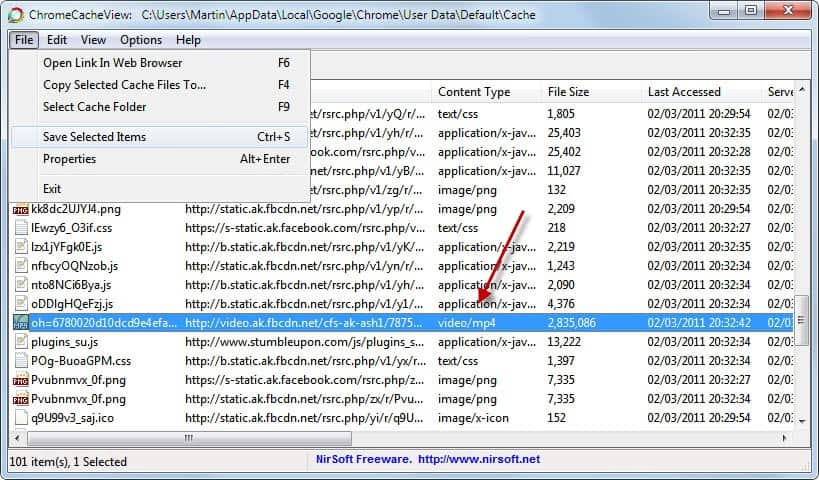
An alternative is the Windows software Google Chrome Cache Viewer which displays all cached items in the web browser. Videos, like other media, are cached on the local hard drive. Just sort the display by content or file size and select File > Save Selected Items to save the Facebook video to another location on the hard drive.
Please note that the video needs to be playing before it appears in the cache viewer.
Mozilla Firefox
Firefox users can use a browser extension such as Video Download Helper to download videos from the Facebook timeline. The extension may not work for individual videos, but if you play them from your timeline, you should be able to download them using the browser extension.
Opera
Opera users can utilize a similar software called Opera Cache View by the same developer. It basically offers the same functionality as the Google Chrome software.
Internet Explorer
Guess what, Internet Explorer users can use IE Cache View from the same developer for exactly the same functionality. Just start the video on Facebook, open the software program, look for the video and download it.
General
Video Cache View is another alternative. The application supports multiple browsers and filters their cache for videos. This makes the identification of the Facebook video a lot easier.
Closing words
We have shown how to download Facebook videos directly with extensions, userscripts and applications. The guide offers at least one solution for every popular web browser out there. The solutions sometimes may be limited to the Windows operating system, but that's what the majority of Internet users are using.
If you have a different solution for download videos from Facebook let us hear about it in the comments.
Methods that don't work anymore
Mozilla Firefox
Firefox users have the largest assortment of tools and extensions at their disposal. I'm going to introduce two different options here, there are however many more available.
The best option is to visit the official Mozilla Firefox add-ons repository and search for Facebook Video Downloads. A list of browser extensions is displayed to you which you can use for that purpose.
All have in common that they display an icon in the browser interface that you can click on to download the video on the page to your local system.
Facebook Video Downloader [update: no longer available] - is another option. This is a userscript which is compatible with the Firefox web browser. It is necessary to install either the Greasemonkey or Scriptish extension first before userscripts can be installed in Firefox.
Visit the userscripts page of the userscript after installing one of the extensions listed above. A click on the Install button installs the script
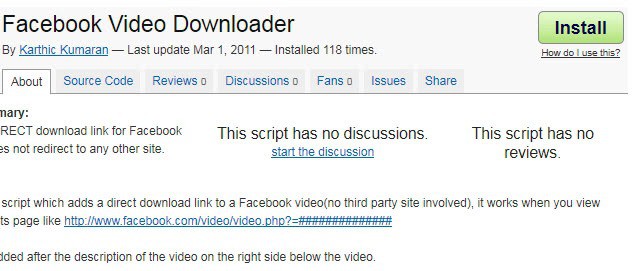
Userscripts manipulate web pages when they are loaded. Facebook Video Downloader adds a download link to every video page on Facebook.
Please note that you may have to reload the video page once before the download link appears on the page.



















Simple…..from your preferred browser (IE, chrome, etc), change the URL from http://www.facebook.com to m.facebook.com, then go to your messages, right click on the video then choose ‘Save As’. viola!!! video downloaded.
Exellent!! thanks for sharing!!
Thanks. Downloading Facebook videos was never easy before. Thanks to your tutorial. Now I can download Facebook videos on the go! Cheers gHacks!
If you’re planning to download the facebook videos directly into the android phones then check out this tutorial
http://softwarebuzzer.com/2013/04/download-facebook-videos/
So that you can save your time ;)
Cheers
Suresh
There are some facebook video downloader(I am using Allmytube) could help achieve that
great and very detialed, friend can you please help me that how to download photo album from facebook? i have too many photos and can’t download one by one.
Great info 2 tech 4 an old lazy man though.
Any solutions may be easier for the IPhone 4?
Again real good info though
that works, but not eveyone uses Mozilla firefox. I was searching and found this tutorial. it works for Facebbok and other Sites. I got videos From worldstarhiphop too
.
http://mr-chuleria.com/tutorials/download-videos-from-facebook
Thanks for the information. Now I can download Facebook videos easily from my browser..thanks once again!
download IDM and install it
that ask u “download this video ‘when ur video play
On Mac OS it’s [User Profile]/Library/Caches/Google/Chrome/Default/Cache
Actually you only need Chrome for this. You don’t need any apps or anything else if you follow this:
(1) Watch the video. Let Chrome cache it.
(2) Go to [User Profile]\Local Settings\Application Data\Google\Chrome\User Data\Default\Cache
(3) Sort according to date. You can recognize the video from its size too, should be couple of MBs, depending on the length of the video.
(4) Copy and paste it to, say, your Desktop.
(5) Rename it to something.mp4
(6) Tadaaaaa!
Do I just type that into the URL or how do I get there??
thank you so much, it worked
This worked! Awesome, thanks!
I’ll give it a try
You can also try
http://www.tubekeeper.com
the website able to download online video from Facebook and youtube, just copy & paste the video page URL to the website, it will generate download link to you. :D
You can also use the free version REAL player. During install you select custom, and select “enable downloading of video”. Then next time you watch a video in any browser you can just click download, and it puts into your video folder on your drive. It works on all video types including youtube.