
Duplicate Photo Finder

There is definitely no shortage of duplicate file finders for the Windows operating system. Most of the programs on the other hand are complicated to use which may confuse or irritate some users. Other programs may use comparison methods that may not be sufficient for your tasks, for instance if only names are checked and not file sizes or hashes.
Duplicate Photo Finder is a comfortable and easy to use application to find and manage duplicate images stored on the PC.
The interface of the application can be best described as minimalistic but sufficient for most users. You start with the selection of one of three available comparison methods at the top. Duplicate Photo Finder supports comparison by file sizes or file hashes.
The first option compares files by size only which is less reliable than the two other options which compare using hashes. The difference between the two hash comparison algorithms is that the first includes EXIF differences while the second excludes them).
- Simple - Compare file sizes only. Fast, medium reliability.
- File Signature - Compare file hashes. Very slow, high reliability (includes EXIF differences).
- Photo Signature - Compare pixel hashes. Very slow, high reliability (excludes EXIF differences).
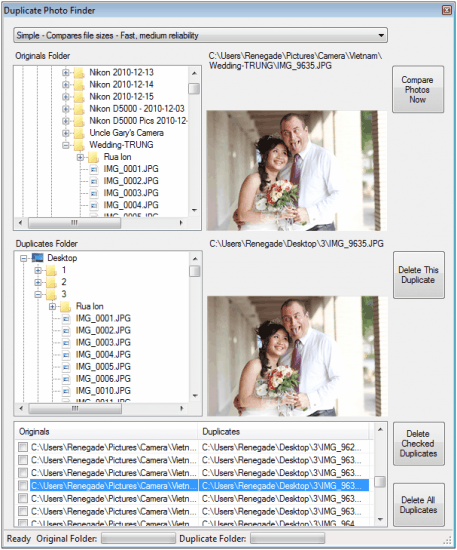
You need to select two folders that you want to compare with each other. It is possible to select the same folder if you want the program to compare files found in a single folder on your system.
Once selected click on the compare photos now button to get started. The scan may take some time depending on the number of pictures that are stored in the selected folder structure.
Note: the program won't go through the folder structure recursively. If you are making use of many subfolders, it may not be the right program for you as you need to scan each folder individually then.
All duplicate images that are found in the process are displayed in a listing at the bottom of the screen. The interesting option here is that it is possible to select them to display both photos next to each other in the interface so that you can analyze all images that have been detected as duplicates before you decide whether you want to delete or keep them.
The program offers controls to delete some or all of the duplicate images at once. Duplicate Photo Finder is handy software program for the Windows operating system. It requires the Microsoft .NET Framework 4.0 and runs fine on 32-bit and 64-bit editions of Windows. Downloads are available at the homepage of the developer.
Advertisement


















This enticed me to look for other similar programs and after some searching I have found the one I liked best – PhotoSort. Now, this is only for Windows and I have a Mac too but you can see how much i liked it since i came back here just to leave the comment :-)
I prefer visipics, it compares based on picture content, not just raw file data.
@Fred
Actually, that was fixed very quickly. You have the options to compare by picture content alone, or by picture content plus EXIF (tag) content.
So, if you have 2 identical pictures with different tags, you can either chose to consider them the same or not — both options are there for you.
I hope that helps some.
Thank you for the kind words Martin! (I’m the developer.)
I decided not to “include subfolders” due to the potential size of large photo collections. I don’t take a lot of pictures, but I still have over 60 GB of photos. When hashing that much data, the length of time is simply massive. The solution to the problem there would have took too long for me to do and still make the Donation Coder NANY 2011 deadline.
@Rick — There are certainly ones that are far more robust. That wasn’t my aim for the program. I wanted something that was extremely simple to use.
It will find duplicates in the same folder, but it will warn you about that as it will return 2 results for each pair. (I tried to idiot-proof it some, but allow searching in the same folder.)
i.e. You need to decide which is the duplicate and which is the original in that case.
e.g. You have “DSC_0001.jpg” and “Me and dad.jpg” which is just a renamed version. Which do you want to delete?
The program isn’t suitable for professional photographers, but it’s probably enough for what most people need.
BTW — I added in a 3rd comparison method. They are now:
* Simple
* File signature
* Photo signature
Simple – Compares file sizes – Fast, medium reliability
File Signature – Compares file hashes – Very Slow, highly reliability (includes EXIF differrences)
Photo Signature – Compares pixel hashes – Very Slow, highly reliability (excludes EXIF differences)
The difference between the file and photo signatures is that the photo signature method ignores EXIF tags. So if you went back to your photos and added in some geotags to a picture, it would still be the same picture, but the *file* would be different.
I had a retired older neighbor in mind when developing it. He’s not very computer literate but likes to take pictures. The number of options in some more advanced software would be overwhelming for him. The sheer lack of advanced features is exactly what he would need.
Anyways, I hope some people find it useful. There are lots of options out there for comparing files and photos. This is just one that’s designed to be super-easy.
Cheers,
Ryan
Ryan thanks for the comments here, it is much appreciated. Do you have plans to add subfolder inclusion or at least an option to select multiple folders for inclusion in the comparison? That would make things a lot easier for users with a subfolder structure.
Yes. I’ve had good feedback on it so far, it looks like people find it useful, and that seems to be the 1 thing that’s missing.
I’m still debating whether or not to have checking folders with assumptions for including subfolders, or to simply have a blanket simple single checkbox option for it (which I’m leaning towards strongly as it would be less confusing for some people).
I agree that it makes more sense to include the subfolders automatically (or with a single switch) for simplicity of the application.
There are much better ones than this. The app assumes you have two folders that you want to compare – it can’t find duplicate photos in the same directory – something that I think is essential.
Interesting find though!