
Ashampoo WinOptimizer 7 Review

Operating systems like Windows have to find the right balance between compatibility and performance. This leaves the operating system open for tweaks and improvements to increase the performance and responsiveness of the computer system.
Ashampoo WinOptimizer 7 can optimize supported Windows editions. The program runs a quick scan on startup to determine areas of interests. It will list unnecessary services that are running in the background, system settings that should be changed for better performance or security, unnecessary browser items and Internet traces, obsolete Registry entries and redundant files.
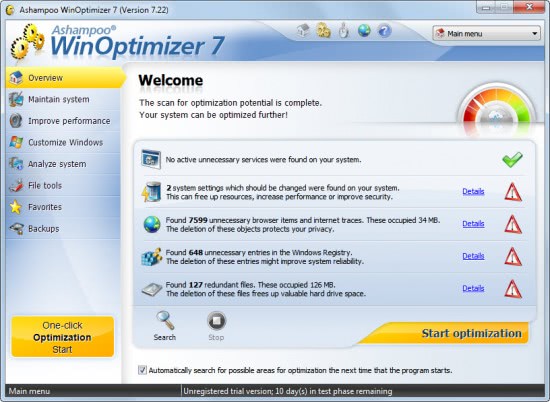
A click on Details next to an entry lists the proposed changes or items that have been found. Here it is possible to filter the results, select some or all of the items for cleaning or modification.
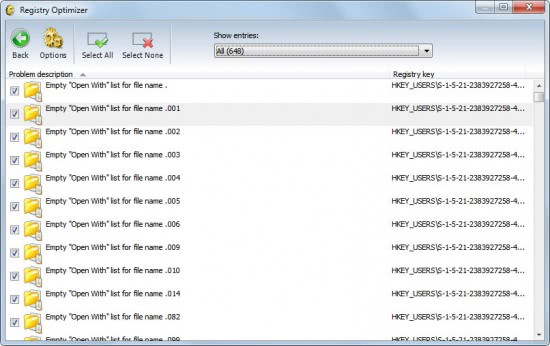
It is recommended to verify the listings before starting the optimization process. Each of the scanned items, like the Registry Optimizer or the Drive Cleaner are also accessible directly. The individual modules provide options to delete selected items directly which tech savvy users will probably prefer since it gives them more control over the deletion and optimization.
A click on Start Optimization runs the optimization script which will make the system changes and delete the invalid and redundant files and Registry settings on the system.
Ashampoo WinOptimizer 7 Review
The core of the program is accessible through the left sidebar. The sidebar display optimization groups such as Maintain System, Improve Performance, Customize Windows or File Tools. A click on a group lists its modules, which usually ranges between four and five.
Maintain System
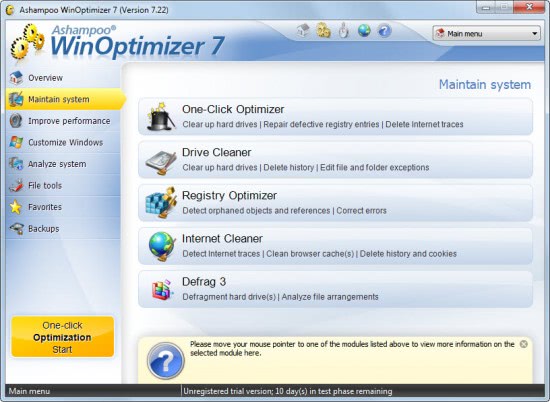
- One-click Optimizer - Clear up your hard drives, repair defective Registry entries, delete Internet traces.
- Drive Cleaner - Clear up hard drives, delete history, edit file and folder exceptions.
- Registry Optimizer - detect orphaned objects and references, correct errors.
- Internet Cleaner - Detect Internet traces, clean browser cache(s), delete history and cookies.
- Defrag 3 - Defragment hard drive(s), analyze file arrangements.
We have already looked at the one-click optimizer. The remaining modules, with the exception of Defrag are part of the optimizer. The Internet Cleaner supports not only Microsoft's Internet Explorer but also Mozilla Firefox and Opera but only if they are installed on the system and not used as portable programs. The options detail which browser data gets deleted by WinOptimizer 7. Available choices offer the usual items like the cookies, manually entered urls or the browser cache. A Secure Cookie option is provided to protect cookies from being deleted by the optimizer. The options are directly accessible from each module which makes it easy to change and assess them before running an optimization module.
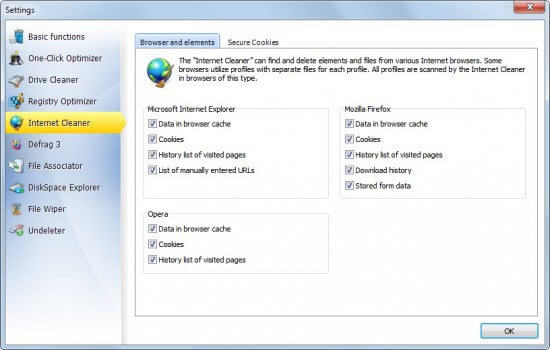
Several modules offer custom options. The Drive Cleaner for instance allows the user the creation of filters to clear specific file types from selected folders or drives.
Descriptions are displayed for each module when the user hovers the mouse icon over them. The excellent help goes into details and is linked to from every page.
Improve Performance
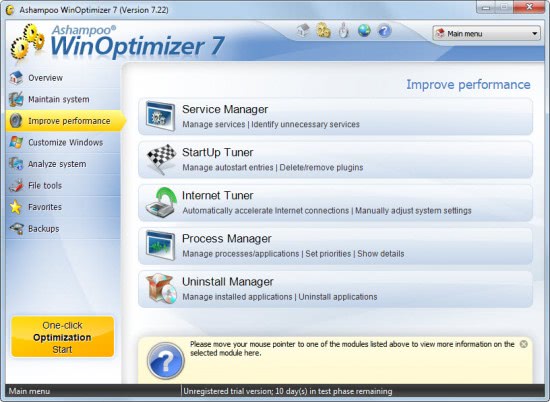
- Service Manager - Manage services, identify unnecessary services.
- StartUp Tuner - Manage autostart entries, delete / remove plugins.
- Internet Tuner - Automatically accelerate Internet connections, manually adjust system settings.
- Process Manager - Manage processes and applications, set priorities, show details.
- Uninstall Manager - manage installed applications, uninstall applications.
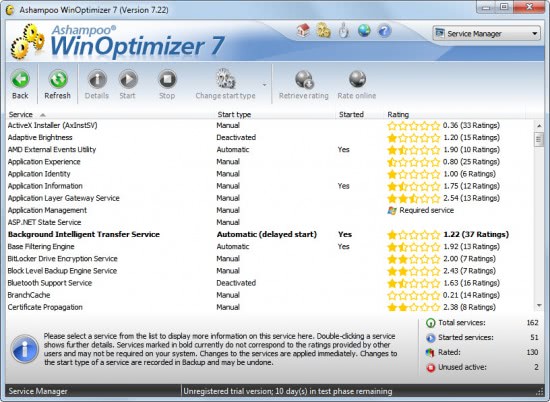
Both the Services Manager and the StartUp tuner displays user ratings for known services and programs to aid the user in the decision making process. The interface makes it quite comfortable to remove programs from the list of startup items and services from being started automatically. The startup manager lists not only applications but also Internet Explorer plugins, giving users options to remove plugins from the web browser and auto start this way.
Some modules do not offer more features than standard Windows applications. The Uninstall Manager for instance does the same as the Windows Control Panel applet. It would have been great if that module would offer a similar functionality like Revo Uninstaller to scan the system for leftovers after the installation. Then again, other modules of WinOptimizer can be (manually) used for that task.
Customize Windows
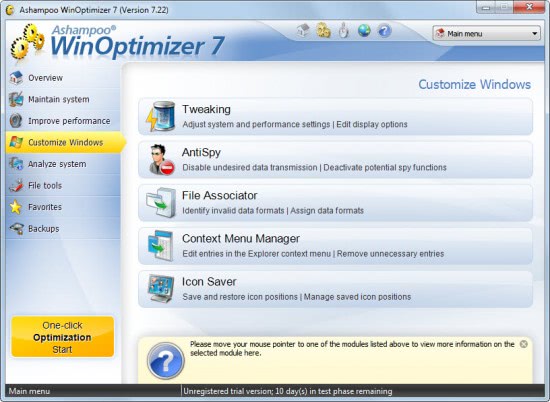
- Tweaking - Adjust system and performance settings, Edit display options,
- AntiSpy - Disable undesired data transmissions, deactivate potential spy functions.
- File Associator - Identify invalid data formats, assign data formats.
- Context Menu Manager - Edit entries in the Explorer context menu, remove unnecessary entries.
- Icon Saver - Save and restore icon positions, manage saved icon positions.
This group offers several tools that are highly requested by Windows users. AntiSpy for instance offers to disable some of the "phoning-home" features of Windows, the context menu editor options to remove entries from the context menu.
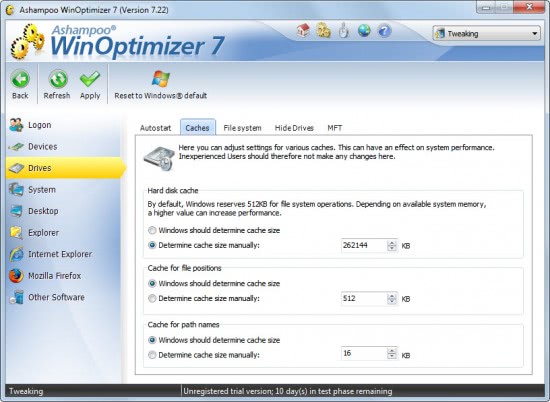
Tweaking leads to a whole new page with its own sidebar listing tweaks for Logon, Desktop, Internet Explorer and drives among others. This section alone is extensive enough that it probably could be a standalone program on its own. Want some examples? Users can configure an automatic logon so that they do not have to select a user and enter a password on system startup, change folder locations for folders such as My Documents, Templates or browser cache, uninstall Windows Messenger or configure caches for hard disks, file positions and path names.
Analyze System
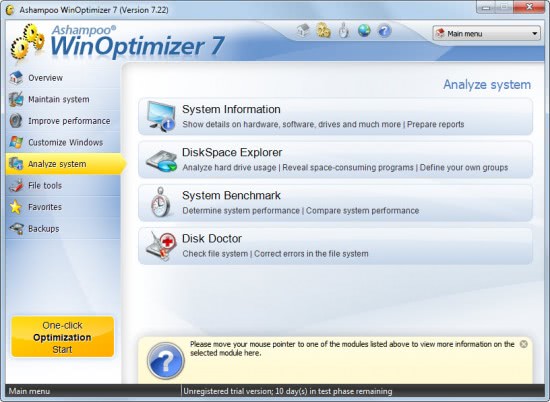
- System Information - Show details on hardware, software, drives, and much more, Prepare reports.
- DiskSpace Explorer - Analyze hard drive usage, Reveal space-consuming programs, define your own groups.
- System Benchmark - Determine system performance, compare system performance.
- Disk Doctor - Check file system, correct errors in file system.
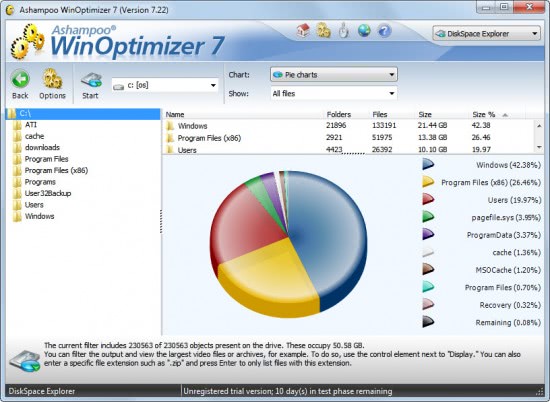
This group contains several interesting items. Disk Doctor for instance can check a disk health. It will report errors and offers to repair them if possible. The disk space explorer displays charts of a drive's largest files and file distribution.
File Tools
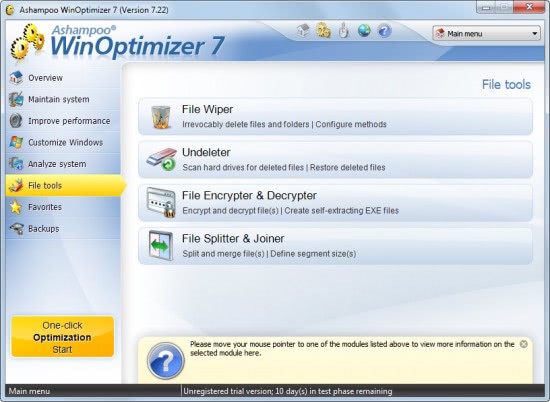
- File Wiper - delete files permanently from the hard drive.
- Undeleter - scan hard drives for deleted files and restore them.
- File Encrypted and Decrypter - Tool to encrypt and decrypt files and create self-extracting exe files.
- File Splitter and Joiner - split and merge files.
Again a section with useful tools that many users will find handy at times. It is possible to recover deleted files or delete files so that they cannot be recovered by those tools anymore.
Ashampoo WinOptimizer 7 creates backups of every action that is performed so that they can be restored in case that is needed.
Optimizing is actually just a part of what WinOptimizer has to offer. The program combines several tools in its interface that many users use individual programs for.
Ashampoo WinOptimizer 7 Installation
The installation of Ashampoo WinOptimizer 7 does not take long. Users should notice that the program displays a prompt to install the MyAshampoo Toolbar during installation. Options are provided to disable this so that the toolbar is not added to the web browser. The optimizer for Windows is compatible with 32-bit and 64-bit Windows operating systems. It was tested on a Windows 7 64-bit Professional PC.
Interested users can download a trial version of WinOptimizer 7 from the following link.
Update: Ashampoo has released WinOptimizer 9 in the meantime which is available as a free, basic, version and a commercial version that you can download as a trial from the official website.
The new version is fully compatible with Microsoft's new operating system Windows 8. It on top of that adds the following options to the program:
- Registry Defrag.
- HDD Inspector that uses SMART to check up on a hard drives health.
- User interface improvements.
- New view types.


















I am a huge fan of Ashampoo’s products. I like their Winsnap screen grabbing application and their multimedia programs are always simple to use with a friendly intuitive interface. I am optimistic, from the descriptions in this article, that this version of WinOptimizer will be just as good. As an obsessive tweaker and tuner, I like the idea of having all those facilities in one place, with the opportunity to restore things if I screw up. Keep it up Ashampoo! (BTW, how did the Ashampoo name come about?).
Please count me in for one and thanks for the giveaway.
I would really like a licence for this product please. Merry christmas and happy holidays to all!
I have WInOptimizer 6 installed and it is excellent software which is easy to use. I would like to continue with the Ashampoo products based on this and upgrade to 7.
GIVE ME THAT, love to have such best optimizer
Thank you Good App.
– Very good products.
I would like to try this software tto, thanks for considering me.
Nice review and sounds great. Love to have one.
Thanks, Very cold here in Northern BC.
I’ve Version6. hope i get this.
I’m using many of Ashampoo’s products with glad. They make quality products and the software prices are not high.
:)
I have the burning suite and would like to give this a try.
I used to have the Version 6 of this great piece of software until the license expired. Would love to have it again to maximize my PC performance.
Any help will be appreciated.
I want one too
I’ve used several Ashampoo products.
I’m a big fan of Ashampoo’s products, and have been using the freebie WinOptimizer5 for a while, but would love to have this updated version which would be a much better fit for my Windows 7 64-bit computer. I appreciate the chance to win, thank you!
I hope i win it, would be a great xmas surprize and thank you for this excellent review!!!
please enter me for this giveaway. thanks
Count me in
Regards
ivan
hope to win a license this time :)
I like this proggie,have been using trial for years.This would be great!
Count me in please and good luck everyone…
I hope to be in with a chance for one of these please.
Hi Martin.
Nice review.
I have been using Ashampoo Win Optimizer 6 on my PC and Its very good. Sometimes it displays a few essential services in scan results.
I dont disable them.
Count me in
Regards
Ashwin
Very useful software.. Want to win this.. :)
Buna ziua
please enter me for this giveaway. thanks
I really would like to have this on my pc
I really would like to win this optimizer.
Hook me up with some free software.
I would love to win a optimizer so i may speed up my slow computer.
Count me in. I would love to win and need an Optimizer.
Good! Please count me in for the giveaway
This looks super sweet. As a student with limited income, I’d love to have one of these licenses, hoping it would speed up up my computer in no time.
Have used a previous version of WinOptimizer, and it’s certainly worth consideration. However, Ashampoo as a vendor is a MAJOR spam nuisance…
hi,
I use a free cleaner and would be happy if I win Ashampoo WinOptimizer. Please count me.
thanks, Cg
ME! Optimize me sir!
Many thanks!
~Ed~
Hi – I have used WinOptimizer6 for a long time and have always wanted to own this upgraded version ever since it was released. I have looked all over the web for a promotion for this version 7 but there has been none. I would absolutely love to win a license and would really appreciate the new features in this version compared to those in the current version 6.6 I use. Thanks so much for organising this give-away. Please count me in the draw and hopefully I win a license!
i really need this, ’cause my feet are so huge…
Another great giveaway. Can you add me in.
“Yo, I can’t say it enough, thanks again Ghacks for the SAS pro licence.”
I’ve wanted to try version 7 for a while now. Got to try WinOptimizer 6, and was very impressed.
I’d love to see the upgrades in the latest version.
Count me in! This is one of the best optimizers on the market. Very easy to use, well organized GUI, does very good job.
Really looking forward to win this one!!! Thanx Ghacks for the great giveaway…
I’m using a lot of Ashampoo’s programs (the uninstaller, the photo commander etc etc) so I’m really looking forward to win this one…
lets try
Hook it up!
Anything that optimises Windows that is constantly running and gathering junk is a very welcome programme more so when a key is offered by a site that I trust immensly. Let’s see if I’m luck this time.
hope i win :)
Count me in!
Good tool !
Please count me too.
Thank you.
This is a great program and I would be delighted to have it on my PC.
I would like an opportunity to use/test this application. I frequently “tune-up” PCs for people and would really like to see how this program stacks up.
Thanks!
Thanks for this giveaway.Ashampoo is really working hard for improving their products and i want to say that they have really improved a lot .I have used ashampoo win optimizer 5 but it lacks features and stability both but this version(7) has a lots of improvements.I want to try this product once again.
Hope i win i free key.
regards,
niroop
Not familiar with the product. It seem like it does a lot of the things Tune-up Utilities does. I like WinOptimizer 7’s interface. Everything seems to be laid out well. I’ll check out the site to see if I can pull a demo and try it out. If I happen to win a key, great. If not, and if the product is as good as it looks, then I will just plunker down the $$ to get it.
Sweet – Pick me :-)
I’m in… Thx !
My old computer needs a good optimizer to feel younger!
Like this program. Hope win a license:D
Yeah, I love this programs, it makes everything faster, registry, hard drives, windows overall and so on …Count me in!
Hi Martin,
Thanks for this giveaway opportunity. Please count me in. this is comparable to TuneUp & my favorite.
Thanks,
sesser
pick me!
Throw the dice and count me in… Tia!
wow nice one would be perfect with my pc
Hi
I use several Ashampoo programs and I want WinOptimizer 7 to join them.
Please count me.
Thanks.
I use Winoptimizer 6 now and I really love it. It’s so simple and easy to use and yet effective in tuning up my 64-bit Windows 7 computer. I would really love to have version 7.
Looking for the giveaway win.
Thanks for this giveaway.Hope i win a free key for this.
Regards,
niroop
With TuneUpUtilities 2011 and The Ultimate Troubleshooter plus manual tweaks I have all the “optimizers” I could possibly need. And this Win 7 Pro x64 install runs as smooth as silk, quicker then when first installed over a year ago.
But for those who don’t hit the jackpot here — look guys — Ashampoo is offering it for $20 USD and if you can’t afford the price a few Starbucks lattes then use the many manual optimizing tips and tricks offered right here on this fabulous site.
But thanks anyway Martin – you da Man!!
I wish I win one :D
Would love to have a chance to win a free key for such an amazing program
To preserve my record of always losing these chances.
I have version 6, so i surely would enjoy version 7.
Good review. Count me in.
I use Ashampoo WinOptimizer 6, want to get to use Ashampoo WinOptimizer 7.
hello,
Thanking you for the givingaway. Ashampoo WinOptimizer One-click Optimizer is working very good for me. Defrag takes more time than windows Defrag.
Please count me in the givingaway of Ashampoo WinOptimizer 7 Review And Giveaway [Ghacks Christmas Giveaway]. I want one license only.
Regards,
Mr. G.T.
Count me in.
I want one! :)
if version 6 really works well on my computer, how much more will the new version7,it’s really a great maintenance software, plus the new version as describe is more versatile, hope to win one license….thanks alot.great offer…..
I already have CCleaner & WinUtilities but I don’t mind winning & installing this one too!
count me in.. i hope.. i win.. :)
I’m in
Thank! I hope i can receive license keycode…!
Please please please include me. I am really fond of Ashampoo software, particularly their WinOptimizer suite. And version 7 is their best so far.
Tired the older version which crashed my laptop hope this one is better…..regards to all…YUP count me in.
Another very good giveaway !
Thank you Ghacks and Ashampoo !
I’d like to take part in your fine giveaway! Thank you for the opportuntity that you give to me.
I need one!!
I am not convinced to use any freeware system optimizers, but why not give it a try to a commercial version like Ashampoo :-)
Count me in!
Thanks
WinOpti(miser). Bah Humbug
Yes, I need this
I use a lot of Ashampoo products. For example winoptimizer 6 and I would like to use the latest version. So count me in, please.
Nice Christmas time
I have been a fan of this package in the past. This would be a perfect addition to my new Win7 box for the holidays.
Awesome review…makes me want to clean my computer NOW! :)
thanks for the chance to win my own copy of theWinoptimizer7!!!!
Thanks a lot for the great giveaways.
Ashampoo WinOptimizer is a very good program. It will help me optimize a lot old computer with Win XP system. I love almost all of Ashampoo products. I hope to get a license.
BTW Good review
Would love to try this one.
What a wonderful idea. I would love a copy,
Ashampoo products are quite good. I’m using ashampoo photo commander 7 and burning studio 2010, and I am very satisfied with them. I’d like to get a frey key for this soft.
Best regards, Jack
I would love to have Ashampoo WinOptimizer! Hope i’ll get a key :D
Hi, I would really like to have a copy of this tweaking-program!
thanks for the giveaway. hope to win.
I really need this software. It will help for my pc. thank you
I’d like to be in with a chance for one of these please. I need optimising badly.
me too.
Count me in!
I have 6, do I hear 7? As always, win, lose or draw, I appreciate your generosity Martin
I hope I win one! :D
Nice one. Please count me in for the giveaway
I need aShampoo!
Thanks a lot for this opportunity. I’ve used Ashampoo WinOptimizer 6, and it never caused me any problem. It would be great to try WinOptimizer 7, so please count me in. Thanks in advance. Merry Christmas.
Great giveaway please count me in
Thanks
Good day,
I really need this software. It will help for my pc. thank you.
I’d like to be in with a chance for one of these please. I need optimising badly.
let’s see if this improves my gaming experience
please give mi the license
A comment ;)
This looks immensely appealing to me. I manage four computers at home and it would be really helpful to have an optimizer like this. Thanks!
I love all product of Ashampoo…
Hope I can win This one!!
THX, LJBU!
Sweet offer.. Always fan!
Hi,
this will be very helpful to me for my old XP machine. Please count me.
john d
Hi Martin,
Thanks for this giveaway opportunity. Please count me in. this is comparable to TuneUp & my favorite.
Thanks,
Grr
Yeah, I love this programs, it makes everything faster, registry, hard drives, windows overall and so on :)
I’m not that concern using this so called optimization tools but don’t mind give it a try. Good review BTW. Thanks
Thanks a lot for the great giveaways and reviews.
Ashampoo WinOptimizer 7 is an all-in-one cleanup and tuneup software. Please count me in. Thanks again.
I hope I win one! :D
I use Ashampoo’s Burning Studio, Home Designer, Magical Snap 2, and Slideshow. There products are top-notch and have a user friendly interface. I would love to win their optimizer software product. Please consider me for the key. Thanks you, and thanks again for the great giveaways.
Looks like there really approved their product, so hopefully i am one of the ten lucky.