
Windows Logon Notifier

Both Windows Vista and Windows 7 support login notifications that are displayed to users who are logging in on the system. These notifications are configured in secpol.msc, which is not available in all editions and versions of the Windows operating system. These notifications can remind users to perform specific tasks on the system or in real-life, like making sure to run a specific program on start up, deleting old emails or buying milk when they go grocery shopping.
Windows Logon Notifier has been created to give Windows users who run versions of the operating system that do not come with secpol.msc a chance to configure notification messages on log on. It can naturally also be used by users of supported operating systems, for instance if they prefer to use a third party program to display those notifications on log on. The portable program displays all necessary parameters after it has been started. To be price, it provides you with options to configure the notification title and text in the interface. Just click into the relevant field to edit it and configure your notification message.
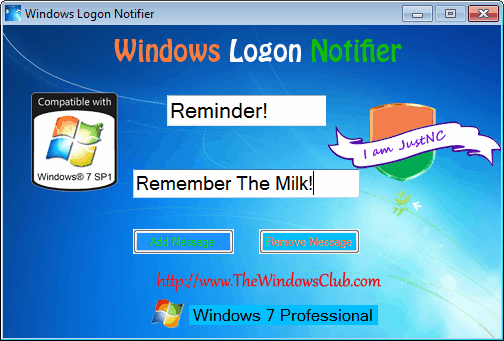
A click on Add Message sets the message as the new login notification, which will be displayed to all users who log onto the system which may include you so that you can use the program as a reminder application for yourself as well. Notifications can be removed again with the Remove Message button in the program interface. Keep in mind that you can only have one notification active at the same time.
Windows Logon Notifier is a lightweight program for Windows 7. The developer mentions that it may work under Vista as well, but that is has not been tested. Download is provided at the Windows Club website.
Advertisement

















