
Tweak Internet Explorer, Toolbar, Restrictions, Settings

Tweak IE is a free program to change various settings in Microsoft's Internet Explorer. The portable software displays a list of available tweaking sections in its sidebar on launch, among them toolbar, control panel and restriction tweaks.
A click on a section opens configuration pages that list various options that can be changed in the web browser. Most of the options are controlled by checkboxes, only some by text input.
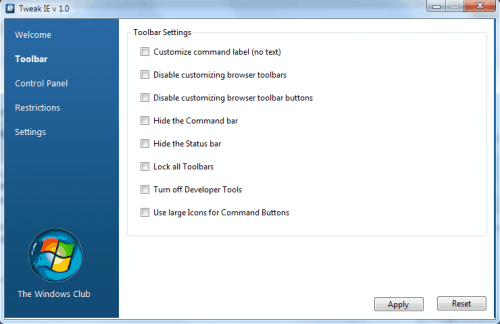
The Toolbar section can be used to hide toolbars like the command bar or statusbar, lock all toolbars so that they cannot be moved or to increase the icon size of the command buttons.
The Control Panel section is divided into the three tabs Internet Options, Advanced and Settings. Here it is possible to hide tabs in Internet Options, restrict access to specific settings including connections, accessibility or certificates and to turn on or off features like Clear Type, encryption support or caret browsing.
Restrictions in the browser can also be configured in the Restrictions section. About two dozens options are available from turning off tabbed browser and restricting users to enable or disable add-ons to disabling menus or turning off auto complete for forms and web addresses.
The last section, settings holds options to turn off Internet Explorer features including Accelerators or inPrivate browsing and filtering.
Tweak IE offers a Reset button to restore the settings of Internet Explorer to factory defaults. The program does not create a System Restore point before applying the settings, something that the developer should consider for a new version of the program.
The portable software program Tweak IE is available for download at The Windows Club website. The program is compatible with Internet Explorer 8, likely to work with previous IE versions as well.
Advertisement















This is a great post. I have had a lot of users ask how to disable certain toolbars, and this is a great solution!
Cheers,
Kyler
IE Outreach Team
Thanks Wally – had already tried that, but you motivated me to try again. Still didn’t work, but on the 3rd attempt I succeeded. As our American friends say – go figure.
Sounds handy – if I could get The Windows Club website to part with a download. I can’t, as it just seems to lead me around in circles – so it’s all a bit academic.
It works for me Jack. Try this address:
http://www.thewindowsclub.com/downloads/TweakIE.zip