
Old Google Restores Old Google Search Interface

Google recently rolled out a redesign of their search interface turning its spartan looks into a sidebar driven version that gives users quick access to search filters. Many of the filters were accessible through commands and secondary pages as well before and this might be enough for some users.
The Google Search sidebar displays a list of suggested filters, related search terms and additional filters behind more links.
There must be certainly some users who have no use for the new sidebar. Maybe they think it is a distraction, maybe they do not use it at all or maybe they just feel passionate about the old Google Search interface.
Old Google is a userscript that restores the old Google Search interface whenever the user performs a search on Google. This essentially means that the sidebar is removed from the page so that only the search results are displayed on the screen.
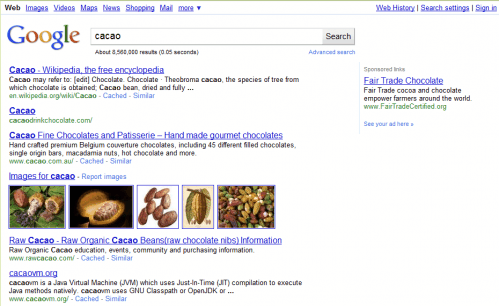
The userscript is compatible with all Google domains and works both on the normal search engine and image search engine.
The userscript works in Google Chrome and Mozilla Firefox with the likelihood that it will also work in other userscript compatible web browsers.
Old Google can be downloaded and installed from the Userscripts website.
Update: Old Google has been discontinued and is no longer updated or maintained by its author. The developer of the userscript suggests to install hide Google Options instead, an extension for the Firefox web browser and Google Chrome browser. The particular extensions have not been updated for some time as well, and it is not clear if they are still working. The last version update dates back to October of 2010, which makes it unlikely that it is still working.
Update 2: A recent Google update moved the search tools from the left sidebar to the top. You can restore the old position with this script.
Advertisement

















I hate the new Google results page. The pale blue and the large spaces. It is just not as clear as the original. I wish there was a way to complain to Google about this. I would like to know of another search engine which used the original search results style
Well you just need to change your browser useragent to IE 6 Or older & you can access old google again. Try it out :)
IE 6 Useragent:
“Mozilla/4.0 (compatible; MSIE 6.0; Windows NT 5.1)”
If you are a firefox user you can try useragent switcher:
https://addons.mozilla.org/en-US/firefox/addon/59/
But it doesn’t change the main page! I’ve been looking for a script that completely changes google to its old self, but couldn’t find one.
Check out the discussion here: http://www.google.com/support/forum/p/Web%20Search/thread?tid=2b617300e762035c&hl=en
You can find many solutions there, but none that would completely bring back the “Google Classic”. Mainly, I cannot get rid of the bold font in the search-box and cannot bring back the old, non shiny buttons.
Currently I’m using [ http://www.google.com/webhp?hl=all ]. But it has two main features missing: suggestions and spell-check.
PS: I found a script called “Segoe UI (Font Family)” that changes the google font to Segoe UI. Another script called “Google Styler” also makes changes to the fonts. I believe such scripts could be altered to bring back the old google fonts. Unfortunately, I do not know any coding so I cannot do this on my own.
http://www.google.com/custom?hl=en&client=google-coop-np
Anybody has script to make Google search box look like old one?
Great find Martin this because i really dont like the new google sidebar who keeps popping up.
I hate this one!