
Microsoft Outlook Inbox Management Plugin

Microsoft Outlook is a popular desktop email program especially in the business sector thanks to its excellent blend of email and calendar functionality but also to its networking capabilities. Plugins for Microsoft Outlook on the other hand are not that easy to find. One of the better plugins for Outlook is the Clear Context add-on which comes as a personal and professional edition. The personal edition has a limited functionality (when compared to the pro version) but is completely free of charge.
Clear Context can be best described as an inbox management plugin for Microsoft Outlook. It's main functionality can be divided into three key areas: Email management, attachment management and managing the inbox or other folders of Outlook.
The email management functionality is all about organizing the inbox and filing email messages. Clear Context provides filing suggestions, one click filing possibilities, highlighting of the most important messages and a threaded email conversation view.
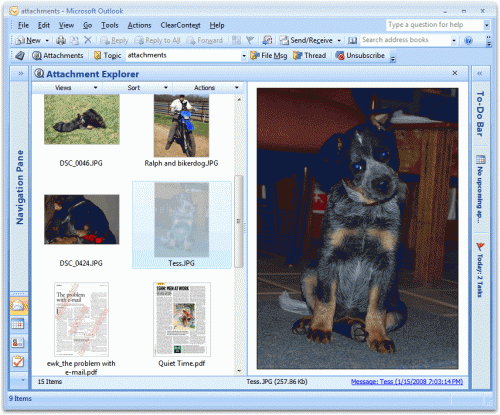
Attachment management on the other hand makes it possible to view all images and attachments from a selected folder without having to browse through individual emails to find a specific attachment. This does give the user a chance to save multiple attachments found in multiple emails at once.
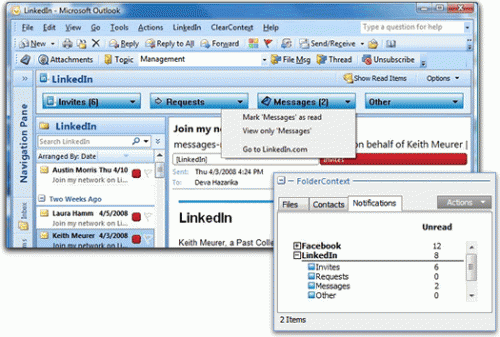
A notification manager can be used to move so called notification emails (like new Twitter followers or Facebook friend requests) from the inbox into other folders to unclutter the inbox.
Clear Context is installed as the pro version. It will revert to the personal version automatically after 30 days. Users who do not want to wait that long can go into ClearContext > about and enter the registraion username and key personalv4 to enable the personal edition right away after installation.
Advertisement



















