
Windows Management: Super Maximize Windows

WinSuperMaximize is a free program for Microsoft Windows devices that maximizes windows by moving the title part off-screen.
A very handy feature for many users - especially those that have to cope with low screen resolutions - is the ability to maximize web browser windows such as those of Firefox or Internet Explorer with the F11 key.
Pressing that key will not only maximize the window but hide certain elements like the title bar of the browser window. This increases the available screen resolution for the actual content of the websites displayed in the browser, and is also often a better display mode when it comes to making presentations or running a kiosk version of the browser on a system.
Win Super Maximize
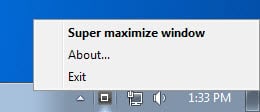
Win Super Maximize takes that concept and applies it to the Windows desktop. The lightweight portable application hides the title bar from being displayed when it is executed.
This is done by moving the title bar into a position off screen. It is still there but not visible to the user as its visibility lies outside the visual monitor screen.
The application will place an icon in the Windows system tray which can be used to execute the maximize function. A double-click on the icon (or a right-click and the selection of Super Maximize Window) will maximize the active window so that the title bar is not shown on the screen.
The same function can be executed by pressing the [Windows F11] key after you have activated the window that you want to maximize on the screen.
Performing the same action again will return the window to its previous stage. The Winsupermaximize software uses a little bit more than 3 Megabytes of computer memory while running and could provide those extra pixels that are needed in some situations.
Its limitations are that it only works with taskbars that are set to automatically hide (at least for horizontal taskbars that is) and that it will not work correctly on multi-monitor systems as it will always maximize the active window on the main computer screen even if it was located on the secondary screen.
The application works fine on newer versions of the Windows operating system despite the fact that it has not been updated for several years.
Note that it is a script that has been turned into an executable. Some antivirus programs may detect this as malicious when in fact it is not.
Update: The software program is no longer available. We have uploaded the latest working version of WinSuperMaximize to our own server. Please note that we have done so for archiving purposes only, and that we don't support the program in any way. You can download the application with a click on the following link: (Download Removed)



















can someone tell “brianary” and “Winsupermaximize Fits Windows To Your Screen [Downloads] TechBlogger” how to post ONE comment?
or maybe the webmaster has to check some internals to make sure robots don’t post comments which would make me learn something useful.
my take, of course, I may be wrong
If you have autohotkey installed,
***hotkeyhere***::WinSet, Style, ^0xC00000, A
will toggle the titlebar on and off also.