
Inline Google Search in Gmail

It seems like I'm the resident Google Labs reporter here at gHacks, but truth be told, they have been rolling out some cool features!
The development team's latest is the ability to search Google inline from Gmail. Enabling the feature adds a Google search bar to the left sidebar in the Gmail interface. If you search from there, the results are presented in a pop up window much like the chat window, and top three results are shown (you can navigate to the others).
You can use this as a jump start for searching, clicking on the result to open it in a new window, but you can easily add it to an email, by selecting "reply with result". This will paste the whole result you selected into the email. This is a convenient, and pretty fast way of sharing search results. I find that it is fastest if I already know the answer to the question. For research I like big ol' regular Google, but if I already know what I need I can get it very easily like this.
Another side-feature which is worth noting is that Gmail has a hundred or so more emoticons available in a labs feature called Extra Emoji. I pretty much hate all emoticons, so you won't see me using this, but if you like the "no-end fun" these bring to your emails you might like to try them out. They have icons for wine, hurricanes, rabbits and whatnot, stuff I mention regularly in all my emails..
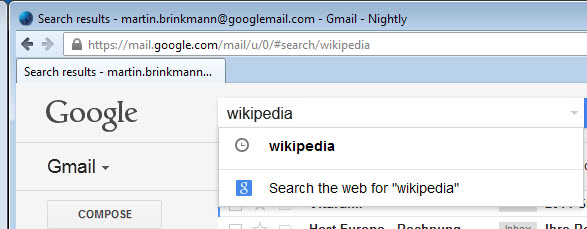
Update: The Inline Search feature is no longer available. If you open Google Labs on Gmail, you will not find it anymore and users who have been making use of it will notice that it is not working anymore.
Google has implemented options to search using Gmail's search bar at the top. All you need to do is type the search term and select the "search the web for" option from the menu that is displayed to you. You may select it with the mouse, or with the keyboard shortcut Shift-Enter.
The results are opened in a new tab in the active browser window. The feature is not identical to the inline search feature because of that, but it is the closest available option at the time of writing. The second labs feature is also no longer available as well.





















