
Portable Ubuntu For Windows

There are quite a few possibilities to take the Linux distribution Ubuntu for a test drive.
It can be run from Live CDs, run in a virtual machine or installed on a free partition on the computer system even from within Windows (using Wubi). Another possibility is to run Ubuntu in a virtual environment using software such as Oracle's VirtualBox for that.
Portable Ubuntu
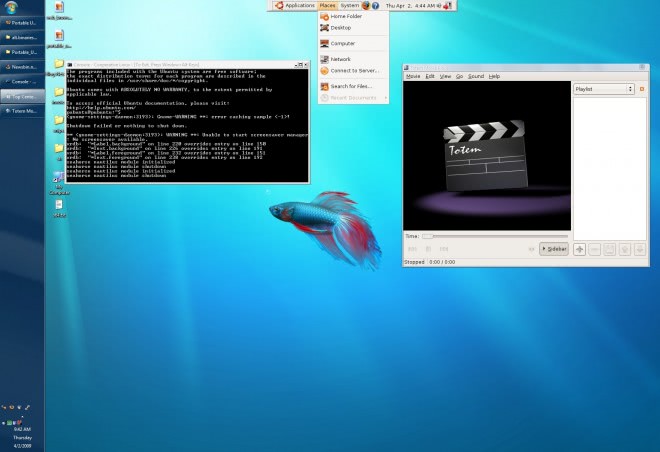
Portable Ubuntu adds another possibility to these choices by offering to run Ubuntu directly in Windows without installation or configuration at all.
The Linux distribution can be downloaded directly from its Sourceforge page. It comes as a 1.5 Gigabyte executable file that self-extracts its contents to the local system.
Users can then immediately start Ubuntu in Windows by clicking on the run_portable_ubuntu.bat file that is located in the root directory of the software program. Starting portable Ubuntu in Windows will open a command line window which will remain open all the time. This command line window contains information about background processes and the state of the Ubuntu system.
The Ubuntu dock at the top center of the screen is loaded eventually, and users may use it to access applications, places, system features and more from it.
Talking about applications. The usual add / remove applications menu can be accessed in portable Ubuntu to install additional applications on the computer system.
One could think that running an operating system inside another operating system would surely demand lots of system resources. This is surprisingly not the case. Running the first version of Ubuntu portable requires less than 50 Megabytes of computer memory that are occupied by its processes.
Main question however is why someone would use Ubuntu portable instead of the other options outlined above. One of the main reasons is that it is the least complicated to use. It cannot get easier than extracting and running the Linux distribution. Even Live CDs might require changing the boot sequence from hard drive to CD in order to run the distribution that way.
The portable application provides access to many Ubuntu applications and features, which can be a great way of taking a look at the options the distribution offers.

It comes close to the Linux user experience but does not provide it fully. There is still the Windows Taskbar, icons and wallpapers that make the system look much more like a Windows system than a Linux system. Interested users can download it right at the developer's website at Sourceforge.
Verdict
I prefer to use virtualization instead, as it separates both operating systems clearly. If you cannot or don't want to install virtualization software, and setup Ubuntu Linux, then Portable Ubuntu Remix is without doubt the most comfortable option that you have.
Update: Portable Ubuntu Remix development stopped in September 2011 when the last version of the distribution was released. While you may still be able to run the program, it is suggested that you use virtualization instead to run Ubuntu alongside Microsoft Windows.













Won’t run in Windows 8 64bit. Getting a fatal error with cygwin/x. Solutions anyone?
It won’t run when I just double click the pubuntu.exe. The splash box that says:
Portable Ubuntu
Version 4 u10.4 Remix
just stays on screen forever.
I have that same thing in Win2000 and now I google this problem and theres like “0” answers about this error… wierd…
Sigh. I’m using Windows 7 x64, and from the reading I’ve been doing, it sounds like coLinux doesn’t work on x64. So this is useless for probably a majority of Windows users.
I got the basic Ubuntu to install and it seems to work. I am more accustomed to KDE (Kubuntu). I followed some instructions on packages to install and switch to the KDE desktop. It takes a while to download the updates. Half a day later whenever I check back I see some files failed to download and install.
Before getting any more detailed, is switching to KDE desktop feasible for this environment?
Running Portable Ubuntu inside Windows 7. This is the fastest way to start Ubuntu or any Ubuntu flavoured Linux from within windows. Portable Ubuntu uses Hardy Heron and default password is 123456. To change it just type
passwd
[…]GHACK! JACK’S BACK![…]
Whatever :^{>
I ran Portable Ubuntu from XP, Service Pack 3, and Windows Blue Screened.
Then when I rebooted, the computer hung while reading the BIOS
Not gonna try that again…
There is a new version. Portable Ubuntu Remix version DOS.
http://portableubuntu.demonccc.com.ar
To get rid of the taskbar use Taskbar Magic. http://rocketdock.com/addon/misc/3425
this is good idea to explore linux from windows, for any one want to use linux natively and feel the linux but without losing windows which is not easy to reinstall as most of new pc won’t ship recovery mediums now a days.
The default password 123456 is not for root, but for the account you end up with when you start portable ubuntu. Type “id” in terminal window to find out who you are. If I remember right it is “pubuntu”.
Then type “passwd” and change that default password for your own.
To change root password type “sudo passwd root”.
The guy earlier couldn’t make any system changes, I’m sure I read somewhere that the root password for pubuntu is 123456?
Hope this helps
Answering my own question: The pwd is mentioned in the manual on the project page.
Works pretty well on my XP box. Unfortunately I’m not able to change settings or to install new applications because it asks for the root pwd. Any ideas?
In Ubantu running on top of Windows can I access Windows files??? e.g. C:\music\innagaddavida.mp3
Ever tried http://www.andlinux.org ???
I think it is useful.
I tried downloading and installing with wubi and it was a pain in the neck and took up at least 10 GB (and didn’t work at all well) so this looks like a good alternative for people without a lot of free space on their HD and with less hassle.
I’ll definitely try it.
geee….
CoLinux Rocks!!! so what will next? portable KuBuntu? portable XuBuntu?
Btw is there any way to automate portable build using the original CD (since likely we have one) so instead downloading the huge file(s), better to create it from our CD’s