
Auto Window Manager

The freeware Auto Window Manager adds additional functionality to the way Windows manages windows in the operating system. You can for instance use it to configure programs to always open in a certain state: maximized or minimized for example.
This setting is compatible with most programs that you run on the system but not all. It worked fine with Firefox and Thunderbird for example but you may encounter programs that it wont work with.
That is of course not all that auto window manager can do.You can furthermore use it to change the functionality of the minimize button.
Instead of minimizing windows to the taskbar, you can configure them to be minimized to the system tray instead. This is great if you want to run a program in the background and don't want it to waste space on the task bar as you do not really need to access it while it is running. You may also configure windows to stay on top all of the time.
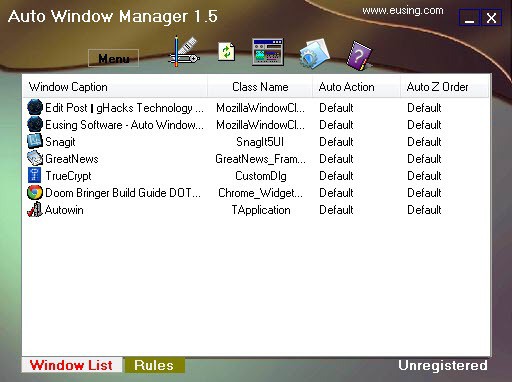
Another nice option is the transparency feature that gives you a similar transparency effect that the Windows Vista operating system ships with. You may choose a transparency level between 100% and 0%, the first value is the default value of all windows on the system, the second the maximum transparency that you can set them to.
Last but not least you may specify a location where windows should be launched on your screen. All options are accessible when you right-click the window.
Update: The program has been updated throughout all the years and is fully compatible with all recent versions of the Windows operating system. You can still control windows directly in the window list tab. A right-click on a window opens a context menu with all window management options, including changing a windows state or position, transparency level or size.
When you switch to Rules you can create permanent rules for application windows. Available here are options to start a window in a select state, e.g. maximized or minimized to the tray, and secondary states like having it stay on top all the time.
Advertisement

















It displays a nag screen every time you run it.
If it’s freeware, why can you register it for EUR 12.25?
http://secure.emetrix.com/order/product.asp?PID=100075259&DID=84675554&ID=&Q=1&DC=&CUR=
it is freeware, quote from their homepage: Auto Window Manager is a freeware product, this means that you can download and use it for free.
Hello,
very nice tool … but it seems to be no freeware!!
Sorry about that!
very nice program, i was looking for something like that, thanks!