
Searching Bing by date? Possible, but not pretty

Ken Saunders mentioned his great experience with Bing Support recently here on the site. He pasted an email that he received from Bing Support at the end of his comment that contained a parameter that allowed users to search Bing by date. I do consider search by date to be one of the most useful options in search.I use the option for instance when I troubleshoot something on the computer. A basic search like Internet Explorer crashes may yield results that have been published in 2005 or earlier which more often than not are not helpful at all anymore. Limiting the results to the past week for instance allows me to find out if others are experiencing the same issues.
Google makes the date search filter available under Search tools > Any time in their search engine but Bing up until now never really followed through with it.
You may be surprised that Bing displays a date filter on the search results page, but it is not always added. It seems that Microsoft thought it a good idea to only make it available for select queries, and not all of your queries. According to Bing Support, general queries usually do not show the date filter while very specific queries do.
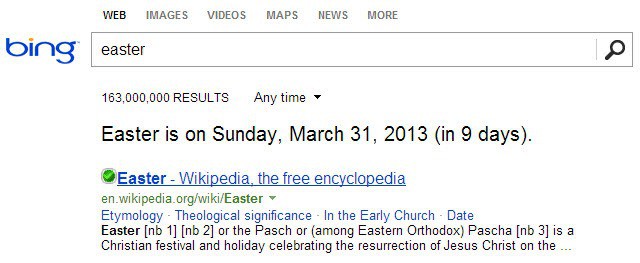
The question that should come up now is whether there is an option to always search by date on Bing, or if that is not possible. After some testing I can tell you that it is possible, but it is not the easiest thing to do as it requires you to manipulate the url of the search results.
Support told Ken that adding the paramater &tbs=qdr:d to the url on the results listing will display the date filter on that page when it gets reloaded. This worked for me in Google Chrome but not in Firefox. I noticed however that the search results were indeed sorted by date when I added that parameter.
Then I remembered that Google used the same parameter for their date-based queries. The d therefore must stand for days. I ran a couple of tests with other date abbreviations, w for week and m for month for example, and they all returned the results that one would expect.
Here is a list of parameters that you can add to Bing's url to filter the results by date:
- &tbs=qdr:s - results of the previous second
- &tbs=qdr:n - results of the previous minute
- &tbs=qdr:h - results of the previous hour
- &tbs=qdr:d - results of the previous day
- &tbs=qdr:w -results of the previous week
- &tbs=qdr:m - results of the previous month
- &tbs=qdr:y - results of the previous year
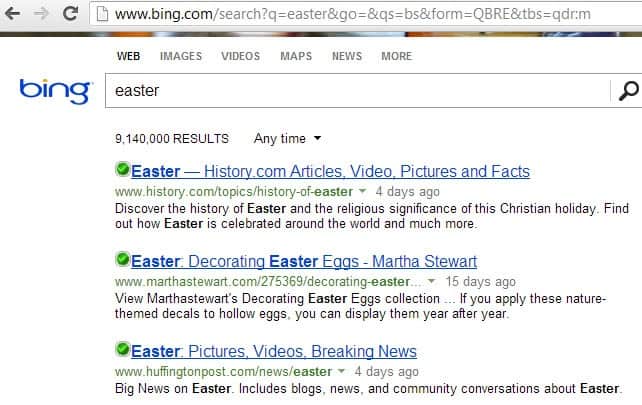
The Any time menu that was displayed in Chrome but not in Firefox only displayed options to filter by day, week or month by the way, which means that you may need to use the parameters anyway if you want to filter by another time interval.
To use the parameters, simply append them to the end of the address (starting with bing.com) and hit return afterwards.
Update: Microsoft just announced that it added a time selector to all Bing search result pages. You can use it to limit the results to a certain time period. Available in the menu are 24 hours, 1 week and 1 month only. If you need to narrow it down further or increase the range of results, use the parameters outlined above to do so.
Advertisement

















This is not really a solution. If you use the US region in settings, you don’t get results from your region/language first. It’s not the same as using google.it.
I figured this out ages ago, thought everyone knew this trick by now… Go to Bing > settings > location > change country/region to United States – English. That’s it, plus now you will be able to easily accumulate Bing Rewards points that you can use for things like more OneDrive space. You say “bye bye bing”, I say “good riddance Google”.
Bing > settings > location > change country/region to United States – English
YES!!!!!!
VERY GOOD ADVICE INDEED…. BUT WHY BING DOESN’T APPLY THIS TO EVERYONE…?!! (MISTERY!!!)
I AM ITALIAN ;-)
SPREAD THE WORD!!!!!
I agree with everyone here. Without a filter by date a search engine is very near useless.
Bye bye bing. I may come back if you ever figure this out on your own… or listen to your users.
It is really mind-boggling. It’s the only reason I use Google 100 %.
I decided to try Bing search after finally tiring of google’s never-ending new-features popups. Now, I’ve just spent literally over an hour going through a never-ending loop trying to find how I can get Bing to offer me an advanced search feature (that I’m unable to access no matter what instructions I follow). Reading the comments above (and many, many others elsewhere) spurred me to add my own incredulity at how such a fundamental feature of web-search could be so difficult to access on Bing! These idiots boggle the mind.
Bing Search if fine, but I will have to switch over to Google, because, if I’m searching for information, I need the latest posts first, rather than something 10 years old. With Google, set newest post first.
The date restriction has been removed.
“Update: Microsoft just announced (Mar 27) that it added a time selector to all Bing search result pages. You can use it to limit the results to a certain time period.”
This does not appear on Bing here in Canada, nor do I recall seeing it during a recent USA visit. Are there any constraints you are aware of?
I do not get that either for my results. Not sure if Microsoft is still rolling that out, or if they are still limiting the feature to specific search terms only. Then again, I do not get the date filter even if I run the example searches given in the blog post.
Too bad, to me and countless others Bing will never be a major contender until it has that feature, and we continuously fall back on Google. Obviously Bing is capable of supporting search by date, beats me why it is not implemented fully. MICROSOFT, ARE YOU LISTENING????
(2) and (6) have the same syntax (&tbs=qdr:m) for minute and month.
Anyway, not what might make things more appealing.
Sorry, minute is n not m. Have corrected it.
MS balks at the thought of allowing the user to think for them selves. It is obvious in everything they touch. Google has exactly the same problem. Why can’t I take the space out of the “Google Drive” folder name????? I refuse to have folders named with a space on my machine and will not use Google Drive until I can.
I know what you mean, I also hate it.
Why not just place function this in the search tools like Google does? It always frustrates me to search on Bing, because I can’t easily search by specific time parameters.
That really helpful for Bing users. The question is, who uses Bing ?
Bing has for March 2013 just 4.2% world market share (Google has 88.8%), and just 7.3% in US (Google has 86.3%), according to http://www.karmasnack.com/about/search-engine-market-share/
People who want the BACK button to go back to the original search results pages would use Bing. Google no longer returns to search results and hangs on the first page visited. at a site.
Um, no. When you click into search results on google (today, so very current) you can go back to the search results.
Some sites, which aught to be purged from the internet, can use ‘web trickery’ to make it difficult to back out of their site. This isn’t Google’s doing.
If you encounter such a site, BLOCK THEM. and either hit back multiple times quickly, or use your quick history to get back to your search results.
With Windows 8.1 Bing has become a much better search engine. It is embedded into Search and most of the MS Modern apps.
There is a simple non-programming solution for Search-by-date and I thank all the people, including this post, for helping me find it.
How To Enable Bing Search By Date http://njnnetwork.com/2013/10/how-to-enable-bing-search-by-date/
I have been using it and the Modern Bing Search ever since I got this worked out. Very nice.