
Avast 7 Will Install Google Chrome, If You Do Not Pay Attention

Avast 7 has been released a few days ago and it has not only received praises but also criticism by part of the security software's user base. Users have been complaining about a variety of things, including slow system starts on Windows 7 among other things (Caused by the installation of Microsoft Security Essentials on the machine. The only fix is to uninstall Avast or MSE). Two Ghacks readers have mentioned another issue after upgrading to Avast 7. The software did install the Google Chrome browser on their system, and made it the default system browser.
When you run the Avast 7 installer, you are greeted with a start screen where you can select the express, compatible or custom install options. Express basically installs the antivirus software with the default settings, compatible installs it as a second line of defense in addition to other security software running on the system, while custom install offers the means to select the program modules that you want to install.
The very same page lists another program that will be installed if Avast users do not pay attention to the menu. The lower quarter of the screen advertises Google Chrome, and displays two selection boxes. These boxes are checked by default, so that Avast 7 will install Google Chrome on the system and make it the default browser on the system.
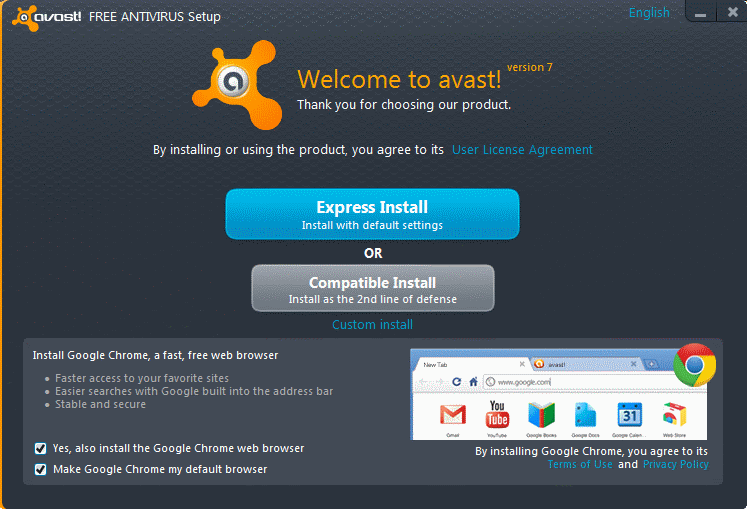
The option to not install Google Chrome does not come up afterwards anymore, even if you select the custom installation option. That's a big usability issue comparable to toolbar and adware offers that you find in other program installers from time to time. The Chrome installation may not happen right away, as it was reported to commence after the first system boot.
If you have installed Google's browser by accident, you can uninstall it again via the uninstall a program control panel applet. You also need to open another browser to make that one the default system browser again.
Bundling Avast with Chrome may alienate part of Avast's user base. I do not know if the browser is also provided to users who upgrade from previous versions of the security software. It would be nice if users who upgraded their version could tell us if Chrome was installed as part of that upgrade as well.
Advertisement
















Windows 10 comes with antivirus … (not that I’ve installed Windows 10 yet).
I considered moving to Windows 10 … !
I have noticed that the previous icon to Google chrome doesn’t start up anything now ! (firefox still works ..)
This caused some concern when I wanted to use chrome in a hurry to print some tickets from gmail !
Safezone does seem to work fine ..
They;re still doing this. It got me today and I’m not happy. There is no applet in remove programs to get rid of it, no uninstaller.
The worst of it is, I had Avast set to NOTIFY me of app updates but not to do them automatically. Not only did it not notify me of a program update, it went ahead, did the update automatically and installed chrome at the same time, all without my knowledge until it asked me to reboot!!!!
I’ve removed Avast I no longer want anything to do with it, but its left an unremovable copy of chrome behind as a present. I wont forget this. Avast and Chrome just became non entities for me. I wish there was more protection against this, this is a shoddy way to treat people.
*reaches for system restore button, which incidentally will also remove about 200 gigs of recently installed data – thanks Avast*
This was happening back in 2012/13 and its still happening. I’m shocked this is allowed to carry on. Why do people still download this crap?
Hi there,
they got me, too – Avast 7 installed, and there it was, Google Chrome, and I did not want it. Maybe I should/could have checked all the boxes to be ticked more properley, but hey, why the heck do they come up with such a surprise? Very bad style, and it really undermined my confidence in AVAST. I don´t like those things – please ask me openly, and don´t trick your users into such a software mess.
Cheers.
Hang on folks….. Avast is certainly pushing Chrome and we know why!
The option box is only visible foe a split second – giving no chance of selecting anything…. now that to me is dirty, very dirty!
This AS been pointed out in the Avast forums and guess what – it’s completley ignored… so time to move on!
BTHW: We’re talking Avast 8 here… and YES the option box *had* use to work
Been using licensed version of avast! Internet Security for just under a year, and would like to add my experience-bit to this whole Chrome-installed-withorwithout-my-permission debate:
1) For those of you who have Gmail accounts, if you page to the very bottom of the inbox right-hand corner, you will see a tiny little sentence on which you can click to see activity detail on your account. It includes your IP address, date, browser used, and if you click further it will even tell you in which country AND area you (or the IP address lol) live. When I accessed my mail from inside avast!’s “Safe Zone” and did the above query, Google reported it was being accessed using Chrome (i am a Firefox fan, also correctly reported by Google), which I definitely did not allow to be installed. I had also ticked avast!’s own internal setting “do not use chrome……..”. I queried them via their ticket system, and their reply was that avast! uses ONLY chrome (to be ‘fixed’ in the ‘next release’, lolo). Obviously avast! blatantly ignores at least one of its own settings as well as the checkboxes, whether users saw them / ignored them / unchhecked them / had coffee etc. or not. So: avast! installs Chrome even if you specifically uncheck the option at install time, and even if you check avast!’s own internal tickbox “do not use chrome…..”. By the way, I could not see Chrome properly registered as a program, so could not uninstall it (Windows 7) using control panel or any other method.
2) Another ticket-based query as to why Google was still able to advertise to me while accessing e-mail from inside the “Safe Zone” was met with a paragraph of fuzzy fudgery completely evading the question. If Google can ‘read’ what I am viewing inside this “Safe Zone”, then firstly why can they do that (preferential treatment by avast! ?), and secondly who else can see what’s happening in the “Safe Zone” – so just how safe for example is internet banking REALLY then using avast! ? Just HOW safe is “Safe Zone”?
To me, all is not well under the avast! hood, which is why I have already removed it.
Good luck to those who stick with it.
Fortunately, Softpedia has a Chrome-free version of Avast available for download…
http://www.softpedia.com/progDownload/Avast-Home-Edition-Download-6474.html
73 DE N4RPS
Rob
I’m a long time user of many AV software programs, for years running Norton Internet Security and/or Norton 360. Then I decided to make a call to Norton by toll-free and had the worst experience of phone support, but anyways. I dropped Norton as my AV protection, since it’s very hard to tell what is safe to use, whether its Avast, MSE, Norton, or whatever. I can relate to most of you regarding your situations with Chrome nonsense, but I use Chrome and in most cases , Chrome sucks up RAM and CPU, and leaves you with an utterly crippled computer without doing other tasks.
It is really hard to decide on the AV software to use, I am right in the same boat with you all. In some ways, I do wonder what these AV software programs are looking for in our computers. Seeing how lite Avast runs, compared to Norton or McAfee or even MSE for some folks. we always have that option for removal or disable some of the settings within Avast! or any other AV program. To me, ever since I downloaded Google Chrome, it kinda demands you in that direction of setting up profiles and wants to know who the heck you are…. so much for privacy these days……. But I will give Avast a chance after it did deflect a website I mistyped and should have been re-routed to better site links.. It did stop a couple threats. So, Avast muct be doing something right. Or is it?
This just happened to me, which is why I was Googling it. It told me I had an update available. When I restarted my computer to complete the update, it kept trying to connect to Google. (I could tell since my firewall is Kerio, which I can’t, unfortunately, use on my Win7 computers.) I put it in standby because I had to go to work, but I can only assume that it is trying to install something from Google or at the least communicate with Google. I can state categorically that there was no check box to ask if I wanted anything but Avast installed.
In my case, this morning, the machine did not boot as it should. Got to a black screen with a blinking cursor. I reset the machine (it had been on for quite some time, more than enough for any slow boot) and it booted, Avast said it needed to finalize an install, which is weird because I told it to only notify and not install new program versions manually.
There was not informational screen.
After the reboot, Chrome was installed.
…Just noticed that Avast was installing google chrome without my consent…( I already had the better version of it, Comodo Dragon installed, I DID NOT want google chrome installed too…but…Avast did that anyways I guess…)
Came across this article..how could I miss that promt at the beginning of the installation? I usually don’t miss things like that..I guess they made it as best as they could to make sure that people don’t notice it at all, and it just installs without them knowing. If that promt before installation was ‘install a virus that avast won’t detect, steals all your information and money,’ we’d have alot of people with stolen identities, and very little money left. :
..Avast should just stop bundling their software with google chrome altogether..I miss the days of Avast 4.8. Seems to me it was better back then compared to this google chrome nonsense.
I turned my computer on today and a panel popped up saying please wait while upgrading. I assumed it was avast because of the colors, but there was no text that read “Avast”. Then it also installed Chrome and set it to default browser.
All I did was turn on my machine, I clicked no buttons.
Question is – to what extent are Google and Avast in bed together? After the privacy issues raised when Google changed their policy, is part of the deal that Avast will now dump your history to Google even if you don’t install Chrome at installation?
When it said ‘Express install with default settings’ I thought, not unreasonably, that this was referring to the actual settings of the anti-virus programme – Not automatically downloading the very product that I have been completely and utterly avoiding for months and despise. I cannot believe that just as I went to get an AV so I could feel safer, doing so made me feel more violated than I had in a long time. Horrible. Like inviting a thief into your house.
I am a long time user of both Chrome AND Avast. And when the settings were on the screen to see, I I had no problem unselecting Chrome and moving on. However tonight, I installed it on my daughters laptop only to see Chrome start to install. While I was planning to do it anyway, this behavior is not acceptable in my mind. I wrote their customer support an email, dont really believe I will be getting anything back from them. However, with this hidden malware type activity, I feel its time to find a new program and support that.
I have been recommending this for years….Now when someone asks my what do I run, I guess it will be _______________ (fill in the blank of the new program…./sigh)
Nasty Nasty. Who’d have expected anti virus software to install a browser during an upgrade? Not I and I’m an mcse.
Not cool avast. . . .
SOLUTION!
Thanks to DL above.
I uninstalled Avast via the Control Panel – Downloaded via Cnet – UNCHECKED the boxes – Selected the CUSTOM INSTALL ~ but made no changes. Restarted. ET VOILA! NO nag screen!! Yaayyyh!
Will report back if there are further probs. :-)
Just like Jake in Jerusalem and others have said, NO warning, no boxes to uncheck, Chrome was installed. I just b1T**ed out Google on their “why do you want to uninstall” feedback page, doubt they’ll listen. As someone earlier commented, maybe just have to start paying for software. I just hope this Chrome uninstall works better than the last time my girlfriend wasn’t paying attention and unintentionally installed it. Took a long time to get everything right again, especially with Outlook.
FYI Norbert (Bob) Gostischa if I wanted Chrome, I am quite capable in installing Chrome, all by myself, without having it foisted upon me by Avast! Therefore, before commenting, please READ! the posts carefully. This discussion is not about Chrome, or about anyone’s opinion of Chrome, good, bad or otherwise, it is about the AVAST Welcome screen continually popping up in the hope that sooner or later we will forget to untick those bl***y boxes and allow Chrome to install – wanted or not… Now, on a more positive note, I am going to try either DL’s or Tracy’s USEFUL suggestion/s (or maybe both!) and will report back on the outcome at a later date.
Upgrade from 6 to 7 german version almost invisibly offers the CHROME installation as well.
Don’t like it – not at all.
Already consider to switch to another AV-solution.
:-/
It’s a pity.
The ironic part of this is that the whole point of security programs like Avast is to keep unwanted software off of our machines. I installed Avast on my girlfriend’s machine and somehow Google Chrome appeared later on.
I have no idea how I missed the check boxes but somehow I did. And I was already on the lookout for some type of sleazy options. Time to find a different AV program now.
I kept getting the “finish installing avast” every start up as well. The only way it stopped for me was to instal google chrome and then uninstall it through the control panel.
I am disappointed with avast.That google chrome installation screen at start up is really bugging me.I think i will have to dump avast after using it for six years.
I’ve been getting the same annoying “finish install” screen for the past couple of days. So far I have not found anything on the avast site acknowledging this problem. I did, however, find a recommendation to uninstall and reinstall avast, when there are installation problems. I will give it that much of a try, and report back what I find.
Ok, that seams to have worked. I simply uninstalled Avast, from the control panel, restarted, and reinstalled Avast 7 from CNET. I unchecked the box for Google Chrome on the install window, and it looks like I’m ok now. If the “finish install” window comes back tomorrow, I will let you know, otherwise, I’m good to go.
It’s something that’s offered. It isn’t pushed. You have the option to refuse the offer.
Many of us happen to use the Chrome browser and find it an excellent choice as our default browser.
If you don’t feel the same way, simply refuse (uncheck) the option to install the Chrome browser.
I try to be polite but sometimes it’s not easy. Norbert, READ!!! People ARE refusing the “offer” and either the unwanted software gets installed anyways, or they refuse and the “offer” is made again… ad nauseum. In my case, Chrome was installed without ANY notice and without ANY “offer to refuse”. Avast seems to have improved now so that they at least ASK us before they grab control of our machines… and keep on asking with all the patience of an endless loop.
Avast is becoming malware. I wish it wasn’t so. Or maybe someone else is masquerading as Avast to give them a bad name??? I wouldn’t bet on that one…
I did the Avast update. Noticed the chrome checkboxes and UNCHECKED them and then next time I rebooted I found that it had installed chrome anyway!!!!! Completely without my permission. I uninstalled chrome and now get nagged every time I boot to finish the installation. But even worse now I find that my email package (Outlook) has started to behave strangely – I can no longer click on any link in an email. Sometimes the click will bring up my IE browser but the page will never load (no matter how long it is left waiting).
I’ve trusted and recommended Avast for many years but I’ m now seriously considering removing it from my system as it seems to have become malware.
If anyone from Avast is reading this – GET A NEW UPDATE OUT ASAP or you will lose a lot of loyal users.
I get the offer from Avast EVERY SINGLE DAY on the first boot of the day.
Is there an option to get rid of this garbage, short of dumping Avast for a different AV? Why does it not believe me that I don’t want Google Chrome or the Ask malware? I’ve been happy with Avast, but I am ready to move on if they keep nagging me to install this rubbish on my system.
It looks like the only way to get rid of the Avast repeating “Finish Install” screen is to switch to Avira.
I’m gone.
Add me to the legions of people being spammed by the “nearly finished” popup after every reboot. :/ Luckily, I’m not in the habit of actually logging in until I’ve got a coffee ready, so I’m able to uncheck the boxes of evil (yes, I consider assumed consent unless you actively opt out to be evil, especially in the computer world).
I’ve just done a System Restore, going back two months! and straight after auto-restart the Avast Welcome / finish screen was there waiting for me!!! AArrgghh!!!
System Restore for whatever reason does not work on Avast. The last time this happened in April I had to completely uninstall Avast and Chrome from the Control Panel. Then I had to do a clean install of Chrome and then Avast. What really sucked was that I am already a Chrome user and Avast managed to destroy all my bookmarks and Chrome settings. It also overrode my single user Chrome install with a system-wide Chrome install and it changed my default browser from Firefox to Chrome.
I have not updated this time because I was afraid the same thing would happen and it appears my fears are justified. Judging from comments on various forums, including this one, I need to avoid doing a maintenance update because that will cause the issue to recur. So once the dust settles I’ll uninstall Avast and then do a clean install.
I upgraded and the chrome box appeared, I deselected it but now every time I reboot I get another avast box asking me to install it again, I think it is now appearing after every auto update. If this carried on I’ll be uninstalling it.
I am a long-time, happy user of AVAST. I agreed to the usual update and rebooted as advised. On restart I got the Welcome / finishing screen with a invitation to install Chrome (as above). I unticked the boxes to decline. The screen closed and everything was normal. Next time I restarted I got the same finishing screen with the invitation to install Chrome. I unticked the boxes and the screen closed and everything was normal. Next time I restarted I got the finishing screen with the invitation to install Chrome. I unticked the boxes, etc., etc…!!! HOW DO I MAKE THIS GO AWAY?
EEKK…me too….SO annoying. EVERY single time, I turn on the computer, there is that b****y screen…
I used to like avast but as many others elsewhere have said, this is NT acceptable and I am going to replace it with some other anti virus(not sure which one, :(
I recently updated and Chrome was installed. I was NOT pleased!
Also I can tell you uninstalling from all programs from the start menu will NOT work! Every time I would restart had the update is finishing screen come up and finish w/chrome installed AGAIN then I tried the control panel option and… YAY No more Chrome.
The same thing just happened to me that Klaus reported yesterday happened to him. I logged in and found a screen apparently from Avast telling me that the installation is nearly finished (what installation??) and that I should just click “Finish”. That’s funny. Malware sometimes tries to install itself the same way… Just click here to install. Yeah, right…
I closed that window and tried to log out, but Windows wouldn’t respond. I couldn’t even start the Task Manager. Finally, when I tried to soft reboot, it let me log out. Well, thanks for that…
When you install s/w that has it’s hooks deep inside your OS, you no longer know what it’s going to do to your machine. It’s not even clear anymore who are the White Hats and who are the Black Hats. Everyone seems to be trying to grab control of your computer. :-(
Thought I would let everyone know if you have avast already and it updates automatically it will install chrome without asking at all! I had to uninstall it from our computer at work, and I’ll say this about chrome, my Boss’ home computer got trashed by it when he accidentally let it be installed on his computer!
Hi!
It semms like it’s getting worse!
Today I startet my PC from Standby and the first thing I saw was an untitled ” Update in progress” screen which had the Avast style.
5 minutes later The Google Chrome symbol appeared in my Taskbar.
I did NOT start this Update and definitely did NOT click ANY button.
Rob said: “I updated by in-laws machine a week or so ago, so was watching very carefully this time. No mention of Chrome until after the reboot when it popped up with the same “Press Finish†screen I’d seen, with the Chrome options in the corner.
I unticked these and my mouse was still in that corner when the window closed all by itself – I did not press the “finish†button myself. Thankfully I’d cleared the options, and it didn’t try to (re-)install chrome.
Was this a timer? Would it have carried on itself with the default options, had I sat there and done nothing, say, if I’d left the machine alone after telling it to reboot? Maybe this is an explanation for some people not seeing anything?”
—
Gotta be a timer, had the exact same thing happen to me but I did not get to uncheck the boxes before the finish installation pop-up closed itself automatically, and now I have chrome installed and it is my default browser. This is just… Wow. I am a longtime avast user, this is shocking behaviour… I actually don’t mind being marketed to but a no consent installation…
They almost got me! Isn’t Google run by the CIA now? With the 4th amendment gone it looks like an attempt to get people using Google Chrome so they can see what your doing.
I updated by in-laws machine a week or so ago, so was watching very carefully this time. No mention of Chrome until after the reboot when it popped up with the same “Press Finish” screen I’d seen, with the Chrome options in the corner.
I unticked these and my mouse was still in that corner when the window closed all by itself – I did not press the “finish” button myself. Thankfully I’d cleared the options, and it didn’t try to (re-)install chrome.
Was this a timer? Would it have carried on itself with the default options, had I sat there and done nothing, say, if I’d left the machine alone after telling it to reboot? Maybe this is an explanation for some people not seeing anything?
After years of updates every week with Avast and never a problem they essentially spam my system take it over and set up Google Chrome. Of course slow it down int he process. Some anti-spyware anti-virus program! I have no reason to ever trust them again. Completely deceptive and NOT the characteristic of a company that is suppose to make you feel safer. They are as bad as the other hacks out there now if not worse. At least when I get asked about some yahoo tool bar It is noticeable and not from a update from my anti virus program that changes by browser all together !!!
What the hell !
Upgraded Avast Pro at home and Internet Security on work, and no Google Chrome was installed.
For the slow start, well, it is not recommended to install along 2 antivirus with real-time protection!
LisaJS, I’m sorry but what that image above clearly SHOWS is the opt out check box and people have stated they unchecked it and on they went with the Avast installation. No Chrome magically found itsway on to their machines. So obviously consent was taken into consideration. Why your installation (and some others) were allegedly different is a quandary to me.
I’m no professional programmer, but I’ve taken plenty of classes that would lead me to believe that Avast’s programmers aren’t going to write in the Chrome installation to react in 27 different ways towards users.
As I said above, I did not receive a Chrome installation offer. However, I pay for my copy of Avast. Avast has treated me just fine for over 5 years. Their PRODUCT is still a STELLAR anti-virus program. If I were to quit using every single piece of freeware that wants to install a tool bar or browser, etc I would have next to no software left on my computer.
With that said, for all the people who use the FREE version of Avast, Avast still has to pay their bills. Their programmers are NOT going to keep working for them if they don’t receive a paycheck. How do you pay the bills if people are utilizing your free service? You get in bed with a bigger company and provide a silly check box to consent to a download of a browser/toolbar/weatherbug etc in your program installation.
For those of you who magically wound up with Chrome on your computers because you were up getting coffee and know without a doubt you didn’t “breeze by” the consent page (which even the best of us have done before – no one is perfect), then I’m sorry that you are so upset that Avast is trying to pay their programmers to continue making such a great product. Please go take advantage of an inferior product instead of simply uninstalling the version of Chrome you unintentionally gave consent to.
My Avast upgrade showed my the screen pictured in this article, but closed it and started the Chrome install as I was moving my mouse to un-check the check box. Now I don’t use Avast.
Avast wants to earn a bit of money in bundling Chrome with their free software. Bit sneaky if true that when updating to the latest version one doesn’t see that Chrome is included. Avast joining the ranks of free software that provide toolbars, CNet own installers, etc. etc. DUH!
Glad I jumped ship a short while back prior to this debacle and selected MSSE after many years of Avast! free.
Same problem, I already had Chromium installed.. It also doesn’t play nice with other installed programs (scanners and security programs).
Avast if my favorite AV, i am using the same for the last 4 years. including chrome i don’t think a serious matter bcz people now very familiar with chrome.
Like other upgraders I did not see the screen shown above on 2/24/12. For early installers that screen with the Chrome options was supposed to appear after the reboot. Prior to the reboot Avast downloaded and then a message appeared that it needed to reboot to complete the install. After the reboot that screen with the checked Chrome options never appeared and we instead received a message that Avast was installing. I am meticulous about doing custom installs and unchecking options for unwanted software, so I resent the implication that all users were asleep at the switch.
Another issue was that Avast did a system-wide install of Chrome rather than the user install I had in place. It also advised me after the fact that Chrome had been installed by an Administrator. Who gave Avast the right to do a system-wide third-party software install as an Administrator of my system without my permission?
I contacted Avast and received a response from the Quality Control Manager that it was a bug in that iteration that caused the problem. I had to uninstall both Chrome (had already lost all my settings, extensions etc.) and Avast to get my laptop working properly again. I did a clean install of Chrome and when I did a later clean install of Avast it recognized that Chrome was already installed and did not offer to install it again. This makes me think that Avast rushed in a quick fix.
This had nothing to do with not paying attention for users who did not get the screen (though that may be the case for some users who did get the screen). It was an Avast bug. See the tweet and the Avast forum post;
https://twitter.com/#!/lukashasik/status/173784651276623873
http://forum.avast.com/index.php?PHPSESSID=qus049ao4ba8dr9uu4nqum76e6&topic=93980.0
I left out the part that my first clue that something was wrong with my laptop was when I tried to open Chrome and it crashed repeatedly (many threads for this after Avast install). Like other users I also experienced other issues. For example I opened Control Panel to check the recent installations and the screen froze. So I restarted my computer again and when I tried to open Chrome, I received the message that an Administrator had done a system-wide install of Chrome. I initially thought it was a Chrome issue but after a quick Twitter check realized that Avast 7 was the culprit.
My update to Avast!7 reminds me each reboot that I am “almost finished with the installation” – and has a box checked which asks me to “participate in Avast community”. I uncheck this box every time – and the sequence repeats each reboot.
I am always skeptical of being “hard-wired” to a server somewhere and permanently sharing information – does anyone know how to get rid of this “reminder” without “joining the Avast community”? Thanks.
Over 3 years now and I will not have any anti-virus software running in the background anymore. To me its worse than having a virus.
I run a few things manually every week or two and never a problem except for the odd tracking cookie.
Most of these types of software start out good then become something that does more harm than good. Just my opinion.
I’ve been using Avast for years. I’ve never had any trouble with Avast – that is to say, never had an infection the bring my system to it’s knees nor did Avast itself bring the system to it’s knees w/ a huge resource footprint or the like.
For years and years reputable software companies have bundled other software (whether it’s Chrome browser or some toolbar), in with their free installations. It has become second nature to many of us to intentionally do a “Custom Installation” just to ensure we don’t have 26 “toolbars” on our internet browser.
I looked at the above screenshot and see NOTHING deceptive about it. If you did accidentally install it, go uninstall it through Programs and Features in Control Panel.
Personally, I pay for a copy of AIS. I upgraded to 7 yesterday. I upgraded through the program itself and it didn’t ask me about Chrome, nor did it install Chrome on my computer. For those of you who don’t believe in paying for anti-virus software, I can relate to an extent, but I have gone to the filthiest corners of the internet with my main machine running Avast Internet Security and while it had every alarm screaming at me as I was under siege every type of malware known to man and machine-kind, I knew I was safe, I wouldn’t trust MSE to defend me with the same precision and zealotry that Avast does. Avasts Firewall alone dwarf’s anything Microsoft has ever put out.
There was a time where I might have been “offended” that a company was trying to bundle extra software, but in this day and age, if you’re giving your software away for free, you gotta make a dollar to pay your programmers, and if that means Avast puts an option for Chrome to be installed so they can make an extra buck by spreading Google’s browser to the masses, I don’t fault them for that because at the end of the day Avast is one of the superior anti-virus/malware programs on the free and pay markets.
No No NO! You cannot justify Avast’s drive-by installation of Chrome by saying “at least they keep me safe when I go to filthy websites.” You’re just rationalizing things to make it seem fair. They bypassed our consent pure and simple. The screen to opt-out did NOT appear to me, it must have popped up then did a countdown after I did my reboot and went to make a pot of coffee. And by pot I mean 2 shots of espresso so maybe 5 minutes?! And by the time I came back they had already installed the older version of Chrome, ruining my Beta version AND on top of which tried to get me to install some sleazy TOOL BAR! And a countdown to consent or ELSE you’re automatically opted IN? That’s the definition of a Drive-by. Sleazy!
+1
Agree completely with Lisa (above),
and others.
After this, Avast is a goner !
(like AVG 3-4 years ago…they did something similar to its users).
Avast has lost my trust, completely.
I already UNinstalled it.
I installed it to give it a try, but my it hard locked my system at the end of the install and again when i eventually was able to reboot. Oh well, looked interesting.
Installers are getting sneakier about these kind of third party installations lately.
If you’re using anything other than Microsoft Security Essentials for an anti-virus, you’re paying too much (even if what you use is “free”).
If you are using the worse ever anti-virus, MSE , you are a looser.
Free anti-virus in the cloud is the winner. So is Security Essentials if your bound to use free stuff.
Google Chrome, the new Ask Toolbar! A really nasty, privacy invading piece of software, if ever there was one.
ok,tried custom and it DID download BUT when i tried to install,got a error message saying unable to install,missing file THEN did the express and everything went ok HOWEVER chrome was installed which i uninstalled with Ccleaner but STILL needed to delete from Windows Programs folder
The installer is deliberately deceptive
and less sophisticated users will be taken
which is the whole point to such deception.
Software producers who treat people
like idiots should be avoided and
there are plenty of alternatives.
Of course I’d rather an install of any software involve just the one software. Boo hoo, freeware isn’t like that.
Except if a user cannot read the onscreen language, I don’t see what the problem is with this, as in generating a headline here. The checkboxes are obvious (*not* obscure), the text with them is 100% clear and right there in your face. Nobody’s tricking anyone. Why would someone who can read need a second chance a few steps later to opt out?
All you have to do is pay attention.
And if you didn’t, just uninstall Chrome. Big deal.
In *MY* Avast upgrade installation yesterday, there was NO mention of Chrome. None. I’ve been installing software on everything from supercomputers to on-board chips for 35 years (yep) and have written super-reliable installing scripts and I can read English, thank you very much.
It seems that the Avast installation differs among different users and, likely, has been changed in production by Avast, probably fixing some bugs as they come to light. I bet they are doing that right now, too. In fact, I *HOPE* that they are fixing bugs as quickly as they can! This would explain why not everyone will be experiencing the same thing.
The whole attitude that ‘if the software doesn’t work right, it must be the user’s fault’ is just so Micro$oft. Some of you guys never knew computers that actually worked right because programmers cared about releasing reliable software. Software doesn’t HAVE to be buggy. Quit blaming the users.
The screen shown above is not the one I saw. My screen showed a lot of text, with the same checkboxes, but only one visually distinctive button in the bottom right.
When software shows nagging screens I want to get rid of them as quickly as possible and Avast is software I usually trust, so I just clicked. It is deceptive.
I agree. Update went through without mention of chrome. On reboot, got a big “avast 7 installed” popup, with big “finish” button in the bottom right. Only as I clicked it (not helped by child bouncing on me) did I notice the chrome tick boxes in the bottom left corner.
A screen /after/ the final reboot, with a “finish” button, is almost universally used for a “thanks, all done now” type dialogue. Not more installation options!
In any case, I had Chrome already installed, only as a secondary bowser. Now I get “An administrator installed chrome, your user-level data will be replaced by system-level data.” and what little customisation I had done is all gone…
Very sneaky, but not only is it totally pointless when Chrome is already installed, wiping out a users’ settings is pretty bad..
@WebHybrid
The installer is deceptive by design.
ibeco is not at fault for trusting Avast
and making him less likely to read fine print.
That is the essence of deception by Avast here.
It is just that kind of user goodwill they are exploiting.
And the author of this article did not generate
a headline based upon false pretenses as you imply.
He provided a heads-up to users who have trusted Avast.
Well that is your problem. It’s like signing an agreement without reading it.
Sorry, no matter how many opine that “It is deceptive,” not reading what you are clicking is where the communication gap happens.
And no, I have nothing invested in Avast or Chrome (or Google) – just a user.
I had Avast 6 (free) on Windows XP SP3, got a notice that a new version of Avast was available and so I went ahead with the upgrade. I didn’t see any mention of Chrome anywhere (and never had Chrome installed). The upgrade required a reboot, but all seemed OK. That was yesterday. This morning, after starting the computer (with another reboot), Chrome was installed, made itself the default browser and even used the IE icon on the desktop to run Chrome, instead. Sneaky. This doesn’t give me a good feeling. Avast is supposed to give people a sense of confidence in using the Internet. Instead, it took control of Windows and helps Google steal information from people, without their consent. I’d guess that this was an installer bug on the part of Avast – unless they are also claiming to “do no evil” while doing so, anyways. To be fair, it’s free and you get what you pay for. Still, it makes one wonder what is going on inside our own computers.
I already had Chrome installed. After having updated to the newest Avast everything worked fine, but after one day this exact screen popped up. Naturally I just clicked continue, without paying attention to anything else, like those obscure checkboxes. Chrome was installed again and I lost all my settings and bookmarks.
Luckily I was able to restore them by going to Windows Explorer and right clicking on the default folder (in the user appdata folder) and restoring a previous version of the folder.