
Change Your Computer's OEM Information

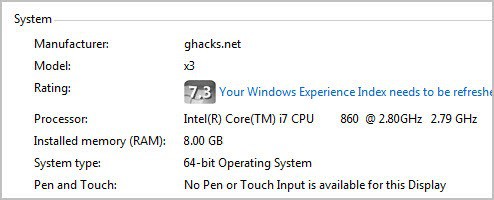
Computers that you buy from manufacturers contain so called OEM Information that are integrated into the operating system. This may include the manufacturer's name, support website, logo, support phone and a unique product ID. Sometimes you may not want those information to be displayed on your computer. That's where software like OEM Configuration come into play.
You can use the program to add, edit or remove OEM information. Please note that the program requires the Microsoft .Net Framework 4.0 to be installed on the system.
When you first start the program you are presented with a selection menu on the left. Here you can click on OEM Info to display and edit OEM information, or on Extra Options to change other related information.
OEM Information are only displayed if you have purchased the PC from a manufacturer.
You can edit the following values:
- Manufacturer
- Model
- Support Hours
- Support Website
- Support Phone
- OEM Logo
A Preview button is available to preview the new information in the Control Panel. This button did not work properly during tests though. This could have been
The saving does however work, and you will notice that the new entries have been added to the control panel once you hit the save information button in the interface.
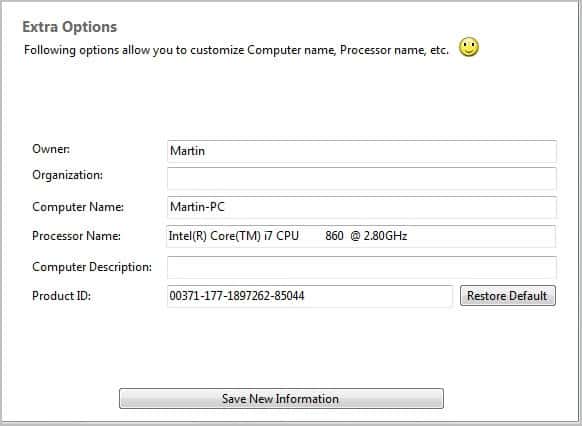
The extra options menu lists additional values that can be edited or removed. The following information can be customized:
- Owner
- Organization
- Computer Name
- Processor Name
- Computer Description
- Product ID
The information are also displayed on the System control panel page. Keep in mind that they only show up initially there if they have been filled out by the manufacturer of the page. Just click the save button once you are done editing. You can also restore the default product ID on the page.
Windows users who would like to give it a try can download the program from Deviant art. It is compatible with all recent versions of the Windows operating system.
Advertisement

















